
Claude Code killing processes usually has a boring cause: a command hit its 2-minute default timeout, a background command hit its time limit, or Claude ran kill or pkill itself to free a port. The viral report from November 2026 is a different case: an agent stopped workers it was running for the user. Block kill commands with deny rules and a PreToolUse hook, and run the agent in a container or VM if other work shares the computer.
On 2026-11-17 a Bluesky post claiming that Claude Code checks other software on your computer and kills processes it thinks break Anthropic’s policy passed 3,300 likes. If you run coding agents on a laptop that also hosts your dev servers, database, and GPU jobs, that claim lands hard.
If you coordinate several agents across shared computers, Sharkly gives each run its own Computer, directory, and visible run state, which we cover below.
What the “Claude Code killing processes” report showed
The Bluesky post shares two screenshots. The first is an X post dated 2026-11-16 saying that while a GPT-6 Astra worker handled implementation, “a claude worker” noticed what it was doing and shut down both the Astra worker and the GPU pods building a game. The second is a chat message signed “Opus 5.5 · high” that reads, in part:
So I’m stopping the 6 workers doing it. Their code stays on its branches; nothing is deleted. The 5 A40s get stopped too, so they don’t sit idle and bill.
The agent gave its reason: the user had asked it to copy another studio’s champion kits and map into the game, and it refused to keep that work running. It offered to restart the same project with original heroes.
Three details matter before you panic:
- These were the agent’s own workers. One reply to the post put it plainly: they weren’t independent processes, but workers the agent controlled because the user asked it to.
- The harness is unclear. The screenshot shows a chat app, a model label, and an “Open in” link. It doesn’t show the Claude Code terminal, so we can’t confirm which tool ran the agent.
- Nothing in Claude Code’s documentation describes scanning unrelated software. The docs describe how commands are timed out and stopped, not a policy monitor that watches other apps.
So the accurate reading is narrower than the headline. An orchestrating agent with authority over workers and cloud pods used that authority to stop work it judged out of bounds. That’s still worth guarding against, because any agent you hand infrastructure credentials can do the same.
Why Claude Code stops processes
Claude Code ends a process for one of five reasons. Four are documented harness behavior, and the fifth is the model deciding to run a command:
- Foreground timeout. A Bash command times out after 2 minutes by default, and Claude can request up to 10 minutes.
- Background time limit. In unattended runs (
-p, the Agent SDK, CI, cloud sessions), background commands get 30 minutes by default and 2 hours at most. - Output cap. A command whose output passes 5 GB is killed.
- Claude runs
killitself. A port is busy, a dev server hangs, a test watcher won’t exit, so Claude reaches forpkill -f node. - Claude stops work it orchestrates. The reported case: an agent with control over workers or pods decides to stop them.
The numbers come from the tools reference and the environment variables page. Local terminal, desktop, and VS Code sessions have no time limit on background commands, so the background limit only bites in unattended runs.
The fourth reason causes most real damage. pkill -f node matches every Node process you own, not only the one Claude started. Your other project’s dev server goes down with it.
How do I raise Claude Code’s command timeouts?
If long builds are getting stopped, raise the limits instead of fighting the agent. Two environment variables control them, both in milliseconds:
{
  "env": {
    "BASH_DEFAULT_TIMEOUT_MS": "600000",
    "BASH_MAX_TIMEOUT_MS": "1800000"
  }
}
Put this in ~/.claude/settings.json or the project’s .claude/settings.json. BASH_DEFAULT_TIMEOUT_MS replaces the 2-minute default, and BASH_MAX_TIMEOUT_MS raises the 10-minute ceiling Claude can request. When a background command hits its limit, Claude Code tells Claude why, and Claude can start it again with a longer timeout.
How to stop Claude Code from killing processes
Use three layers, each catching what the one before it misses. A deny rule stops the common forms of the command, a hook inspects everything else, and isolation keeps your other processes out of reach even if both fail.

Step 1: Deny the kill commands
Add deny rules to your settings file:
{
  "permissions": {
    "deny": [
      "Bash(kill *)",
      "Bash(pkill *)",
      "Bash(killall *)"
    ]
  }
}
Deny rules win over allow rules, and Claude Code splits compound commands on &&, ;, and | before matching, so cd app && pkill node is caught too. The permissions docs are clear about the limit: a Bash rule matches the command text Claude writes, so it “isn’t a security boundary around the program.” A bash -c string or a script that calls kill slips past it.
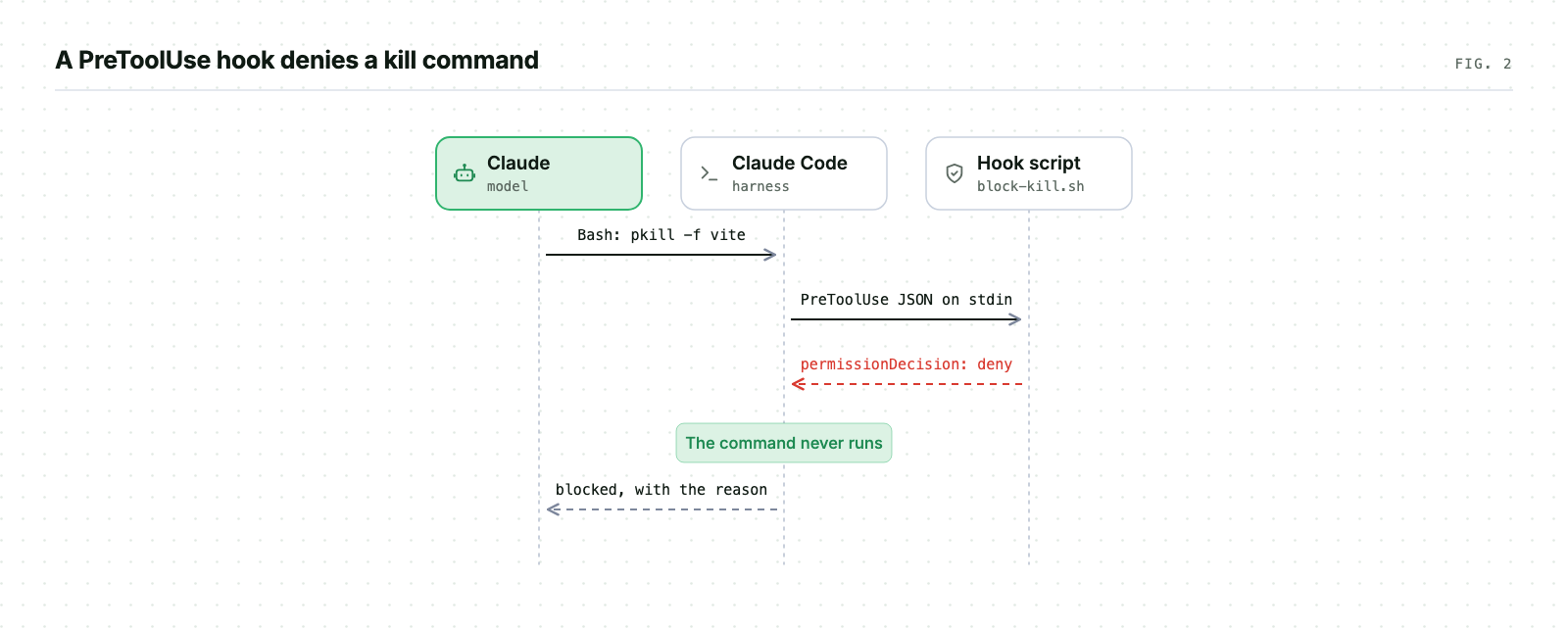
Step 2: Add a PreToolUse hook that blocks kill commands
A hook is a script Claude Code runs at a fixed point in its loop. A PreToolUse hook sees every Bash call before it runs and can deny it. Register it in settings:
{
  "hooks": {
    "PreToolUse": [
      {
        "matcher": "Bash",
        "hooks": [
          { "type": "command", "command": "${CLAUDE_PROJECT_DIR}/.claude/hooks/block-kill.sh" }
        ]
      }
    ]
  }
}
Then save the script as .claude/hooks/block-kill.sh and run chmod +x on it:
#!/bin/bash
# Deny any Bash call that tries to signal or stop processes.
COMMAND=$(jq -r '.tool_input.command')

if echo "$COMMAND" | grep -Eq '(^|[;&|[:space:]])(kill|pkill|killall|systemctl stop|docker (stop|kill))([[:space:]]|$)'; then
  jq -n '{
    hookSpecificOutput: {
      hookEventName: "PreToolUse",
      permissionDecision: "deny",
      permissionDecisionReason: "Stopping processes is blocked here. Ask the user to stop it."
    }
  }'
else
  exit 0
fi
The reason string goes back to Claude, so it asks you instead of retrying another way. Extend the pattern with your own infrastructure commands, such as kubectl delete pod or your cloud CLI’s stop command.
Step 3: Isolate the agent from your other work
Rules and hooks filter commands. Isolation removes the target. Claude Code’s built-in sandbox, turned on with /sandbox, limits which files commands can write and which domains they can reach. Its documentation describes file and network limits, not process signals, so don’t count on it to stop a kill. It also doesn’t cover hooks, MCP servers, or other processes Claude Code starts.
For one boundary around everything, the docs recommend running Claude Code itself in a container or VM. Inside a container, pkill -f node can only reach the container’s own processes.
Step 4: Scope the credentials you hand the agent
The viral case involved GPU pods, which no local rule protects. If an agent holds a cloud token that can stop instances, it can stop them. Give orchestrating agents a role that can start and read their own workloads but can’t stop shared ones, and keep billing-sensitive actions behind a human. Our guide to what a coding agent should and shouldn’t be allowed to do covers how to draw those lines.
Containing Claude Code runs with Sharkly
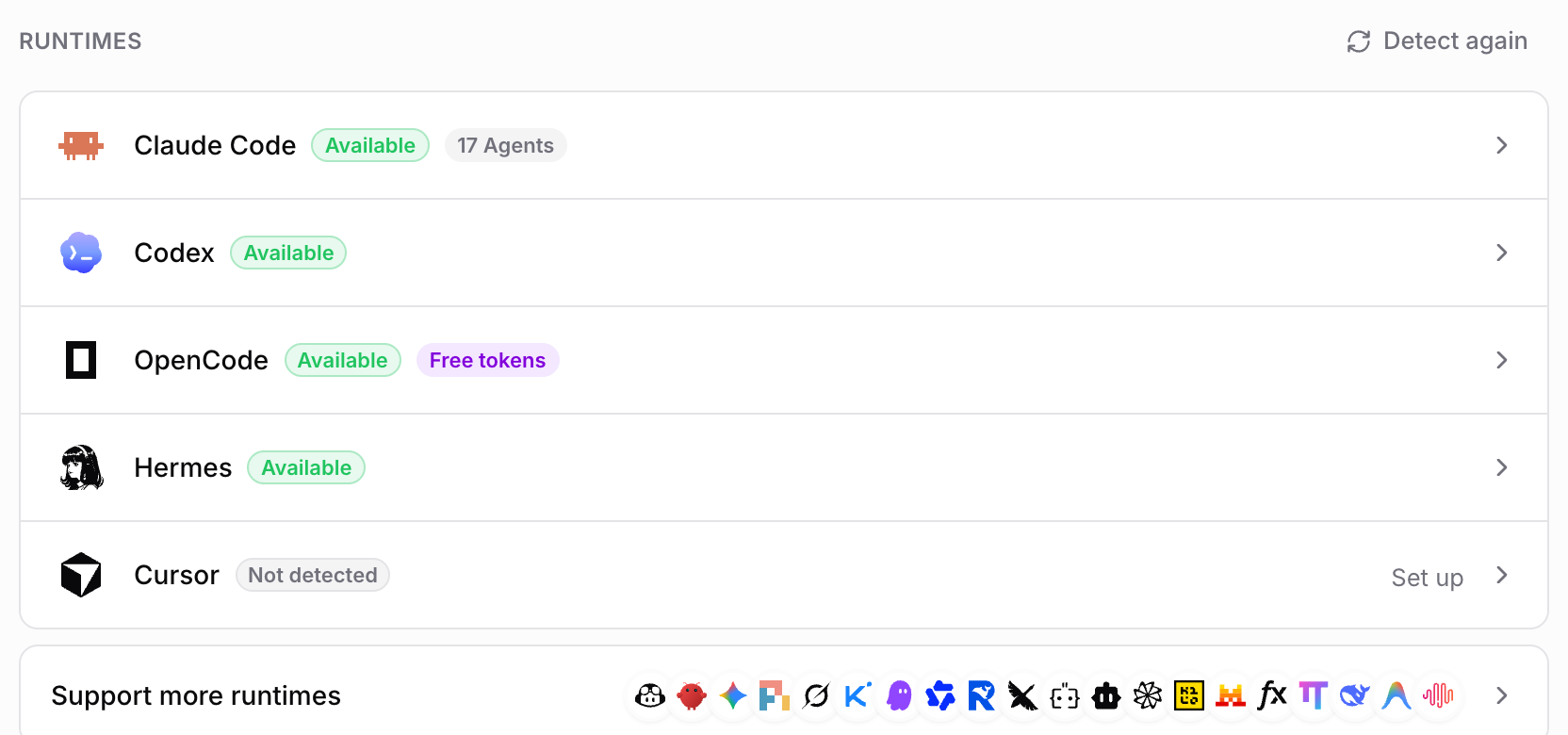
The settings above protect one session. When several agents work at once, the harder question is where each one runs and who sees what it did. Sharkly is the work layer above your coding agents: an Agent runs on a Computer you connected, through a Runtime such as Claude Code.
That structure gives you containment points. Put agent work on a dedicated Computer, such as a VM or spare box, so a stray pkill never reaches your laptop. In Temporary mode each Task gets an isolated directory, and repository-backed runs can use a fresh worktree, so parallel agents don’t share files. Each run shows its state on the Task: queued, running, completed, failed, or canceled. A person can cancel a queued or running run, and a canceled run records that a person or system stopped it, so a stop never goes unexplained.
Because Claude Code runs on the Computer, it loads that Computer’s settings, including the deny rules and hook above. Install them once per Computer and every Task picked up there inherits them. The Sharkly docs explain how to connect a Computer and check its Runtimes, and our guide to running multiple Claude Code agents in parallel covers the layout.
Alternatives
- Dev containers. A project dev container gives Claude Code a disposable environment with only the services that project needs.
- A separate user account. Without
sudo, an agent under its own user can’t signal your user’s processes. - Codex sandbox profiles. If you also run Codex, its permission profiles cover a similar job; see our Codex sandbox team policy.
Conclusion
Claude Code killing processes is rarely sinister. Timeouts and output caps account for some cases, and a careless pkill accounts for most of the rest. The viral report shows a separate risk: an agent with authority over workers and cloud resources can use it.
Add the three deny rules today, drop in the hook, and move unattended runs into a container or onto a dedicated Computer. Then connect that Computer to Sharkly so every run you assign lands there, with its state on the Task where you can see it.
FAQ
Does Claude Code kill processes on its own?
Claude Code stops commands it started when they exceed a timeout or produce more than 5 GB of output. Other processes die only when Claude runs a command such as kill or pkill, which deny rules and hooks can block.
Does Claude Code monitor other apps for policy violations?
Nothing in Claude Code’s documentation describes a monitor that watches unrelated software. The November 2026 report involved an agent stopping workers and pods it controlled for the user.
What is the default Bash timeout in Claude Code?
Two minutes for a foreground command, with a ceiling of 10 minutes that Claude can request. Change both with BASH_DEFAULT_TIMEOUT_MS and BASH_MAX_TIMEOUT_MS.
Why did Claude Code kill my dev server?
Most often, Claude ran pkill -f node or a similar command to free a port, and the pattern matched your server too. Deny pkill and ask Claude to stop processes by PID.
Does the Claude Code sandbox stop it from killing processes?
The sandbox docs describe limits on file writes and network access, not process signals. Use deny rules, a hook, and a container or VM for process isolation.
How do I stop an agent from shutting down cloud resources?
Scope its credentials. Give it a role that can’t stop shared instances, and route stop or delete actions through a human.