
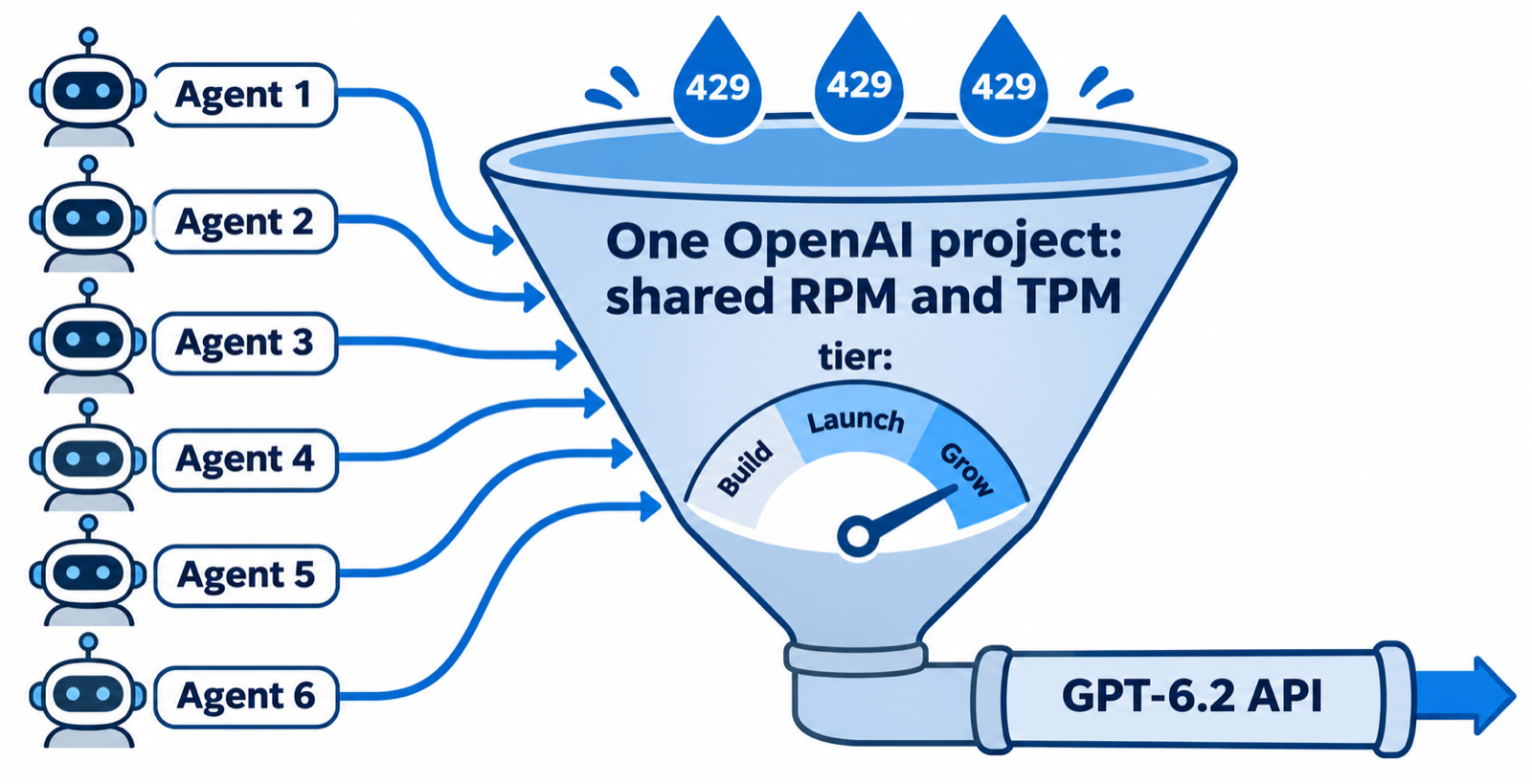
TL;DR: GPT-6.2 rate limits are the same for Astra and Sol in the API: 5,000 RPM and 1,000,000 TPM on the Build tier, 10,000 RPM and 4,000,000 TPM on Launch, and 15,000 RPM and 40,000,000 TPM on Grow. Limits apply per organization and per project, so every agent on one key shares them. For agent teams, tokens per minute runs out first, not requests.
OpenAI shipped GPT-6.2 Astra and GPT-6.2 Sol on November 17, 2026. Astra is the frontier model for the hardest work; Sol is the cheaper everyday model, built for “powering agents at scale” in OpenAI’s own words.
One agent rarely hits a limit. Six agents on one API key hit it by lunch. This guide covers the GPT-6.2 rate limits, the Codex plan caps, and how to size an agent team so it queues instead of failing. If you already run several coding agents, Sharkly is where you set how many of them run at once.
GPT-6.2 rate limits by usage tier
GPT-6.2 Astra and GPT-6.2 Sol share one standard rate-limit table on OpenAI’s Sol model page and Astra model page. RPM means requests per minute; TPM means tokens per minute. Whichever you exhaust first stops you.
| Tier | Qualifies at (total credit purchases) | Monthly usage limit | RPM | TPM |
|---|---|---|---|---|
| Build | $5 | $500 | 5,000 | 1,000,000 |
| Launch | $100 | $5,000 | 10,000 | 4,000,000 |
| Grow | $500 | $200,000 | 15,000 | 40,000,000 |
The qualification and monthly usage columns come from OpenAI’s rate limits guide. Your tier upgrades automatically as total credit purchases cross each threshold. The monthly usage limit is a separate cap from the spend limits you set yourself.
Astra costs four times as much per token ($8 input, $40 output per million versus $2 and $10 for Sol), but its rate limit is the same. What you hit depends on how many tokens your agents push.
How GPT-6.2 usage caps work in Codex
If your agents run through Codex on a ChatGPT plan instead of an API key, a different cap applies. OpenAI’s Codex pricing page gives local messages per five-hour window as ranges, because task size changes the cost of each message.
| Model | Plus | Standard Business |
|---|---|---|
| GPT-6.2 Astra | 6 to 50 | 6 to 50 |
| GPT-6.2 Sol | 17 to 180 | 17 to 180 |
| GPT-6.1 Sol | 15 to 160 | 15 to 160 |
| GPT-6 Astra | 5 to 45 | 5 to 45 |
Four details matter for agent teams:
- Pro plans have no five-hour limit right now, but weekly limits may still apply.
- Local messages and cloud chats share one allowance. A cloud task can use more of it than a local message.
- Speed costs allowance. Fast mode draws 2x included usage on GPT-6.2 models; Ultrafast draws 6x.
- Long sessions cost more per message. OpenAI says tasks that hold more context use “significantly more” of the allowance.
An agent that has read half a repository sends a large context every turn, so its message count drops fast. We covered the same pattern for Anthropic’s plans in Claude Code usage limits, and the response to the Codex Pro limit cut follows the same logic.
Why TPM, not RPM, limits an agent team
A coding agent does not send thousands of small requests. It sends a few large ones. Each turn resends the conversation so far: instructions, files it has read, tool output, and its own earlier reasoning.
Take one illustrative agent: 80,000 input tokens per turn and 6 turns a minute. That is 6 RPM and about 480,000 TPM. Against the Build tier:
- RPM: 6 of 5,000 used. Not close.
- TPM: 480,000 of 1,000,000 used. Two agents fill it.
Your numbers will differ; the ratio won’t. Agents are token-heavy and request-light. For this example agent, the raw ceiling is two agents per project on Build and eight on Launch. Keep the 30 percent headroom from the sizing steps below and that drops to one agent on Build and five on Launch. On Grow, the rate limit stops being your bottleneck and the $200,000 monthly cap or your own budget takes over.
Limits are shared across the organization
OpenAI defines rate limits at the organization level and the project level, not per user. Every agent that uses keys from one project draws from the same pool. Some model families also have a shared limit listed on your limits page, so traffic to one model can count against another.
How to size agent concurrency to your GPT-6.2 tier
The fix is to cap how many agents run at once, so extra work waits in a queue instead of colliding at the API. Here is the order that works:
- Find your tier under Settings, Organization, Limits on the OpenAI platform.
- Measure one real agent run. Note input tokens per turn and turns per minute from your Runtime’s usage output.
- Divide your TPM by one agent’s TPM and keep 30 percent headroom for spikes.
- Set that number as your concurrency cap for every agent drawing on the project.
- Watch for 429 errors for a week, then raise the cap one step at a time.
In Sharkly, each Agent has a Max concurrency (assigned tasks) setting, a Max run duration in minutes, and a Queue timeout in hours. When the cap is full, new tasks wait in the Queued state until a slot frees up. Chats can share the same limit, so a conversation does not sneak past it.
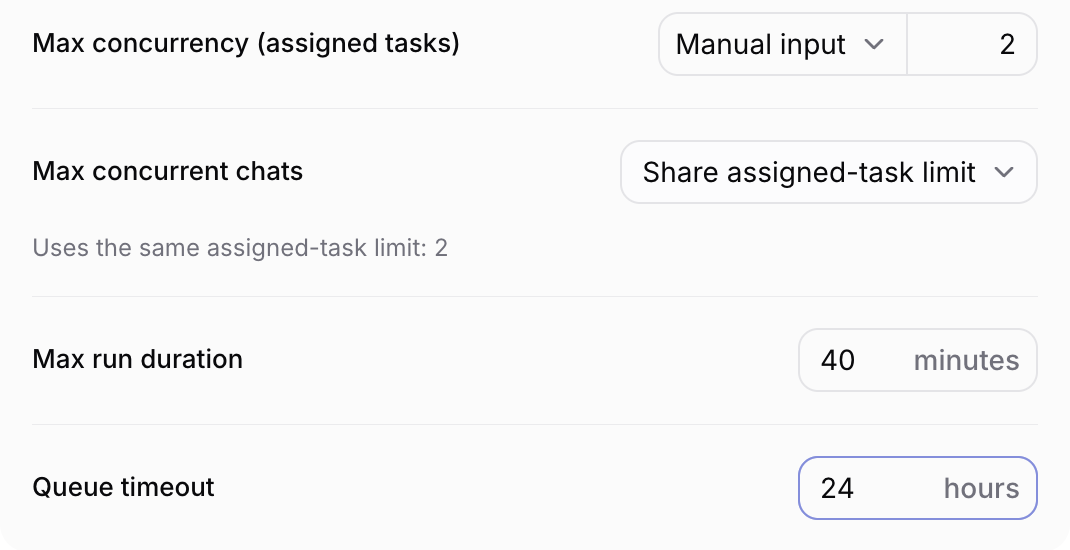
A Computer has its own task concurrency limit too. The Sharkly docs note that higher concurrency uses more CPU, memory, disk, provider capacity, and repository bandwidth, so raise it only once the current load runs cleanly.
Split agents across OpenAI projects
Project-level limits let you fence agent groups. Give your review agents one OpenAI project and your bulk refactor agents another. A runaway refactor then hits its own project limit instead of starving review. The organization limit still caps the total, so this sets priority; it does not add capacity.
For a Runtime that authenticates with an API key, set the key as an environment variable on the Agent. Sharkly injects Agent environment variables into the agent process when it starts. Give each agent group a key from its own OpenAI project, so its traffic lands on the right limit.
Watch tokens per task
The Agent header in Sharkly shows assigned tasks, total runs, and tokens used. Read tokens per task, not only the monthly total. A task type that burns three times the tokens of the others is your first candidate for Sol instead of Astra, or for a tighter task description.
Move bulk work off-peak
Each Agent’s Runtime settings include a Working hours switch for scheduling work off-peak. Point it at test generation, dependency bumps, and documentation passes. Those tasks run overnight and leave daytime capacity for the work people are waiting on.
How to handle a GPT-6.2 429 error
Even with a cap, you will see an occasional 429. OpenAI’s guide is specific about what to do:
- Follow the
Retry-Afterheader when it is present, and treat it as a minimum. - Without it, use exponential backoff with random jitter.
- Read
x-ratelimit-remaining-tokensandx-ratelimit-reset-tokensto see how close you are. - Don’t nest retries: if your code retries, turn off the SDK’s own retries, or the two multiply.
- Don’t retry quota or billing errors. They need a person.
A 503 with server_is_overloaded means the model is busy, not you. Handle it with the same backoff.
import random
import time

import openai

client = openai.OpenAI(max_retries=0)  # one retry layer only


def call_with_backoff(prompt: str, max_attempts: int = 6) -> str:
    delay = 1.0
    for attempt in range(max_attempts):
        try:
            response = client.responses.create(model="gpt-6.2-sol", input=prompt)
            return response.output_text
        except (openai.RateLimitError, openai.InternalServerError) as err:
            if attempt == max_attempts - 1:
                raise
            retry_after = err.response.headers.get("retry-after")
            wait = float(retry_after) if retry_after else delay
            time.sleep(wait + random.uniform(0, 1))
            delay = min(delay * 2, 60)
    raise RuntimeError("unreachable")
Astra or Sol: which model stretches your limits further
Rate limits are identical, so the choice turns on token use and price. Use Astra for architecture changes, hard bugs, and long autonomous runs. Use Sol for everything routine. In Codex on Plus, Sol gets roughly three times as many messages per five-hour window as Astra, which is the clearest signal of the cost gap.
A mixed team is the usual answer: one Astra agent leads, several Sol agents do the pieces, as in GPT-6 Astra as your Crew leader. Routine work belongs on a cheaper model, the logic behind GPT-6 Luna for the boring 80 percent.
Other ways to get more GPT-6.2 throughput
- Batch API. It runs outside your synchronous rate limits and costs 50 percent of standard rates. Good for evals and bulk classification; wrong for an interactive agent.
- Background mode with a
2hor8hwindow. It counts against a separate Batch/Background queue limit instead of your live TPM. - Prompt caching. Cached input costs $0.40 per million on Astra and $0.10 on Sol, a large saving for agents that resend the same context.
Conclusion
GPT-6.2 rate limits are generous per request and tight per token. For a team of agents, the working limit is your tier’s TPM divided by what one agent burns, shared by every agent on the project. Measure one run, cap concurrency below that number, split noisy agent groups into their own projects, and let the queue absorb the rest.
You can build this with scripts and a semaphore, or set it per Agent in Sharkly. Connect one Computer, create one Agent on Codex with GPT-6.2 Sol, set its max concurrency to 2, and assign it something boring. More on running agents side by side in How to run 10 AI coding agents at once.
FAQ
What are the GPT-6.2 rate limits?
In the API, GPT-6.2 Astra and Sol share the same limits: 5,000 RPM and 1,000,000 TPM on Build, 10,000 RPM and 4,000,000 TPM on Launch, and 15,000 RPM and 40,000,000 TPM on Grow.
Does GPT-6.2 Astra have lower rate limits than Sol?
No. OpenAI lists the same RPM and TPM for both models at every tier. Astra costs more per token, so it hits your budget faster, not your rate limit.
How do I move to a higher OpenAI usage tier?
Tiers upgrade automatically on total credit purchases: $5 for Build, $100 for Launch, $500 for Grow.
Are rate limits per API key or per organization?
Per organization and per project. Every key in a project draws from the same pool, so ten agents on ten keys in one project still share one limit.
How many GPT-6.2 Astra messages do I get in Codex?
On Plus and Standard Business, OpenAI estimates 6 to 50 local messages per five-hour window for GPT-6.2 Astra and 17 to 180 for Sol. Pro plans currently have no five-hour limit, though weekly limits may apply.
Why do my agents hit 429 errors when RPM looks fine?
Agents send large contexts, so they exhaust tokens per minute long before requests per minute. Check x-ratelimit-remaining-tokens in the response headers.
Does Sharkly add its own model limits?
No. Sharkly runs the coding agents you already use, and model quota depends on the tools, plans, and API accounts your team connects. Sharkly controls how many tasks each Agent runs at once.