Meta shipped Muse Wonder on October 12 at $4 per million input tokens and $20 per million output, with a 1M-token context and an API that speaks three dialects: OpenAI Responses, Chat Completions, and Anthropic Messages. That last part is what makes it usable from a Sharkly board today. Meta’s coding-agents guide documents running Codex and Claude Code on muse-wonder-1.0 by pointing them at api.meta.ai, and both are Runtimes a Sharkly Computer can expose. The model Meta’s headline benchmarks describe, Muse Wonder Full, is not on the API and cannot be a Runtime’s model; more on that below.
This guide sets up a Muse Wonder lane on an existing Sharkly Computer using the Codex Runtime, names the model on the Agent so the board shows which lane a Task went to, and sizes the work to what Meta’s and Artificial Analysis’s numbers say the model is good at: long agentic runs.
TL;DR
Configure a Codex provider for Meta in ~/.codex/config.toml on the Computer, with model = "muse-wonder-1.0", wire_api = "responses" and the key read from MODEL_API_KEY in the local service’s environment. Rescan until the Codex Runtime reads Available. Create an Agent on that Runtime, specify the model in its Custom arguments, and give it the long Tasks: refactors that span many steps, migrations, review-and-fix loops. Keep the knowledge-heavy and terminal-heavy work on Opus 5.5 or Astra Agents. Agents research, execute, test, and report; the Task carries the result.
Where the model setting lives
Sharkly does not pick models. The Agents documentation says an Agent follows the Runtime’s default model, does not display a model name, and that to change models you specify one in Custom arguments on the Agent or Runtime, for example specify model: model-name. There is no model dropdown and no thinking-depth control, because Sharkly cannot reliably read which model a Runtime used.
For a Meta model that means two layers. The provider, where the Runtime finds api.meta.ai and its key, lives in the Runtime’s own configuration on the Computer. The model choice lives on the Agent. One Computer can then carry a Muse Wonder Agent and an Opus 5.5 Agent on different Runtimes, with the model written where a reviewer can read it.
Step 1: give Codex a Meta provider on the Computer
Meta’s guide gives the Codex configuration. On the Computer, in ~/.codex/config.toml:
model = "muse-wonder-1.0"
model_provider = "meta"
model_reasoning_effort = "high"
model_context_window = 1048576

[model_providers.meta]
name = "Meta Model API"
base_url = "https://api.meta.ai/v1"
env_key = "MODEL_API_KEY"
wire_api = "responses"
Two notes from Meta. Log out of OpenAI in Codex first, or it keeps using the OpenAI provider. And wire_api = "responses" matters: the Responses API carries reasoning across turns, which is what keeps a long run coherent.
The key goes in the environment of the process that starts Codex, which on a Sharkly Computer is the local service. Set MODEL_API_KEY where that service reads its environment, then restart it. Do not put the key in Sharkly. The Computers documentation is explicit that passwords, tokens and API keys do not belong in the executable, arguments or environment fields on the Runtime. Those fields are for defaults, not secrets.
Test in a plain terminal on that host before touching the board:
codex "Say which model you are and stop."
If Codex answers from muse-wonder-1.0, Sharkly can use it. Open Computer detail and run the rescan or connection test. The Codex Runtime should read Available. A Computer that shows online only means its local service is sending heartbeats; the Runtime status is what says a run can start.
If you prefer Claude Code as the Runtime, Meta’s guide maps the model slots: ANTHROPIC_BASE_URL="https://api.meta.ai", ANTHROPIC_AUTH_TOKEN="$MODEL_API_KEY", ANTHROPIC_MODEL="muse-wonder-1.0", the Opus slot to Wonder, the Sonnet and Haiku slots and CLAUDE_CODE_SUBAGENT_MODEL to muse-spark-1.3, and ENABLE_TOOL_SEARCH="true" so MCP tools still load. Every slot needs a Meta model or Plan Mode and subagents try to call Claude models Meta does not serve. The same rule applies: key in the host environment, not in a Sharkly field.
Step 2: an Agent that says which model it is
Open Agents, select New Agent, choose the Computer and the Codex Runtime, and name the Agent for the lane, Long-run worker rather than Muse. In Custom arguments, specify the model, muse-wonder-1.0, matching what you tested. Set the working directory to Create temporary directory so each Task runs isolated, and set the per-Task timeout longer than you would for a cheap lane. Meta’s whole pitch for this model is that it keeps going, and SWE-Marathon measures exactly that.
Because Sharkly will not show the model, the instructions make the Agent write it down:
You are the long-run lane. State the model id you ran on at the top of your report.
Take the Task as written. Plan before you edit, and keep a running list of what
you tried and why, so a reviewer can follow the path, not only the diff.
Run the closest relevant check before reporting done. Report failures as failures.
If you need a fact you are not sure of, look it up in the repository or say you
could not confirm it. Do not fill gaps from memory.
Stop and ask before anything destructive, anything that sends data outside the
attached repositories, or any action you would want a person to confirm.
The fourth instruction is there for a reason. Artificial Analysis scores Wonder at 25 on its knowledge index against 46 for Opus 5.5, with a 27% hallucination rate. It is a strong worker and a weak encyclopedia; the instruction tells it which one to be.
Step 3: route the long Tasks here
What the lane is for, from Meta’s model card and the independent runs:
| Measure | Muse Wonder | Claude Opus 5.5 |
|---|---|---|
| SWE-Marathon (long coding runs) | 53.1 | 46.3 |
| DeepSWE 1.1 | 78.8 | 74.2 |
| Terminal-Bench 4.0 | 52.0 | 59.6 |
| AA-Omniscience (knowledge) | 25 | 46 |
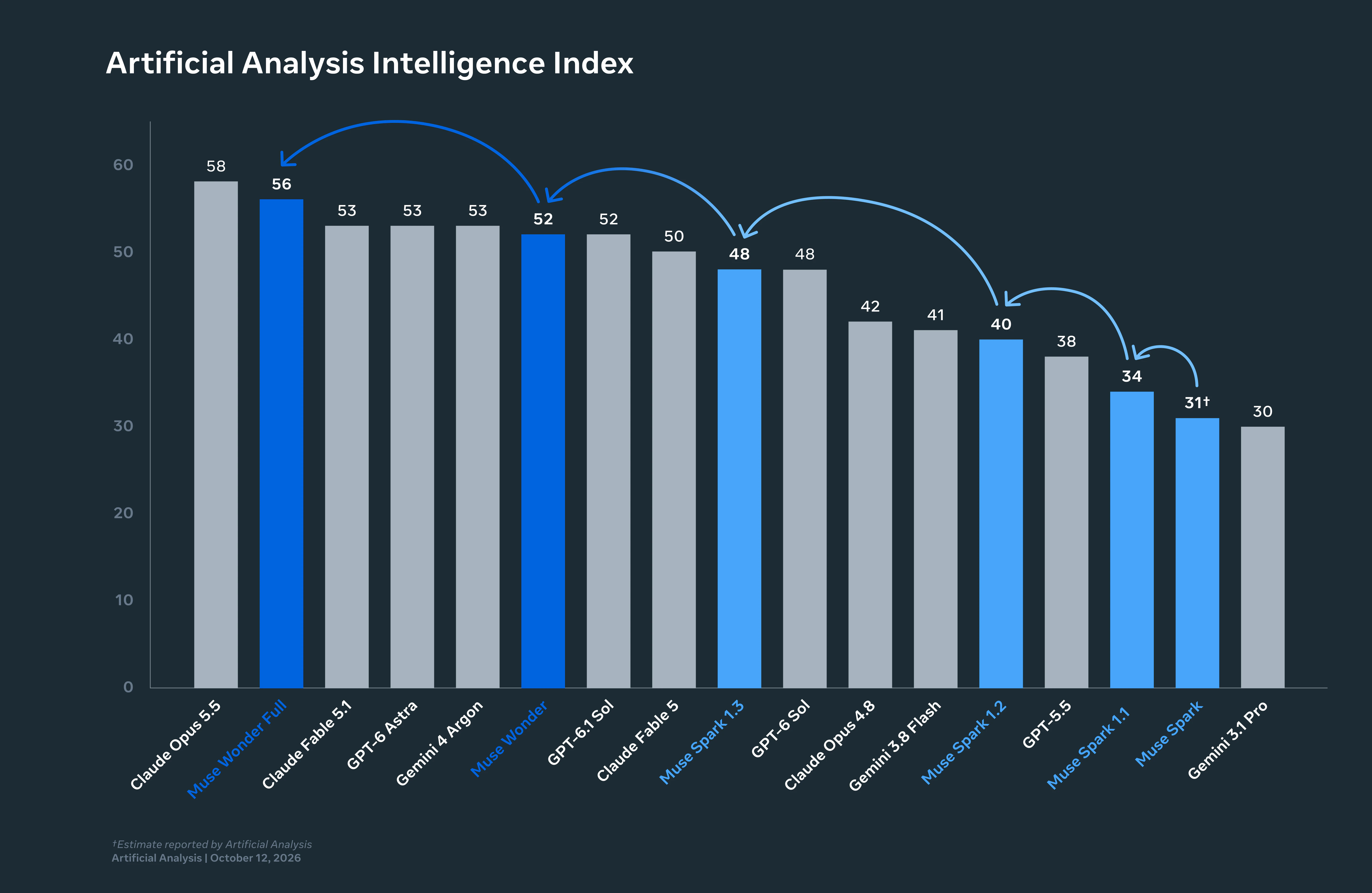
| Intelligence Index | 52 | 58 |
| Price per 1M in / out | $4 / $20 | $4 / $20 |
Same price, different shape. The routing rule for a Crew follows directly:
- Assign to the Muse Wonder Agent when the Task is long, has many steps, and will hit blockers: a multi-file refactor, a dependency migration with failing tests to chase, a fix-and-verify loop against a flaky suite.
- Keep it on Opus 5.5 or Astra when the Task is terminal-heavy, needs broad factual knowledge, or needs the strongest reviewer. Which agent gets the Task covers the general rule.
Then pick a Task with a clear acceptance criterion, select the Muse Wonder Agent as Assignee, and move it out of Backlog into a status that is ready for work. The run moves through queued, dispatched and running, and the execution log records tool calls and Runtime events. When the Agent stops to ask, the question returns to the Task as a comment and routes to the Inbox. Meta trained Wonder to check in before important actions; on a board, that check-in has somewhere to land. Active Focus and the review queue is about what to do with it.
What you cannot run: Muse Wonder Full
Muse Wonder Full scores 56 to Wonder’s 52 and ties Claude Code on Sonnet 5.5 at 68 on the Coding Agents Index. It is only available inside Muse Code on the $50 Power and $200 Maximum plans. It has no API model ID, so neither Codex nor Claude Code can be pointed at it, and Muse Code is not a Runtime Sharkly’s local service detects. Sharkly does offer a custom ACP Runtime for tools detection misses, but Meta’s docs do not say whether Muse Code speaks ACP, so treat that as untested. For a team, Full is a model one engineer uses in a terminal, not one a board can assign. Muse Wonder Full is subscription-only goes into what that means.
Cost and data
None of this lands on Sharkly’s bill. Model usage runs through the Meta key configured on the Computer, at Meta’s rates: $4 / $20 / $0.20 cached per million, with no long-context premium and a team-wide limit of 3,000 requests and 4M tokens per minute. Long runs resend their context each turn, so a Muse Wonder lane is cache-heavy by nature; Artificial Analysis measured $4.52 per task against $5.98 for Opus 5.5, mostly because Wonder’s output was cheaper.
API traffic in Meta’s Standard mode is not used for training. That is different from Muse Code subscriptions, which default to Contributor mode. A Runtime on a Computer uses the API, so the team’s code stays out of Meta’s training set without anyone flipping a switch.
The model changed this week. Context, progress, blockers, results, and human review stayed visible from request to release. You can build this manually with worktrees, or use Sharkly to manage the workflow.