
TL;DR
Stuck AI coding agents are no longer moving toward a result, even though they may still look busy. You catch one with six signals: no new tool calls for a set time, the same error three times, edits that undo each other, tokens climbing with no diff, an approval nobody sees, and a run that never started. A scheduled watchdog checks for all six and posts on the task.
Why you need to detect stuck AI coding agents
When you run one agent, you watch it. When you run five, you stop watching, and that’s when stuck agents cost you. A run that stalls at minute 4 can sit there until you happen to look, and by then the afternoon is gone.
The hard part is that “stuck” and “slow” look the same from the outside. Both show a quiet terminal and a spinner. One will finish if you wait; the other will burn tokens or sit idle forever.
This guide gives you a way to tell them apart, a small watchdog you can run on a schedule, and what to do when it fires. If you already track agent work on a shared board like Sharkly, most of the signals below are already recorded for you.
Stuck vs slow: the one-line test
A slow agent is still producing new evidence; a stuck agent is not. New evidence means a new tool call, a new file change, a new test result, or a new message. If the last piece of new evidence is older than your threshold, treat the run as stuck until proven otherwise.
Slow has its own causes. Long reasoning, a big context, and a slow model can all delay the first token by minutes. We covered that case in why your agent looks stuck when it is thinking. The fix there is patience and a sane timeout. The fix for stuck is to intervene.
| Slow | Stuck | |
|---|---|---|
| New tool calls | Yes, spaced out | None for N minutes |
| Diff | Growing | Flat, or flipping back and forth |
| Errors | Varied, then resolved | The same one, repeating |
| Token use | Rising with output | Rising with no output |
| Right move | Wait | Stop, add context, or reassign |
6 signals of a stuck AI coding agent
Each signal is cheap to check, and each points to a different fix.
- No new tool calls for N minutes. Pick N from your own runs: if 95% of healthy runs never go quiet for more than 8 minutes, set N to 10.
- The same error three times. An agent that hits the same failing test or the same import error three times in a row is looping, not learning.
- Edits that undo each other. Change A, then revert A, then change A again. Compare consecutive diffs; if they cancel out, the agent has lost the thread.
- Tokens rising with no diff. Spend keeps going up while the working tree stays the same. This is the expensive version of stuck.
- Waiting on an approval nobody sees. The agent asked a question or hit a permission prompt, and the person who can answer it isn’t looking at that terminal.
- The run never started. The task says assigned, but no run is executing. This one is the sneakiest because nothing looks wrong.
Signals 1 to 4 live inside the run. Signals 5 and 6 live around it, in the system that hands out work. Most home-grown monitoring only checks the first group.
How a watchdog works
DeepSeek’s team described this pattern in their essay “Exploring Super-agent Design”. Their design includes a Watchdog: a separate session that runs on a schedule, outside the main system. It handles API errors and asks the model whether each Worker is making progress or drifting. Maintainers can also ask it why something failed.
That essay describes an architecture, parts of it in a prototype the authors say isn’t an official product. You can’t switch it on. You can copy the idea, though, because the core of it is small.
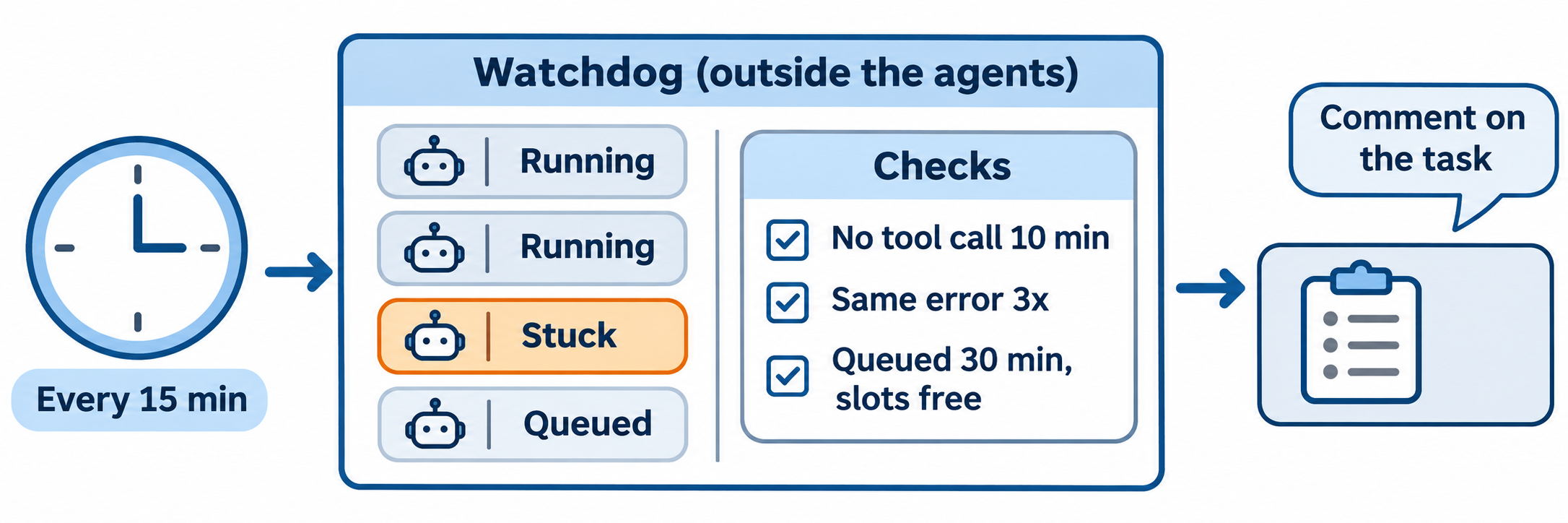
A watchdog is a scheduled check that reads run state from outside the agent and reports on the task when something looks wrong. Three properties matter:
- It runs outside the agent. A stuck agent can’t report that it’s stuck.
- It runs on a clock. Events tell you what happened; a clock tells you what didn’t.
- It reports where the work lives. A comment on the task beats a log file nobody opens.
This is the same split that site reliability teams draw between white-box and black-box monitoring, and the same reason Kubernetes separates liveness and readiness probes: “the process is up” and “the process is doing useful work” are different questions.
Build a simple watchdog with Sharkly
You can build this on a Sharkly board without new tooling, because Sharkly already records run state for every task.
What run state can you read?
A Sharkly run moves through documented states: Queued (waiting for dispatch capacity), Dispatched (claimed and starting on the Computer), Waiting for local directory, Running, Completed, Failed, and Canceled. The task’s execution log shows why a run was queued, when it started and ended, its tool calls and Runtime events, the trigger source, and failure details.
Those states map onto the six signals. Running with no new tool calls covers signal 1. A run waiting on you surfaces as an attention item in Inbox, which covers signal 5. Queued for too long covers signal 6.
Step 1: Know what “full” means on each Computer
A Computer is a device you connect to Sharkly with Sharkly Desktop or the Sharkly CLI. Each one has a task concurrency limit. When the limit is reached, or the Computer is offline, or the Runtime is unavailable, new tasks queue. So a queued run is normal when slots are full and a red flag when they’re free.

Step 2: Create a scheduled Automation
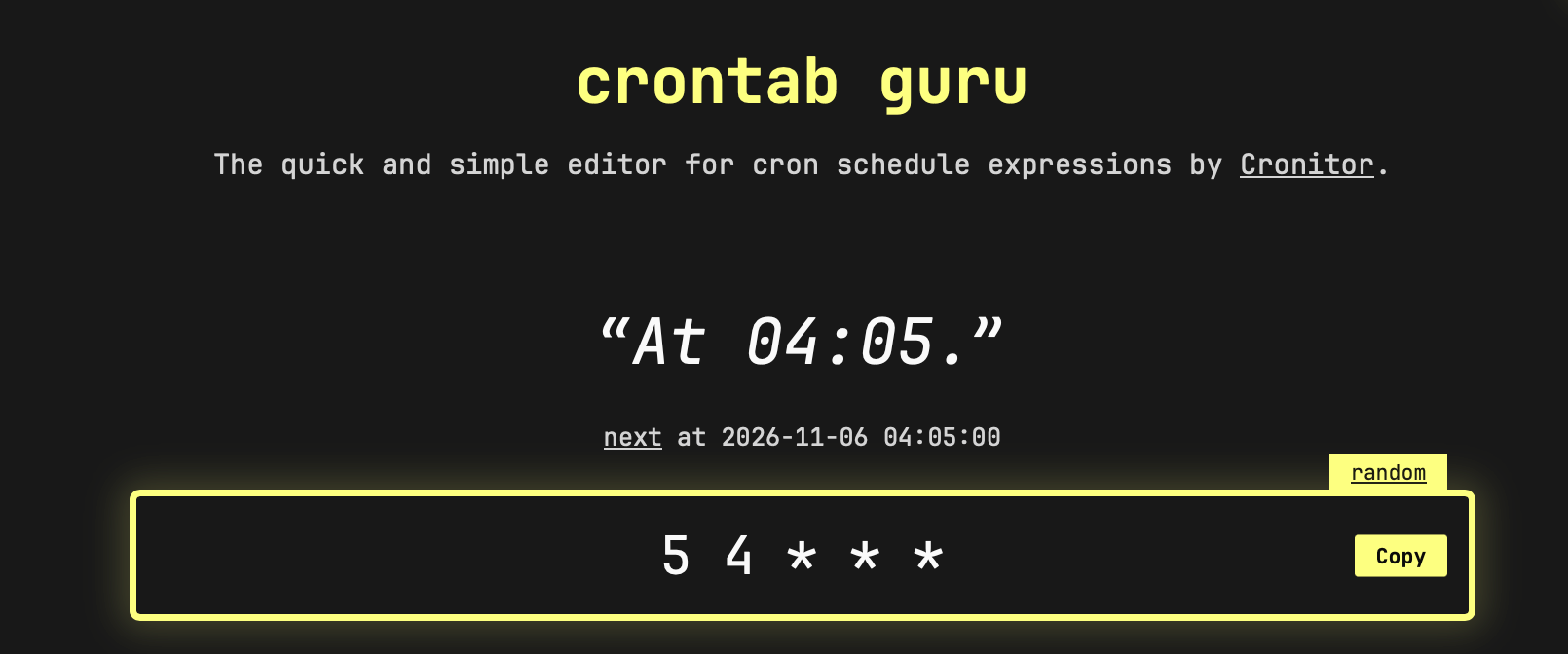
An Automation is a Space-owned rule that runs instructions with one Agent or Crew on a trigger. Give it a schedule trigger: a five-field cron expression plus a timezone. Every 15 minutes during working hours looks like this (check it on crontab.guru):
*/15 8-20 * * 1-5 Asia/Singapore
Step 3: Write instructions that check, not fix
Keep the watchdog read-only at first. Its job is to notice and report.
Every run:
1. List tasks in this Space whose latest run is Queued, Dispatched or Running.
2. For each task, open the execution log and flag it if:
   - Running and no new tool call in the last 10 minutes
   - the same error message appears 3 times in a row
   - Queued for more than 30 minutes while the Computer has free slots
3. For each flagged task, post one comment: which signal fired, the
   timestamp of the last real progress, and one suggested next step.
4. Do not cancel, reassign or edit any task. Do not comment twice on
   the same task within 2 hours.
5. If nothing is flagged, finish with "0 stuck" and post nothing.
Run it once with Run now before you trust the schedule. Then review several runs, as the Sharkly docs advise, before you widen its scope.
A real story: the healthy heartbeat
Here’s a case from our own board, on 2026-10-29. Our check said everything was fine. The Computer was online and its heartbeat was current. Meanwhile every task claim was being refused, and runs sat queued for two hours.
The heartbeat was telling the truth about the wrong question. The Computers docs say it plainly: an online Computer only confirms that the local service is sending heartbeats; it does not make every Runtime executable.
The fix was one extra rule: alert when nothing has been claimed for 30 minutes while slots are free. “Alive” was never the question. “Is work moving from Queued to Dispatched?” was. That rule now sits in step 3 above, and it’s the one we’d add first.
What to do when the watchdog fires
The signal tells you which fix to reach for.
- Stop the run. A queued or running execution can be canceled. Do this for loops (signals 2 and 3) and for token burn with no diff (signal 4). A canceled run doesn’t resume in place, but the task and its history stay.
- Add context as a comment. An eligible comment on a task assigned to an Agent can start a follow-up run. Name the file, the failing test, or the decision the agent was missing. One focused paragraph beats a pasted log.
- Split the task. If the agent keeps losing the thread, the task is too big. Break it into pieces with a checkable outcome each, the habit behind the plan, observe, verify loop.
- Reassign it. If a Runtime or directory problem caused the failure, assign the task to another Agent or Crew, or fix the Computer first.
- Answer the question. For signal 5, the fix is a person. Route approvals to Inbox so they reach someone, as in human-in-the-loop coding agents.
Sharkly runs bill against the Claude Code, Codex, or API plan already on your Runtime, and Sharkly does not sell tokens. That makes signal 4 worth catching early: a stuck agent spends your plan, not ours.
When a watchdog is overkill
If you run one or two agents and watch them, skip the Automation. Your eyes are the watchdog. Use one when you run enough agents in parallel that you can’t see them all, which for most people starts around three to five, the point where running 10 agents at once stops being about terminals and starts being about attention.
Conclusion
Stuck is a lack of new evidence, not a lack of noise. Check the six signals from outside the agent, on a clock, and report on the task. Add the “nothing claimed while slots are free” rule first, because it catches the failure every heartbeat misses.
To set it up, connect a Computer, create a scheduled Automation with the instructions above, and press Run now. Sharkly is free to start, and the Automations guide covers each trigger type.
FAQ
How long should I wait before calling an agent stuck?
Base it on your own healthy runs. Find the longest quiet gap in 95% of them and add a margin. Ten minutes with no new tool call is a sensible start for most coding tasks.
Is a long time to first token a sign of a stuck agent?
Not by itself. Long reasoning and large contexts delay the first token. Wait for your first-token threshold, then apply the stuck signals.
Can the agent detect that it’s stuck itself?
Sometimes, but don’t rely on it. A looping agent tends to keep looping. An outside check on a schedule is more reliable.
Should the watchdog cancel runs automatically?
Not at first. Start read-only and let it comment. Once its flags have been right for a few weeks, you can let it cancel one narrow case, such as the same error five times.
What’s the most common signal people miss?
The run that never started. Most checks look inside running work. Add a rule for runs queued too long while capacity is free.
Does a healthy heartbeat mean my agents are working?
No. A heartbeat proves the local service is reachable. It doesn’t prove a Runtime can execute or that work is being claimed.