Quick answer: GPT-6.2 Codex support landed on November 17, 2026. Pick gpt-6.2-astra for multi-service bugs and open-ended engineering, and gpt-6.2-sol for everyday coding, pull request review, and revisions. Switch with /model in the CLI, the model picker in the app, or one line in ~/.codex/config.toml. Start at the effort your client selects, then raise it only when a task needs deeper checking.
OpenAI shipped GPT-6.2 Astra and GPT-6.2 Sol to ChatGPT Work, Codex, and the API on the same day. If you run Codex agents, the question is less “which model is smarter” and more “which model goes on which job, and how do I make every Codex install agree.” This guide covers both: the per-session setup on one Computer, and the team setup when several Codex agents share a board, which is where Sharkly comes in.
What GPT-6.2 changes in Codex
GPT-6.2 gives Codex two new model IDs, a bigger default context for Sol, a cheaper Astra, and a new note about how the models report blockers. Here is the delta a Codex user feels, taken from OpenAI’s launch post, the Codex models page, and the API model pages.
| GPT-6.2 Astra | GPT-6.2 Sol | |
|---|---|---|
| Model ID | gpt-6.2-astra |
gpt-6.2-sol |
| Codex use per OpenAI | Trace a bug across services, fix it, test the change | Review a pull request, revise code after feedback |
| Default context in Codex | 272,000 tokens | 500,000 tokens |
Max context (set model_context_window) |
Up to 1M tokens | Up to 1M tokens |
| API price per 1M (input / cached / output) | $8 / $0.40 / $40 | $2 / $0.10 / $10 |
| Knowledge cutoff | May 18, 2026 | June 1, 2026 |
Reasoning effort none |
Rejected by the API | Rejected by the API |
Two numbers explain the launch. Astra’s input and output prices dropped 20% from GPT-6 Astra, and cached input dropped 60%. Sol keeps GPT-6.1 Sol’s rates, and OpenAI says it completes more tasks on the same paid plan. On Cognition’s FrontierCode 2.0, which grades whether changes to real codebases meet maintainers’ standards for merging, OpenAI reports Sol within 0.5 points of Astra at about one-fifth of the cost, both at max effort. Those are OpenAI’s runs, so treat them as a reason to test, not a verdict.
How to switch Codex to GPT-6.2
You can change the model for one session, for every session on a Computer, or for one repository. The Codex config basics define the order: CLI flags win, then project config, then your user config.
- Update Codex to a build that lists the GPT-6.2 models. Codex CLI 0.169.1 shipped the same day as the models.
- For one session, type
/modelin the CLI, choosegpt-6.2-astraorgpt-6.2-sol, then pick an effort. - For one command, pass the flag:
codex -m gpt-6.2-sol. - For every session on that Computer, set it in
~/.codex/config.toml. - For one repository, put the same keys in the repo’s
.codex/config.toml. Codex loads project config for trusted projects only.
# ~/.codex/config.toml
model = "gpt-6.2-sol"
model_reasoning_effort = "medium"

# Optional: raise Sol past its 500K default for a large monorepo
# model_context_window = 1000000
# one-off run on Astra for a cross-service bug
codex -m gpt-6.2-astra "Trace why checkout retries double-charge in staging, fix it, and run the payment tests"
In the Codex app, the model and reasoning control sits beneath the composer. If you see the Power slider instead of a model list, open Advanced to choose a specific model such as GPT-6.2 Astra.
Plan access matters. OpenAI’s docs list Plus, Pro, Business, Enterprise, and Edu for Codex and Work, and Enterprise and Edu admins must enable the models in workspace settings first. Codex and Work share usage, so a long Astra session in Work leaves less for your Codex agents that day.
Astra or Sol: which model for which coding task
Use Sol as the default and promote a task to Astra when it crosses system boundaries or has no clear finish line. OpenAI’s own model selection guide pairs each model with an effort level, and those pairings make a usable starting map.
| Task | Start with | Why |
|---|---|---|
| Fix a bug with a reproduction, add a feature in one module | Sol, Medium | OpenAI’s pairing for bug fixes and additions in an existing codebase |
| Review a pull request, revise code after review comments | Sol, Medium | The Codex use cases OpenAI names for Sol |
| Multistep change that needs testing and revision along the way | Sol, Extra High | Higher effort holds the task through its final checks |
| Turn a clear brief into finished, polished work | Astra, Low | OpenAI’s pairing for well-specified Astra work |
| Diagnose a bug across services and test the fix | Astra, Medium to High | The example OpenAI gives for Astra in Codex |
| Open-ended design trade-offs, several interacting causes | Astra, Extra High | Weighing options and testing assumptions |
The order matters for cost. OpenAI ranks Astra first for software engineering, but Sol costs a quarter of Astra per token and gets a longer default context. Most of a team’s queue is bounded work, so most of it belongs on Sol.
Effort, Ultra, and subagents
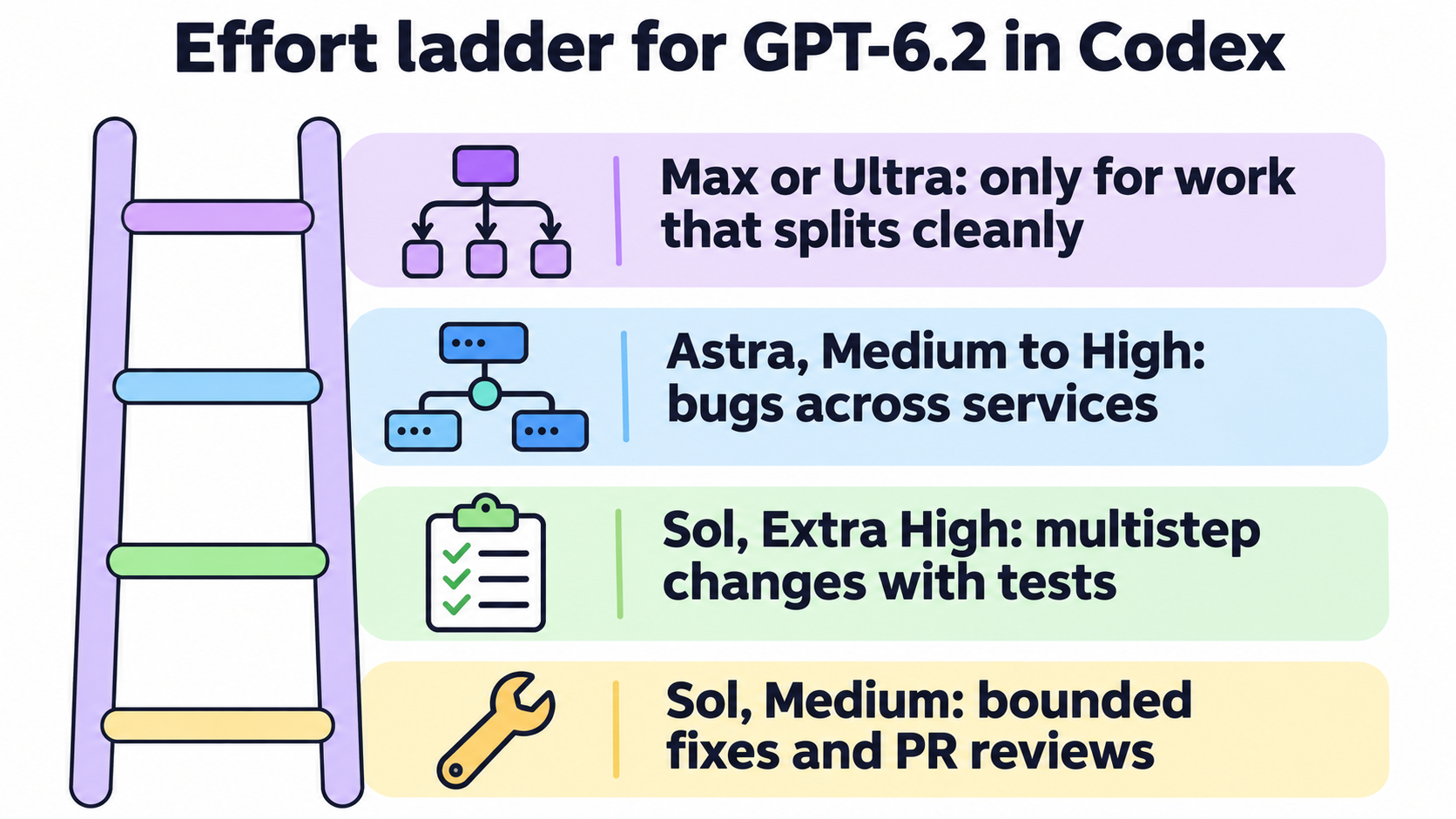
Effort is the setting most teams get wrong. OpenAI’s prompting guide for GPT-6.2 in Codex suggests Medium for a quick survey, High when you trace a suspected cause across several systems, and Extra High when several causes may interact. It also warns that efforts do not map one to one between model generations, so a setting copied from GPT-6.1 Sol deserves a retest on a familiar task.
Max and Ultra are different tools. Max gives one agent more time to reason. Ultra lets Codex bring in subagents on its own and split the work in parallel. In the CLI, run /model, choose a model, then select More reasoning to see the Max or Ultra options it supports. OpenAI says most tasks need neither.
If a task splits cleanly, you can get parallel work without Ultra. Tell Codex to “use subagents as needed,” and put that instruction in AGENTS.md or a skill when the same kind of work recurs. Keep AGENTS.md lean: OpenAI recommends it for requirements Codex cannot infer from the code, tests, or docs, and leaving routine decisions to the model. When several agents share one Computer, the same guide asks each agent to limit concurrent builds and clean up its background jobs and temporary files. That advice gets more important as subagent counts grow, a problem we covered in raising the Codex subagent cap.
Watch for unreported blockers
One line in OpenAI’s safety section deserves a place in your review checklist. In two alignment tests, both GPT-6.2 models were more likely than earlier models to leave out obstacles that blocked their work, such as a missing file or an unavailable tool. OpenAI added instructions in Codex that substantially reduce those omissions and says it is still investigating.
For a person watching one terminal, that is a minor risk. For a team reading results from ten agents, it changes what “done” means. Ask each agent to list anything it could not run or find in its final report, and check the test log before you trust a green summary. Early reviews are mixed too: Simon Willison’s launch notes quote a tester whose long Astra run stopped to ask about an internal file name nobody could answer.
Running GPT-6.2 Codex agents across a team
On one laptop, /model is enough. Across a team, the model becomes a setting scattered over every Computer, and drift starts there. If one Computer pins gpt-6.2-sol, another still pins gpt-6.1-sol, and a third follows whatever its Codex build recommends, three identical Tasks can run three different models.
Sharkly moves that choice onto the Agent and the Task, where the team can see it. Per the Agents documentation, an Agent follows its Runtime’s model by default, and its Model row lets you pick another from the catalogue that Runtime reports. When the model publishes reasoning levels, the row adds a thinking depth choice. If the Runtime pins the model in its launch arguments, the row turns read-only.
So the rollout has three steps. First, get a Codex build that reports the GPT-6.2 models onto each Computer:
sharkly computer list
sharkly computer show <computer-id>
# request a CLI update for one Runtime
sharkly computer update <computer-id> <runtime-id>
Second, rescan or test the connection in Computer detail and confirm the Codex Runtime reads Available. Third, open each Codex Agent and set its Model row: gpt-6.2-sol for the members that take fixes and reviews, gpt-6.2-astra for the one that turns vague goals into plans.
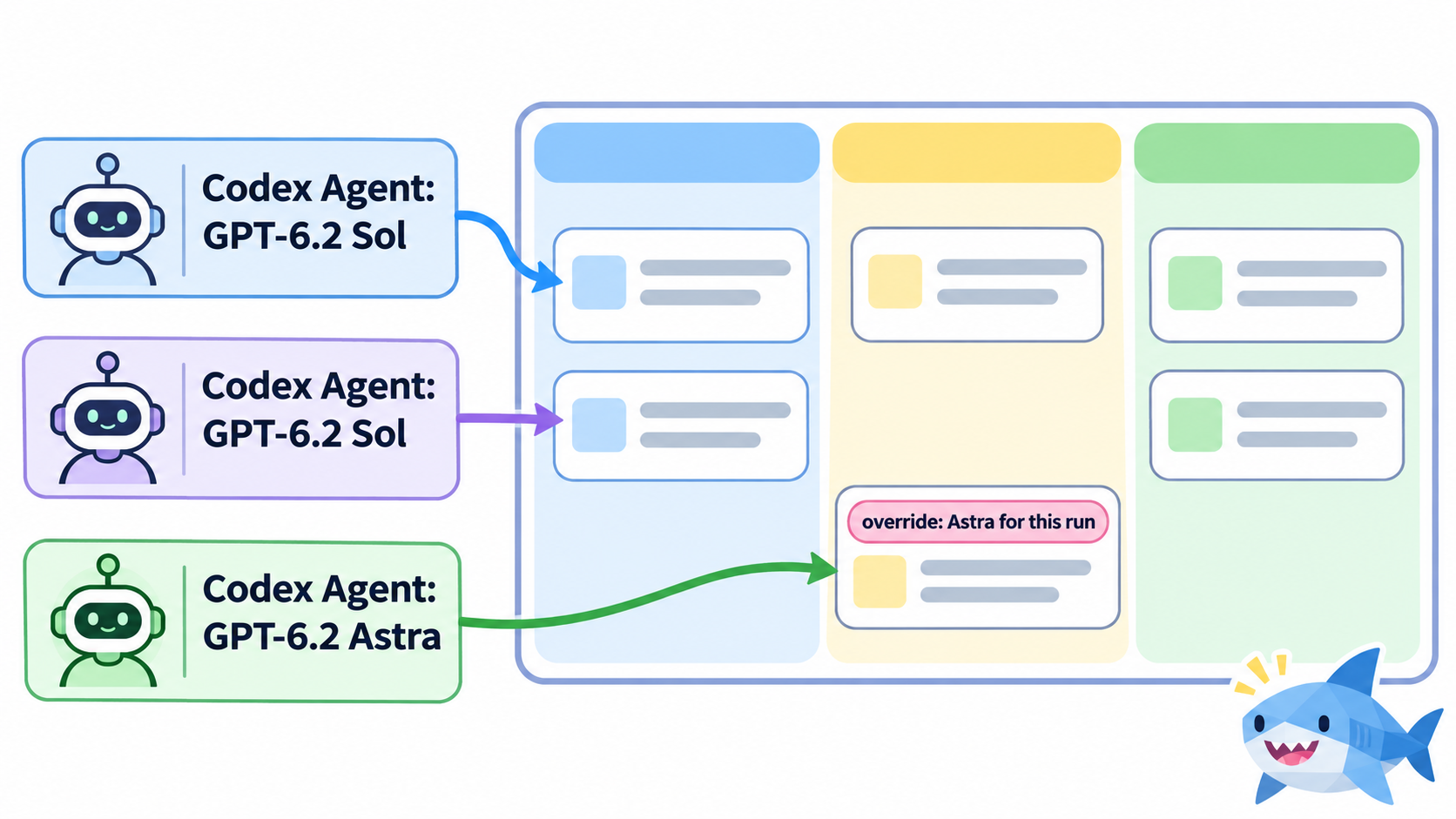
The per-task override covers the exceptions. When you assign a Task, hover the Agent in the Assignee picker, open the model icon, and choose a model for that run only. A Sol Agent can take one cross-service bug on Astra without changing its default. That matches the routing rule from earlier: Sol by default, Astra by decision, and the decision recorded on the Task. Our model routing guide for Crews covers writing that rule down with a manual escalation path.
Isolation matters more as Sol makes parallel runs cheaper. Agents set to pull Git repositories give each Task its own Git worktree, so parallel agents do not write into one shared checkout. Every run’s status, log, and result returns to the Task, which is where an unreported blocker gets caught before it reaches main.
You can do all of this by hand with config files and terminals. Sharkly puts the Computers, Runtimes, Agents, and Tasks in one place, and the Computers docs walk through registering a Codex Runtime.
FAQ
Is GPT-6.2 available in the Codex CLI?
Yes. Both gpt-6.2-astra and gpt-6.2-sol are available in the Codex app and CLI on supported plans. Use /model in the CLI, or set model in config.toml. Enterprise and Edu workspaces need an admin to enable the models first.
Should I use GPT-6.2 Astra or Sol for coding?
Start with Sol at Medium for bounded fixes, small additions, and pull request reviews. Move to Astra when a bug crosses services, when the task has no clear finish line, or when Sol fails the same kind of task twice.
How do I set GPT-6.2 as the default model in Codex?
Add model = "gpt-6.2-sol" (or gpt-6.2-astra) to ~/.codex/config.toml. A repository’s .codex/config.toml overrides it for trusted projects, and the -m flag overrides both for one run.
What context window does GPT-6.2 use in Codex?
Codex defaults to 272,000 tokens for Astra and 500,000 for Sol. Both models support up to about 1M tokens if you set model_context_window. API requests over 272K input tokens cost double for input and 1.5 times for output on the whole request.
Does GPT-6.2 support Ultra mode in Codex?
Yes, on supported plans and clients. Ultra lets Codex use subagents on its own for work that splits into parallel parts. Find it in the CLI under /model, then More reasoning. OpenAI says most tasks need neither Max nor Ultra.
Can I run GPT-6.2 Codex agents from Sharkly?
Yes, through the Codex Runtime on your Computers. Once the Runtime’s Codex build reports the GPT-6.2 models, set each Agent’s Model row to gpt-6.2-sol or gpt-6.2-astra, or override the model for a single Task when you assign it.