
Moat is an OpenRouter alternative worth testing if your coding agents regularly use models in Command Code’s catalog and bill usage to personal accounts. Membership discounts apply to requests paid with credits. Compare cost per accepted patch, tool behavior and data handling before you switch. If your team bills centrally, check the account terms first.
A cheaper model call can still make a patch cost more. An agent that loses context, retries a tool call or leaves a reviewer to finish the work can erase the savings on input tokens. With several coding agents running at once, you also need to know whose account pays and whether the gateway can handle the load.
Start with one task your team already understands. You can use Sharkly to assign the trial and keep the reviewer, run, and decision on the same task while the coding tool handles execution.
What Moat changes for coding agents
Moat is a paid membership from Command Code. Its membership docs describe an API for OpenAI-compatible and Anthropic-compatible clients, with a Command Code key and a model ID from the Moat catalog. The docs include setup paths for tools such as Claude Code, Codex and OpenCode. Check the instructions for the specific client and version you run.
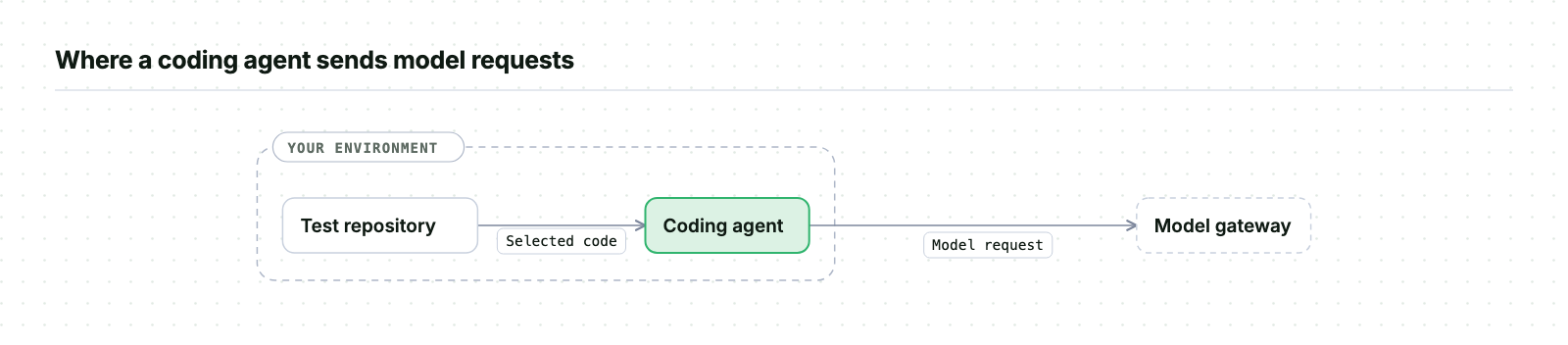
Gateway changes affect the path between the coding agent and the model. In a trial, the coding agent reads selected code from a test repository and sends a model request across your environment’s boundary to the gateway. That request can contain code, prompts, or tool output, depending on what the agent includes.
An API response can appear fine on a short prompt and still cause trouble during an actual task. Test whether the agent can stream output, call its tools and continue after receiving tool results. Check long-context behavior with the files your agent normally reads. Where the client reports cache usage, capture it so you can compare repeat runs fairly.
| Check | What to record |
|---|---|
| Model availability | Exact model ID, endpoint, and account used |
| Tool calls | Successful edits and test runs, plus malformed or repeated calls |
| Context and streaming | Completion of a representative session and any truncated output |
| Concurrency | Completion time and rejected requests at your normal parallel load |
| Review | Accepted diff, test results, and human repair time |
Can you use Moat with an existing coding agent?
Command Code documents two API base URLs. OpenAI-compatible clients use https://api.commandcode.ai/inference/v1, and Anthropic-compatible clients use https://api.commandcode.ai/inference. Some SDKs add the rest of the request path themselves. Follow the Moat setup guide for your client and confirm the model ID before starting a paid run.
Keep the working configuration handy so you can restore it after the trial. Record the provider and model in the task, and leave the API key in the runtime’s normal secret store. A reviewer needs enough information to repeat the run without seeing the credential.
Moat pricing and what your team pays
As checked November 27, 2026, the Moat membership page lists $60 billed annually, equivalent to $5 per month, or $10 billed month to month. Model usage paid with credits is a separate charge. Command Code’s docs say that membership pricing applies when credits pay for a request. Covered requests on another Command Code plan can draw from that plan’s allowance at its own rates.
Account ownership can change the math. The membership docs say each person needs their own membership and requests billed to an organization do not receive Moat prices. If finance pays for a shared organization account, confirm the billing terms for that account with Command Code before using personal prices in your forecast.
How do you compare Moat with OpenRouter pricing?
Compare the same model where possible and use actual run totals. OpenRouter’s pricing page lists fees on credit purchases for its Standard and Business plans. Use the fee that applies to your account. On the Moat side, include the membership and the paid input, output and cached tokens at the rates shown for the model and endpoint you used.
Suppose your monthly workload is 20 tasks. In this example, running them through Moat costs $32 in credits plus a $10 monthly membership. If 14 patches pass review, that’s $3 per accepted patch. A current setup that costs $48 for 16 accepted patches also comes to $3 per accepted patch. Those figures are illustrative. The next question is how much reviewer time each setup consumed.
Count retries, failed runs, and manual repairs. See when cheap models cost more for a worked comparison of model spend and repair time. Input, output, and cache charges can move in different directions. If you compare different models because one is missing from a catalog, record that change so the result reflects the whole setup you tested.
How to run a Moat trial
Use a public or synthetic test repository first. See how to test a coding model on real tasks for a reusable trial structure. Select three jobs that resemble your normal work, such as explaining a module, fixing a known test failure, and making a small change that touches two files. Start both configurations from the same commit and give both agents the same acceptance criteria.
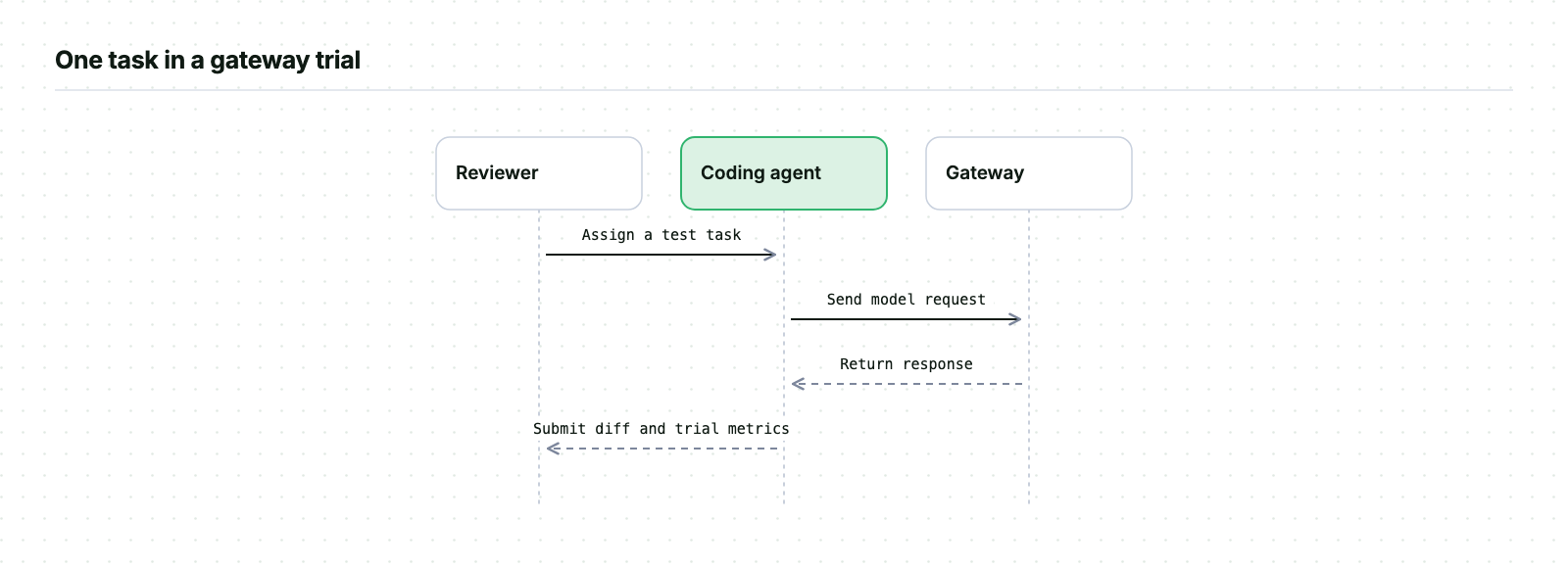
- Record a baseline. Run each task on your current gateway. Save the model ID, test results, accepted diff, elapsed time, and billed cost.
- Change the gateway. Keep the client version, task prompt, repository state, and model fixed where possible. Record any differences.
- Test parallel runs. Repeat the comparison at the concurrency your team uses during a normal workday. Record failed or interrupted runs alongside successful ones.
- Review the patches. Use the same test command and acceptance criteria. Log how long the reviewer took and whether they had to finish any work.
- Make the rollout decision. Set a threshold for acceptable quality, cost, and review time before widening access.
An upstream request can still hit a short-window limit. Command Code documents rate-limit errors, and the membership docs describe the absence of five-hour or weekly caps for credit-funded requests. Include both concurrency and billing behavior in your trial.
What should you check before sending private code?
Read the Command Code privacy policy and ask which upstream endpoints, retention terms, and regions apply to your chosen model. Check which controls your client can actually send. If your team requires a specific provider or data policy, compare those requirements with the routing options documented for your current gateway. OpenRouter’s routing guide shows how its provider selection works.
Run the gateway comparison in Sharkly
Create a task with the baseline, candidate setup, acceptance criteria, and reviewer. Assign it to an Agent that runs through your selected Runtime on a connected Computer. The runtime uses the model access configured in that coding tool. Sharkly keeps the assignment and execution trace on the task so the reviewer can see what ran and why. Sharkly Agents documentation
Ask the Agent to return the diff, checks, and elapsed time in the task. Add the usage cost from the gateway account and record the review decision beside it. For more on choosing a model for a specific run, see model selection per task. On the next trial the reviewer can compare the new run with the same baseline. See the Sharkly quickstart for how to assign and review a first run.
For a broader rollout, have each reviewer record the same three outcomes on the task: passed checks, changes required, and unresolved issues. Keep failed runs in the comparison. A run that stopped midway still consumed time and may have used credits.
Which setup should your team keep?
Try Moat when the models you need are listed, the billing account qualifies, and you can test representative jobs without exposing private code. Keep your existing gateway if its provider controls or account setup meet requirements your trial cannot reproduce. Direct provider access is another option when one model covers your workload and you can manage its credentials and billing.
Put one representative coding task in Sharkly, attach the baseline criteria, and assign a reviewer before you change the gateway. Use the accepted patch and its full cost to decide whether the trial should expand.
FAQ
Is Moat a flat-rate service for tokens?
Moat charges for membership and applies member prices to eligible usage paid with credits. Check the model table and the account that pays for the requests.
Does a team account get Moat discounts?
Command Code says the membership covers a personal account and organization-billed requests do not receive member pricing. Confirm terms for the account you intend to use.
Can I run a trial without private source code?
Yes. Use a public or synthetic repository with the same kinds of tests and file edits your agents perform on the job.
Is API compatibility enough for a coding workflow?
Use it as a starting point. Run a task that exercises tool calls, streaming, and context across several turns so you can measure whether the whole workflow completes.
Is Moat open source?
The public materials describe a hosted membership and API. Command Code’s public Moat pages reviewed for this article did not identify a software license for the hosted gateway. Individual model licenses are a separate question.