Not really. Installing the Droid CLI costs nothing, but Factory’s pricing page lists no free plan and no public free trial: the first plan is Pro at $20 per month. Factory’s docs do mention trial and free accounts, but they do not publish what a trial includes or how long it lasts.
Factory Droid is Factory’s own autonomous coding agent. It runs in the Droid CLI, the Factory desktop app, the web and Slack, and bills model usage against your Factory plan or against API keys you bring.
What’s free and what you pay
| Route | Cost | The cap | What you pay past it |
|---|---|---|---|
| Install the Droid CLI | $0 | Sign-in to Factory is needed to run sessions on Factory models | A plan |
| Free trial | Not published | Factory does not publish trial terms | Not published |
| Pro | $20/month | Rolling 5-hour, 7-day and 30-day rate limits | Droid Core (no extra cost) or Extra Usage credits |
| Plus | $100/month | About 5x Pro usage, plus Droid Computers | Same |
| Max | $200/month | About 10x Pro usage | Same |
| Teams | $60/month per team plus $40/month per seat | Pro rate limits per seat, up to 10 seats | Same, per seat |
| Business, Enterprise | Custom, Contact Sales | Custom limits by contract | By contract |
| BYOK (your own keys) | Free up to an allowance on Individual plans | Allowance size not published | Charged according to your plan |
All prices were checked on factory.com/pricing and docs.factory.com on October 23, 2026.
Is there a Factory Droids free trial?
There is no trial you can read the terms of. The pricing page shows Pro, Plus, Max, Teams, Business and Enterprise, each with a Sign Up or Contact Sales button, and the word “trial” does not appear on it. The individual plans doc does not mention one either.
Factory’s docs do show that trials exist in some form. The Environments prerequisites page says “Free accounts cannot launch Environment sessions; trial, ended, or overdue subscription states can also block managed compute.” The May 1, 2026 changelog lists a fix for “a free trial onboarding issue” in the Factory App.
So a new account may be offered a trial at sign-up, but Factory does not say how long it runs, how much usage it carries, or whether it needs a card. Third-party posts quote token amounts and durations from older promotions; none of those numbers appear on Factory’s own pages today, so treat them as history. If a trial shows up when you sign up at app.factory.ai, read its terms there before you start a long session.
Students and startups. We found no student, education or startup offer on Factory’s pricing page or docs.
What each paid plan includes
Pro, $20 per month. The individual plans doc lists the Factory App, Droid CLI and Droid SDK, cloud and local background agents, and billing, usage and readiness dashboards. (That doc also lists managed Droid Computers under Pro, while the pricing page lists them as a Plus feature; check your plan page if you need them.) The pricing FAQ adds that all products, “IDE, Web, CLI, Slack etc are included in all plans.”
Plus, $100, and Max, $200. These buy more of the same capacity. Plus is “~5x Pro usage” and Max is “~10x Pro usage” with early feature access. Factory publishes these as multiples, not as token counts.
Teams. $60 per month per team plus $40 per seat, up to 10 seats, with each seat getting its own Pro rate limits and centralized month-to-month billing.
Business and Enterprise. Both are “Custom pricing” behind Contact Sales. The organization plans doc lists SSO, SAML/SCIM provisioning, zero data retention and audit logging for Business, and unlimited seats, dedicated compute, on-premise options and data residency for Enterprise. Factory publishes no price range for either.
Where the limits stop you
Individual plans meter usage in three rolling windows: 5 hours, 7 days and 30 days. They run independently, and “you need headroom in all three to send a request.” Each window starts when you first use Droid.
Usage is drawn from Factory Standard Credits, and each model has a multiplier on the Available Models page. Today Claude Opus 5.5 is 1.6x, Claude Fable 5.1 is 4x, and Grok 4.7 is 0.8x. Cheaper open models sit far lower: DeepSeek V4.1 Flash is 0.12x and Nemotron 3.5 Super is 0.08x. Picking the model is the biggest lever you have on how long a plan lasts.
When you hit a limit, the current request finishes and the next one gets a rate-limit error. You then have two choices:
- Droid Core. A pool of open-weight models with its own separate rate limit. Factory’s pricing FAQ says you “can switch for free to Droid Core,” and the docs answer “No” to whether enabling it costs extra. The list changes over time; today it includes Inkling, Mistral Large 4, Qwen3.8 Max, DeepSeek V4.1 Flash and MiniMax M3. Run
/limitsto switch. - Extra Usage. Prepaid USD credit, $10 minimum, no expiration, drawn down as sessions use models. Unused Standard Usage does not roll over; purchased Extra Usage does.
Missions, Factory’s multi-feature orchestration, use the same rate limits and require Extra Usage to be enabled.
Can Droid use your own Anthropic or OpenAI key?
Yes. The BYOK docs say the Droid CLI can “use your own OpenAI or Anthropic keys, connect to any open source model providers, or run models locally on your hardware.” Keys “remain local and are not uploaded to Factory servers.” You add a model with /settings or /model in the CLI, or in ~/.factory/settings.json:
{
  "customModels": [
    {
      "model": "your-model-id",
      "displayName": "My Custom Model",
      "baseUrl": "https://api.provider.com/v1",
      "apiKey": "${PROVIDER_API_KEY}",
      "provider": "generic-chat-completion-api",
      "maxOutputTokens": 16384
    }
  ]
}
The catch is the allowance. The pricing FAQ says “All Individual plans include an allowance of free BYOK usage. After this allowance, BYOK usage will be charged according to your specific plan.” Factory does not publish the size of that allowance. So BYOK is not a way around a Factory plan: you pay your provider for tokens and, past the allowance, Factory for the usage too.
BYOK custom models also stay local. They work in the CLI and desktop app, which read your local settings.json, and do not appear in Factory’s hosted web or mobile platforms.
The closest thing to $0
Install and look around. The CLI install is free:
# macOS / Linux
curl -fsSL https://app.factory.ai/cli | sh

# Homebrew
brew install --cask droid

# Windows (PowerShell)
irm https://app.factory.ai/cli/windows | iex

# npm
npm install -g droid
Then run droid in a project. The quickstart says “If prompted, sign in via your browser to connect to Factory’s development agent.” From there you see whatever your account is entitled to.
Local models through BYOK. The BYOK docs cover Ollama (baseUrl set to http://localhost:11434/v1, context of at least 32k, models of 30B+ parameters recommended for agentic coding) and LM Studio. Inference costs nothing beyond your hardware, but the BYOK allowance still sits inside an Individual plan.
Login-free Droid is enterprise only. Factory’s airgap build “skips sign-in” and has “no Factory account requirement,” running only your own models. It is “an enterprise capability” that is “not distributed through the public download channels.” Not a free route for an individual.
If your goal is a coding agent at $0 rather than Droid specifically, OpenCode is the realistic option. In an earlier test on October 16, 2026, OpenCode 1.19.2 on opencode/deepseek-v4.1-flash-free finished a write-and-run task in 32 seconds with no sign-in; direct API calls to that free tier returned HTTP 403 FreeTierError. Our DeepSeek V4.1 Flash free guide has the details, and free AI API keys covers keys you can call from code. For the same question about another agent, see is Claude Code free.
Where Sharkly fits
You already have coding agents. Sharkly turns them into a team. It runs the coding agents you already use, such as Claude Code, Codex and OpenCode, as assignable Agents on your own Computers. Each Task runs in an isolated worktree, and the result comes back on the Task for review.
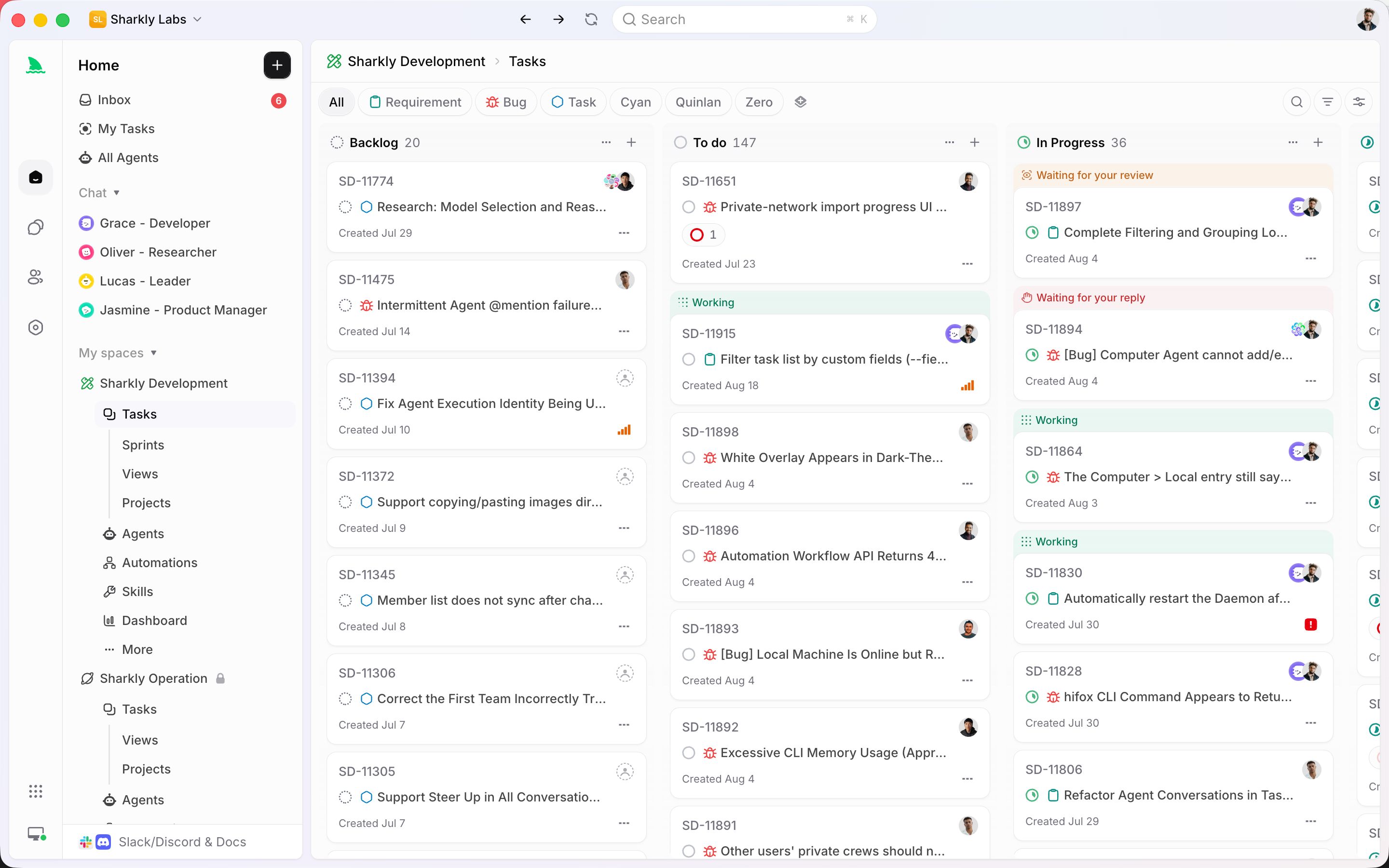
Sharkly does not make Droid free, and Droid is not one of the Runtimes Sharkly detects out of the box. Sharkly does let you add a custom ACP Runtime with a startup command, and Factory documents an ACP mode (droid exec --output-format acp); we have not tested that pairing, so treat it as something to try, not a supported setup. If you are weighing Factory as a platform for the whole team, our Factory alternative comparison covers where each one fits.
Per the Sharkly pricing page, Free covers organizations of up to 5 people, and Team is $7 per person billed yearly after that. “Guests, Agents, and Computers do not occupy seats,” and “Sharkly does not sell tokens”: model usage stays on the subscriptions or API keys configured in each tool.
If you run more than one coding agent, put them on one board with Sharkly.
FAQ
Is Factory Droid free? No. The Droid CLI is free to install, but Factory’s pricing page starts at Pro, $20 per month, and lists no free plan.
Is there a Factory Droids free trial? Factory’s docs refer to trial accounts and a free trial onboarding flow, but Factory does not publish the trial’s length, usage or card requirement. Check what app.factory.ai offers when you sign up.
Is Factory AI free for teams? No. Teams is $60 per month per team plus $40 per seat for up to 10 seats. Business and Enterprise are custom-priced through sales.
Can I use Factory Droid with my own API key for free? Partly. Individual plans include an allowance of free BYOK usage, but the allowance size is not published and usage past it is charged according to your plan. You also pay your provider for the tokens.
What happens when I run out of usage on Pro? Switch to Droid Core, a pool of open-weight models with a separate rate limit at no extra cost, or buy Extra Usage credits starting at $10.