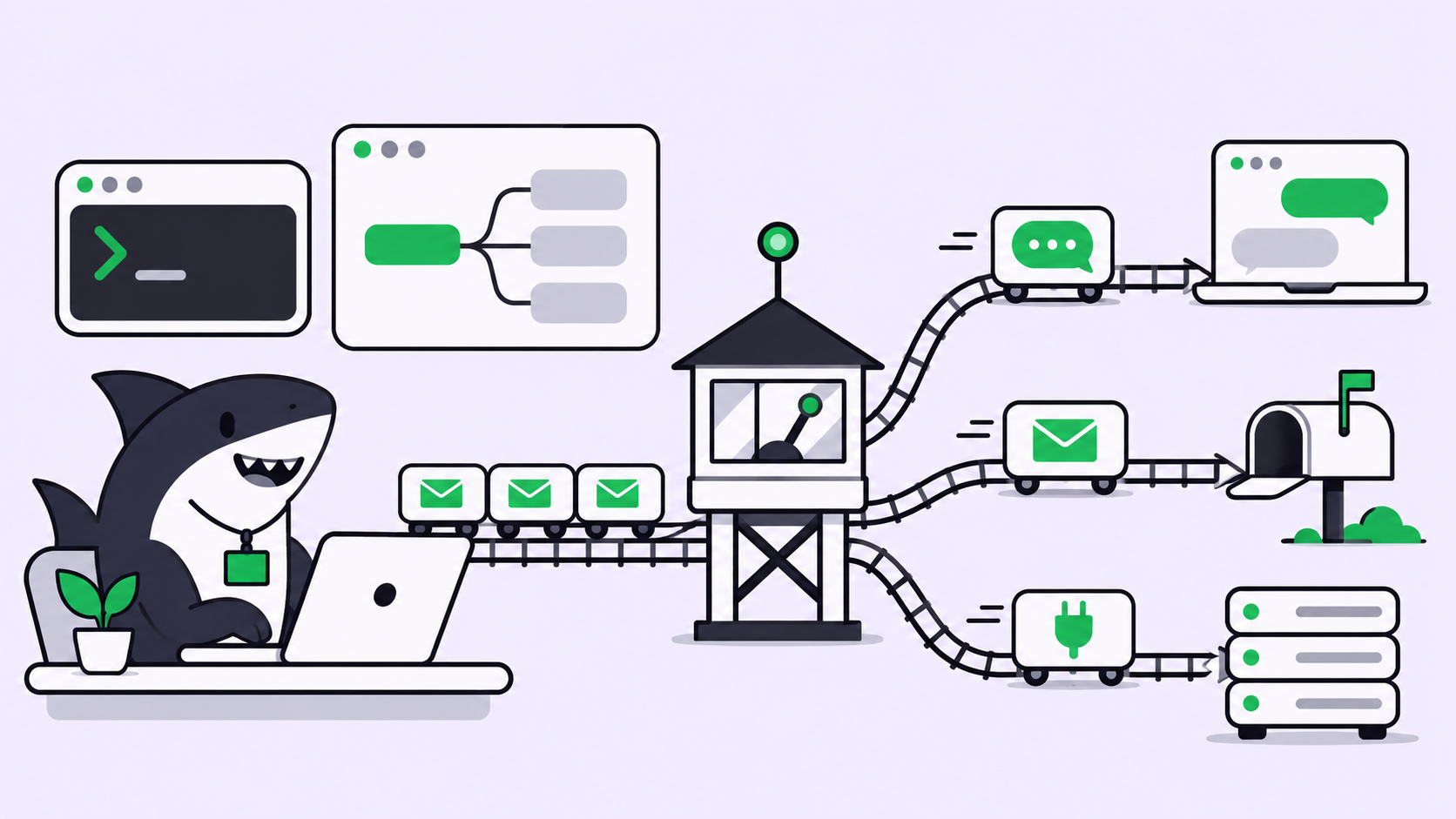
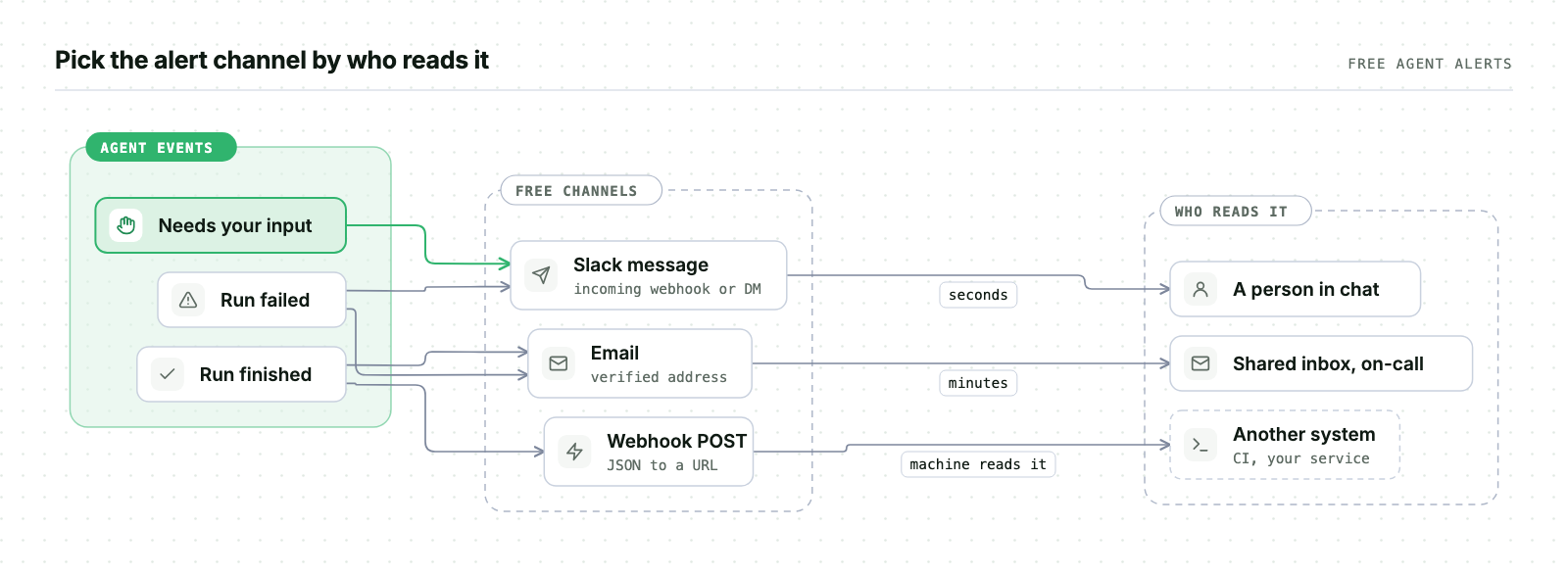
Free AI agent alerts come in three shapes, and you pick by who reads them. Use a Slack message when a person must act within minutes. Use email when the reader is a shared address, an on-call rotation, or someone who never opens chat. Use a webhook when the reader is another system. All three cost $0 at alert volume.
Why agent alerts break down
You start a coding agent, switch tabs, and come back forty minutes later. It stopped twenty minutes ago and has been waiting on a permission prompt since. That idle time is the real cost of running agents without alerts.
The opposite failure is noise. Wire every agent event to a channel and your team mutes it by Friday. A muted channel is worse than no channel, because people think they’re covered.
Three events deserve an alert. Everything else belongs in a log or a board:
- The run needs you. A permission prompt, a question, or a review request. This one is urgent.
- The run failed. An API error, a crash, or a blocked state. Someone has to decide what happens next.
- The run finished. Useful, but it can wait for a digest if your agents finish often.
If you run agents on several Computers (Sharkly’s term for connected laptops and servers), Sharkly puts those three states on one board, so the alert links to a task instead of a terminal you can’t find. More on that below.
Free AI agent alert channels compared
The right channel depends on the reader, not the agent. This table covers the free options most teams reach for first.
| Channel | Cost | Setup | Best reader | Limit to know |
|---|---|---|---|---|
| Slack incoming webhook | $0 | One URL per channel | A person in chat | 1 message per second per channel |
| Slack DM from a work tool | $0 on Sharkly Free | Connect Slack once | The task’s assignee | Needs workspace and personal connection |
| Email (Cloudflare Workers Free) | $0 | Worker plus binding | Shared inbox, on-call | Verified destination addresses only |
| Discord webhook | $0 | One URL per channel | A small team or community | Read the rate-limit headers |
| Generic webhook | $0 | Your own endpoint | Another system | Whatever your endpoint enforces |
| Desktop notification | $0 | Hook or app setting | You, at your desk | Useless once you walk away |
When is Slack the right alert channel?
Slack wins when a person has to act fast. A message lands in seconds, on desktop and phone, and the reader can reply in a thread. Slack’s incoming webhooks give you one secret URL per channel that accepts a JSON POST.
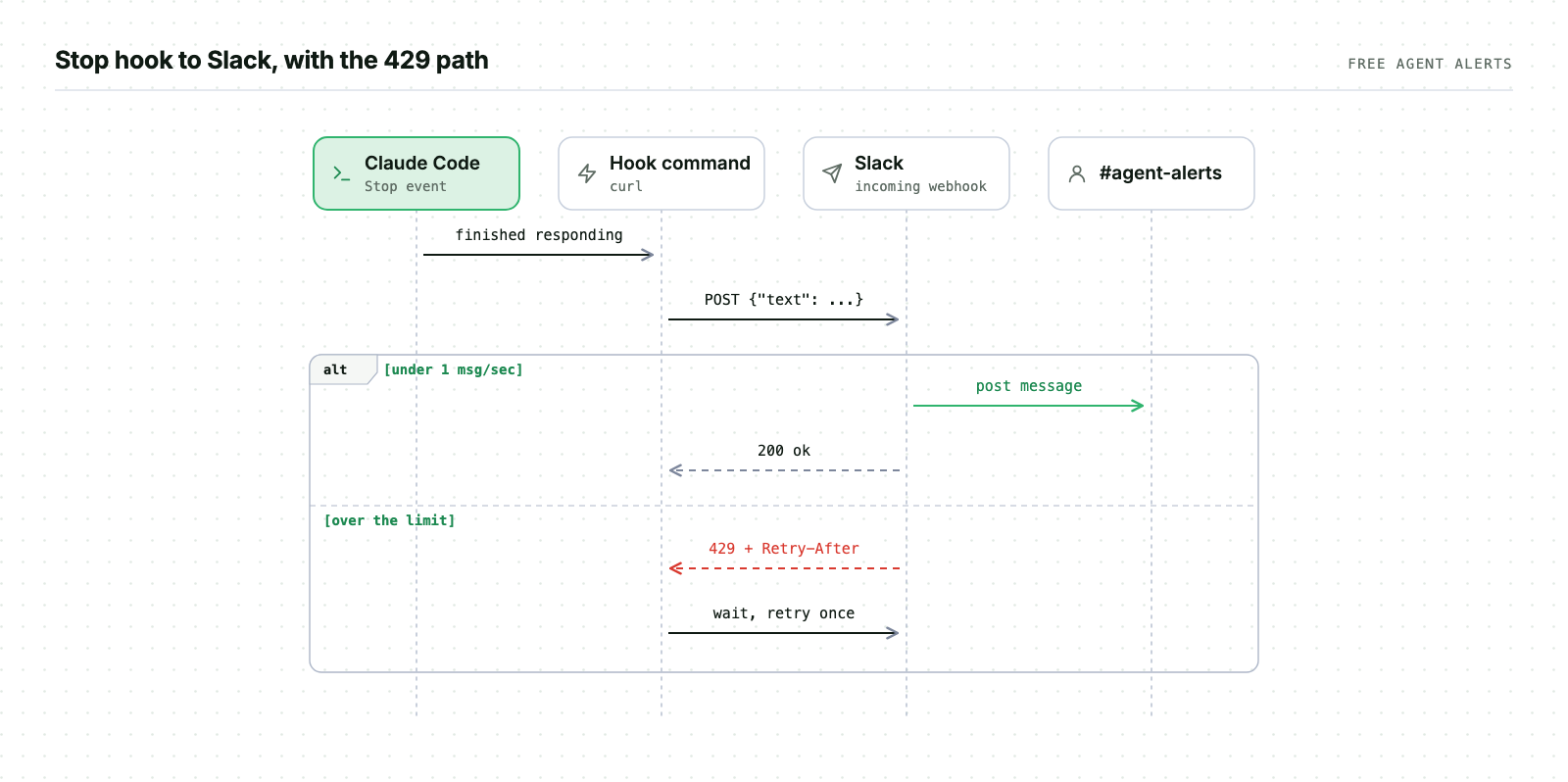
The catch is volume. Slack’s rate limits page lists incoming webhooks at 1 message per second per channel, with short bursts tolerated. Go over it for long and Slack returns HTTP 429 with a Retry-After header. Ten agents finishing at once will hit that.
When is email the better alert?
Email wins when the reader isn’t a single person in chat. A shared alias, an on-call rotation, or a manager who reviews outcomes once a day all read email reliably.
The free path got easier in November 2026. On November 24, 2026, Cloudflare made Email Sending available on the Workers Free plan. The limit is the recipient: Free sends only to verified destination addresses in your account, and any other address fails with E_RECIPIENT_PLAN_RESTRICTED. Sends to verified addresses don’t count toward quota on any plan. New accounts also start with a conservative daily cap, per the limits page. For agent alerts sent to your own team, that boundary rarely matters.
When should an alert be a webhook?
Send a webhook when software reads the alert. A CI job that should retry, a dashboard that counts failures, or a service that opens an incident all want structured JSON, not prose.
Discord webhooks sit between the two: free, one URL per channel, readable by people. Discord’s rate limits docs tell you to read the limit from response headers rather than hard-code it, and to back off on 429.
Send a Slack alert when Claude Code stops
Claude Code runs shell commands on lifecycle events called hooks. Three of them map to the alerts above, per the hooks reference:
Notificationfires when Claude Code needs your permission or input.Stopfires when the main agent finishes responding.StopFailurefires instead ofStopwhen the turn ends on an API error.
Every hook receives JSON on stdin with common fields such as cwd and hook_event_name. This script posts one line to Slack and honors Retry-After once:
#!/usr/bin/env bash
# ~/.claude/hooks/notify-slack.sh
input=$(cat)
event=$(echo "$input" | jq -r '.hook_event_name')
dir=$(basename "$(echo "$input" | jq -r '.cwd')")
payload=$(jq -n --arg t "Claude Code: $event in $dir" '{text: $t}')

hdrs=$(mktemp)
code=$(curl -s -D "$hdrs" -o /dev/null -w '%{http_code}' \
  -H 'Content-Type: application/json' -d "$payload" "$SLACK_WEBHOOK_URL")
if [ "$code" = "429" ]; then
  wait=$(grep -i '^retry-after:' "$hdrs" | tr -dc '0-9')
  sleep "${wait:-1}"
  curl -s -o /dev/null -H 'Content-Type: application/json' \
    -d "$payload" "$SLACK_WEBHOOK_URL"
fi
rm -f "$hdrs"
Register it for the two urgent events in ~/.claude/settings.json:
{
  "hooks": {
    "Notification": [
      { "hooks": [{ "type": "command", "command": "~/.claude/hooks/notify-slack.sh" }] }
    ],
    "StopFailure": [
      { "hooks": [{ "type": "command", "command": "~/.claude/hooks/notify-slack.sh" }] }
    ]
  }
}
Leave Stop out at first. It fires at the end of every response, so a chatty session sends dozens of “finished” messages an hour. Add it once you know the volume your team can stand.
This works for one developer on one laptop. It stops working when five people run agents on six Computers, because every hook posts to the same channel with no owner, no task, and no way to tell which alert someone already handled.
How Sharkly routes agent alerts
Sharkly is a workspace where your coding agents work as a team: tasks on a board, runs on connected Computers, and People and Agents in the same Inbox. Alerts come from the task, so each one names the work and the person responsible.
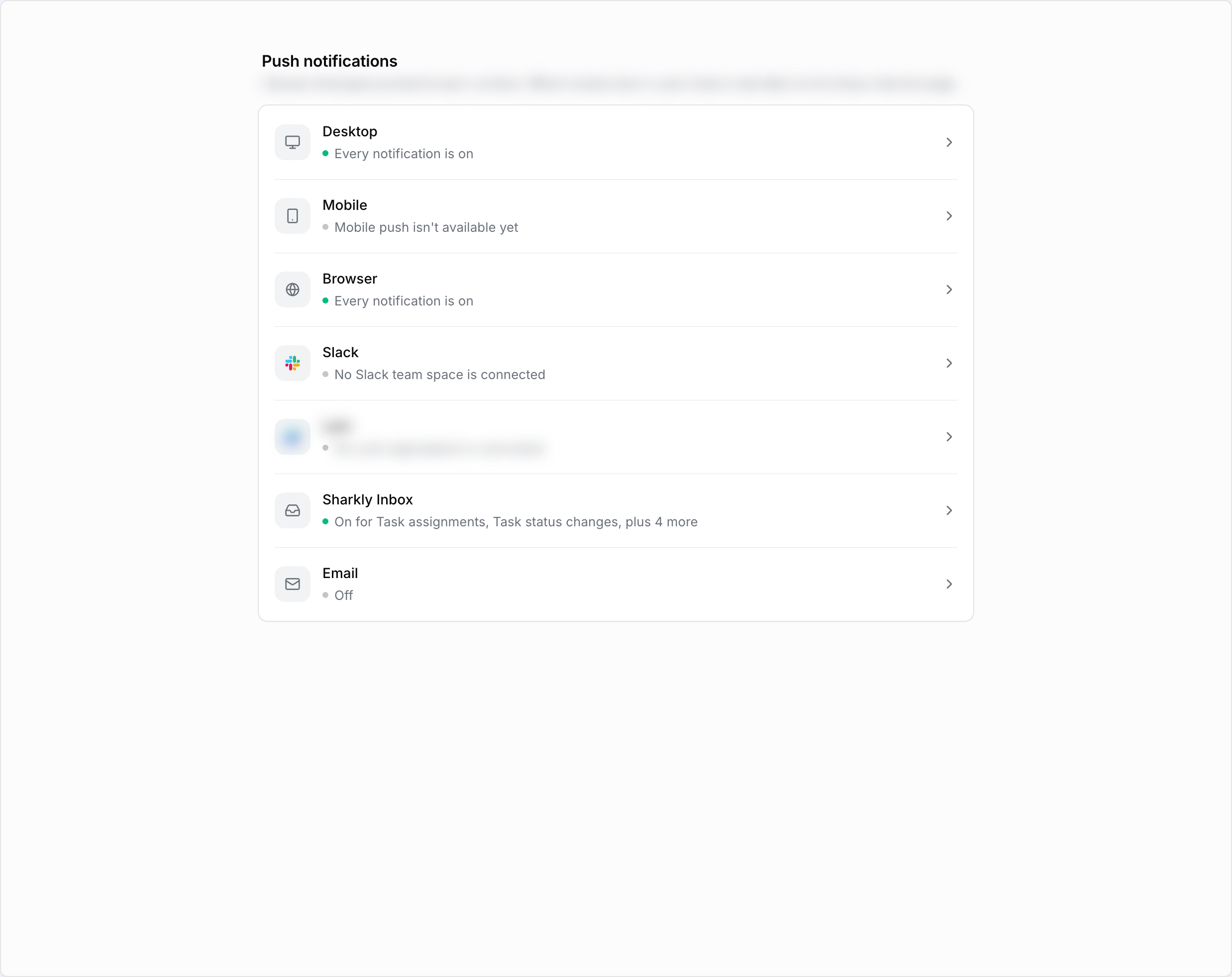
Each member picks channels in Settings, Notifications: Desktop, Browser, Slack, Sharkly Inbox, and Email. The Email channel sends to your account address, with per-event switches.
The Agent conversations group carries the three events this article opened with: the Agent finished its run, the run failed, the run is blocked, and the conversation is waiting on your reply or your review. Each one can be off, on, or on and marked important. A separate Automation runs group covers runs that finish, fail, get cancelled, or get skipped.
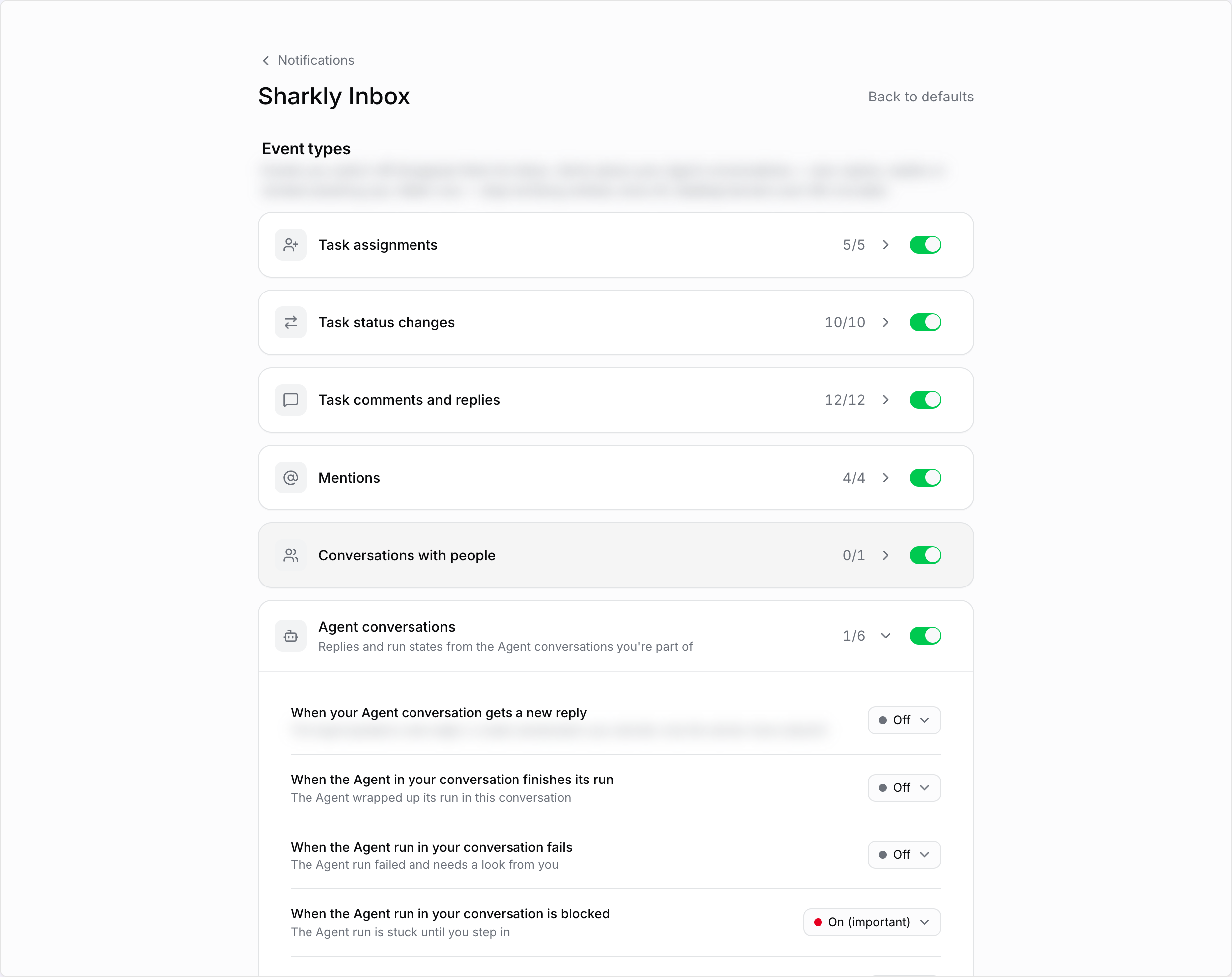
Two rules keep the noise down. Waiting, review, failure, and blocked alerts go to the task’s assigned person first, not every subscriber, according to the task subscriptions docs. And muting a group in Slack stops the DMs but keeps the Inbox record, so nothing is lost when you quiet a channel.
Slack DMs need two things: the organization has a connected Slack workspace, and the member connects a personal Slack account. The Slack integration guide shows the status-change DM format, which names the task ID, both statuses, and who made the change.
Need an email to a shared alias or a JSON POST to your own service? Point an Automation at a task status and have a notifier Agent send it. We walk through the status trigger in how Sharkly task statuses start agent runs.
Sharkly’s Free plan covers organizations of up to 5 people, and Agents and Computers don’t take seats, per the pricing page (checked November 26, 2026).
Keep free alerts useful
Free channels fail in the same few ways. These habits keep them readable:
- Alert on state, not activity. “Needs input” and “failed” are states. “Edited a file” is activity, and it belongs in a log.
- Name the owner in the message. An alert nobody owns gets read by everyone and acted on by no one.
- Batch finished runs. A morning digest of completed work beats twelve pings overnight.
- Keep webhook URLs secret. A Slack or Discord webhook URL is a write credential. Store it in an environment variable, never in a repo.
- Handle 429 once, then drop. One retry after
Retry-Afteris enough for an alert. A retry loop turns a burst into a storm. - Test the failure path. Kill a run on purpose and confirm the alert arrives before you trust it.
Real-world setups
A solo developer running Claude Code on a laptop wires Notification and StopFailure to a private Slack channel and stops checking terminals.
A four-person team running agents on shared Computers turns on Sharkly’s Agent conversations alerts for blocked and waiting states, with Slack DMs, and gets one daily email of finished tasks.
A platform team posts failed runs as webhooks to its incident service, so a failure opens a ticket instead of a chat thread.
Start with one alert
Pick the single event that wastes the most time today. For most people, that’s an agent waiting on a permission prompt. Wire it to the channel its reader already watches, run it for a week, then add the next one.
If your agents already run on more than one Computer, connect them to Sharkly and turn on the blocked and waiting alerts first. Every alert then points at a task with an owner.
FAQ
Are Slack incoming webhooks free?
Creating an incoming webhook costs nothing beyond the Slack workspace you already use. The constraint is rate, not price: about 1 message per second per channel, with HTTP 429 and Retry-After when you exceed it.
Can Cloudflare Workers Free send email alerts to anyone?
No. Workers Free sends only to verified destination addresses in your account. Other recipients fail with E_RECIPIENT_PLAN_RESTRICTED. Workers Paid allows any recipient, with 3,000 emails a month included.
How do I get notified when Claude Code needs permission?
Add a Notification hook in your Claude Code settings. It fires when Claude Code needs your approval or input, and it runs even with desktop notifications turned off.
Should every finished agent run send an alert?
Usually not. Finished runs are the least urgent of the three events. Send them as a digest, and keep real-time alerts for failed, blocked, and waiting runs.
What’s the difference between a webhook alert and a Slack alert?
A Slack alert is written for a person to read. A webhook alert is structured JSON for a system to act on, such as opening an incident or retrying a job.
Does Sharkly send email notifications?
Yes. Each member can turn on the Email channel in Settings, Notifications and choose which event types reach their account address.