Quick answer: Is Gemini Omni 1.2 Flash free? Not on the API. Google’s pricing page marks the free tier “Not available,” so every call bills at about $0.07 per second of 720p video. Free use lives in Google’s apps: three 15-second clips a month in Google Vids, or 50 daily credits in Google Flow.
Gemini Omni 1.2 Flash is Google’s video generation and editing model, released November 5, 2026. It makes clips of 3 to 15 seconds with native audio from text, images and video.
“Free” depends on the door you use. A developer call and a click inside Vids are separate products with separate bills. The split matters most when coding agents make the calls, because an agent retries without feeling the cost. If that’s your setup, Sharkly is where the task, the attempt limit and the human review live. The bill stays with Google.
Where Gemini Omni 1.2 Flash is free
Every row below was checked on Google’s own pages on November 6, 2026.
| Route | Free? | The cap | Card required? | Past the cap |
|---|---|---|---|---|
| Gemini API | No | Free tier “Not supported” | Yes: billing plus a $5 minimum prepay | About $0.07 per second at 720p |
| Google Cloud | Paid rate card | Per token | Billing account for standard use | Same $12 per 1M video tokens |
| Google Vids | Yes | Up to three 15-second videos a month | None listed | Google AI plan or Workspace |
| Google Flow | Yes, limited | 50 credits a day, clips up to 10 seconds | None listed | Plus, Pro or Ultra credits |
| Gemini app | No video | Video generation needs a Google AI plan | Yes, for a plan | 15-second clips rolling out to Ultra |
Neither the Vids post nor the Flow help page mentions a card. We did not run a fresh signup. [VERIFY] confirm no card prompt on a new account for Vids and Flow.
Why the Gemini API has no free tier for Omni
Three Google pages agree, so this one isn’t a matter of interpretation.
- The Gemini API pricing page shows “Not available” for input and output in the Free Tier column, and calls the model available “on the paid tier.”
- The rate limits page lists the Free tier as “Not supported” for both requests per minute and requests per day.
- The billing page closes the usual workaround: the Google Cloud Welcome credit “can’t be used towards the Gemini API or AI Studio.”
So the $300 trial credit doesn’t help on the Gemini API. It may apply on Google Cloud’s own endpoint, but Google’s pages don’t say so for Omni. [VERIFY] test the Welcome credit and express mode against Omni on Google Cloud.
This differs from text models. Our free AI API key guide covers the models that do have an unpaid tier. Omni isn’t among them.
What the API costs per clip
The cheapest way in is a $5 prepay, the billing page’s minimum for moving to a paid tier. That lands you in Tier 1 with a $250 billing cap, 8 requests a minute and 40 requests a day for Omni.
| Resolution | Per second | 15-second clip | Clips for $5 |
|---|---|---|---|
| 360p | $0.023 | $0.35 | 14 |
| 720p | About $0.07 | About $1.04 | 4 |
| 1080p | $0.104 | $1.56 | 3 |
| 4K | $0.209 | $3.13 | 1 |
Google publishes the per-second rates and the $1.04 figure. The other clip totals are our arithmetic from those rates. Billing runs on tokens: $12 per 1M video output tokens, at 5,792 tokens per second of 720p. Input tokens add $1.50 per 1M, which is small for a text prompt.
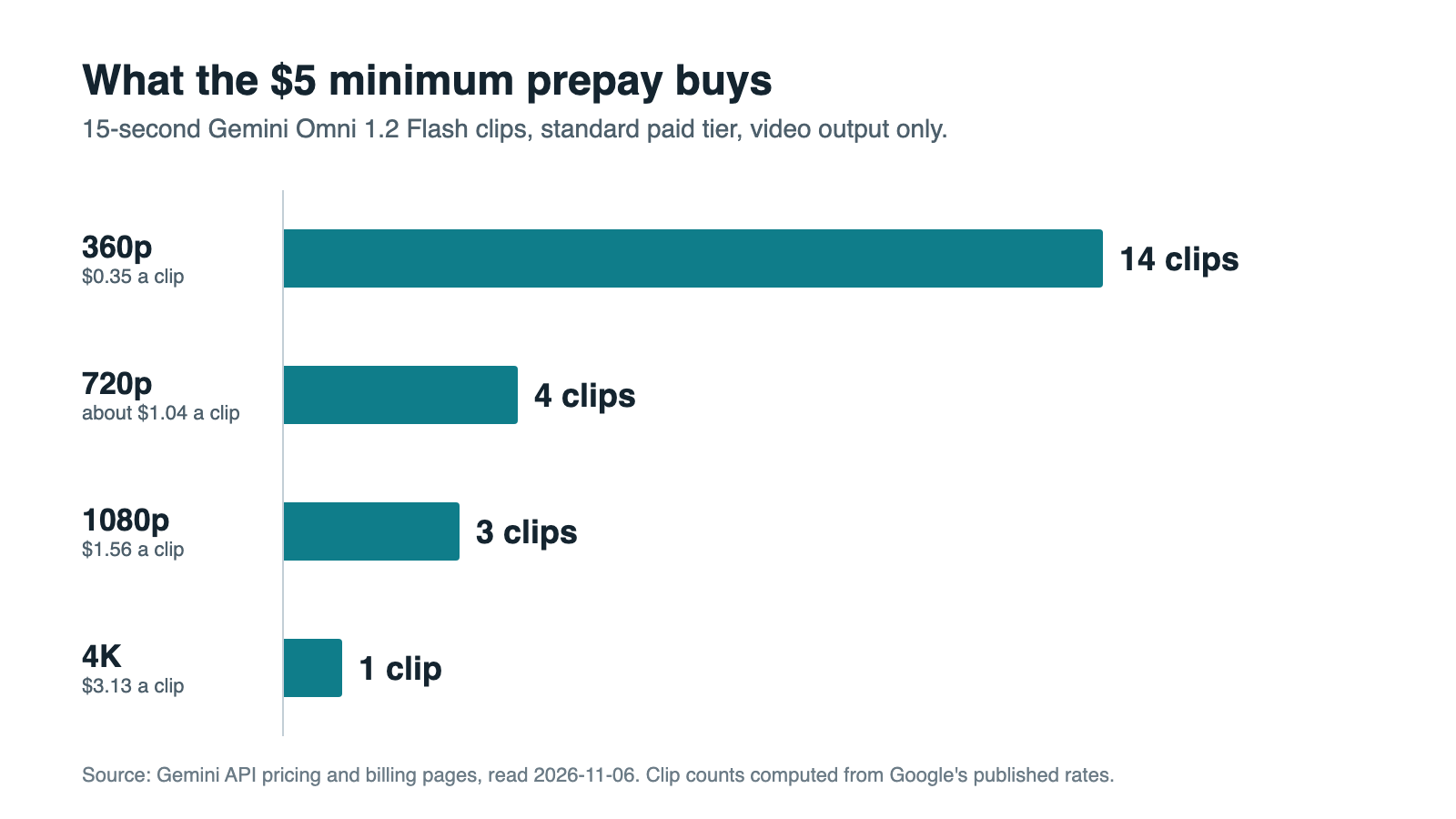
If you still call gemini-omni-1.1-flash, requests route to 1.2 on December 3, 2026, and bill at 1.2 rates. You get the 30% price drop without a code change.
Google Vids: three free clips a month
This is the cleanest $0 route. Google’s Vids announcement says anyone with a Google account or Workspace subscription can “generate up to three 15-second videos per month in Vids at no cost.”
One conflict to know about: Google’s Vids availability page lists 60 seconds of AI video clips a month for personal accounts, not 45. We’d plan on three clips, since the post is dated and specific to this model.
The allowance lives in the app, so it’s a free way to judge output quality, not a way to feed a pipeline.
Google Flow: 50 credits a day
Google’s Flow credits page gives every user 50 credits a day, with or without a subscription. For Omni Flash 1.2, non-subscribers can generate or edit clips up to 10 seconds.
- 360p: 1 credit per second, so five 10-second clips a day.
- 720p: 3 credits per second, so one 10-second clip with 20 credits left.
The limits are real. Unused credits don’t roll over. Between roughly 2 PM and 5 PM UTC, you may not be able to generate video without a subscription. Clips over 10 seconds, extension and upscaling all need a paid plan, and Flow requires you to be 18 or older in a supported region.
Paid plans add monthly credits: 200 on AI Plus, 1,000 on AI Pro, and 10,000 or 25,000 on Ultra. A 15-second 720p clip costs 60 credits, because seconds 11 to 15 bill at double rate.
Gemini app: no free video
Google’s Gemini Apps limits page leaves video generation unchecked for accounts without a Google AI plan. Plus, Pro and Ultra all have it. The announcement says 15-second videos are rolling out to Ultra subscribers.
Google’s US plans page listed AI Plus at $4.99 a month, AI Pro at $19.99, and Ultra from $99.99 on November 6. Prices vary by country. Limits here are compute-based, with no published clip count, so plan on watching the usage bar.
Numbers you’ll still see quoted
Omni pricing moved fast, and older pages linger. If you see one of these, check its date.
- “7 credits for a 4-second clip” in Flow. That’s Omni Flash 1.1, which retires from Flow on December 5, 2026.
- “Up to 50 videos per month” in Vids. That line sits on a Vids help page that also says the tool needs an eligible Workspace subscription. For free accounts, plan on the three clips in the November 5 post.
- “Free in AI Studio.” The Omni pricing page links to AI Studio, but its free column says “Not available.” We didn’t test an unpaid key, and we wouldn’t plan around one.
Which route fits your work
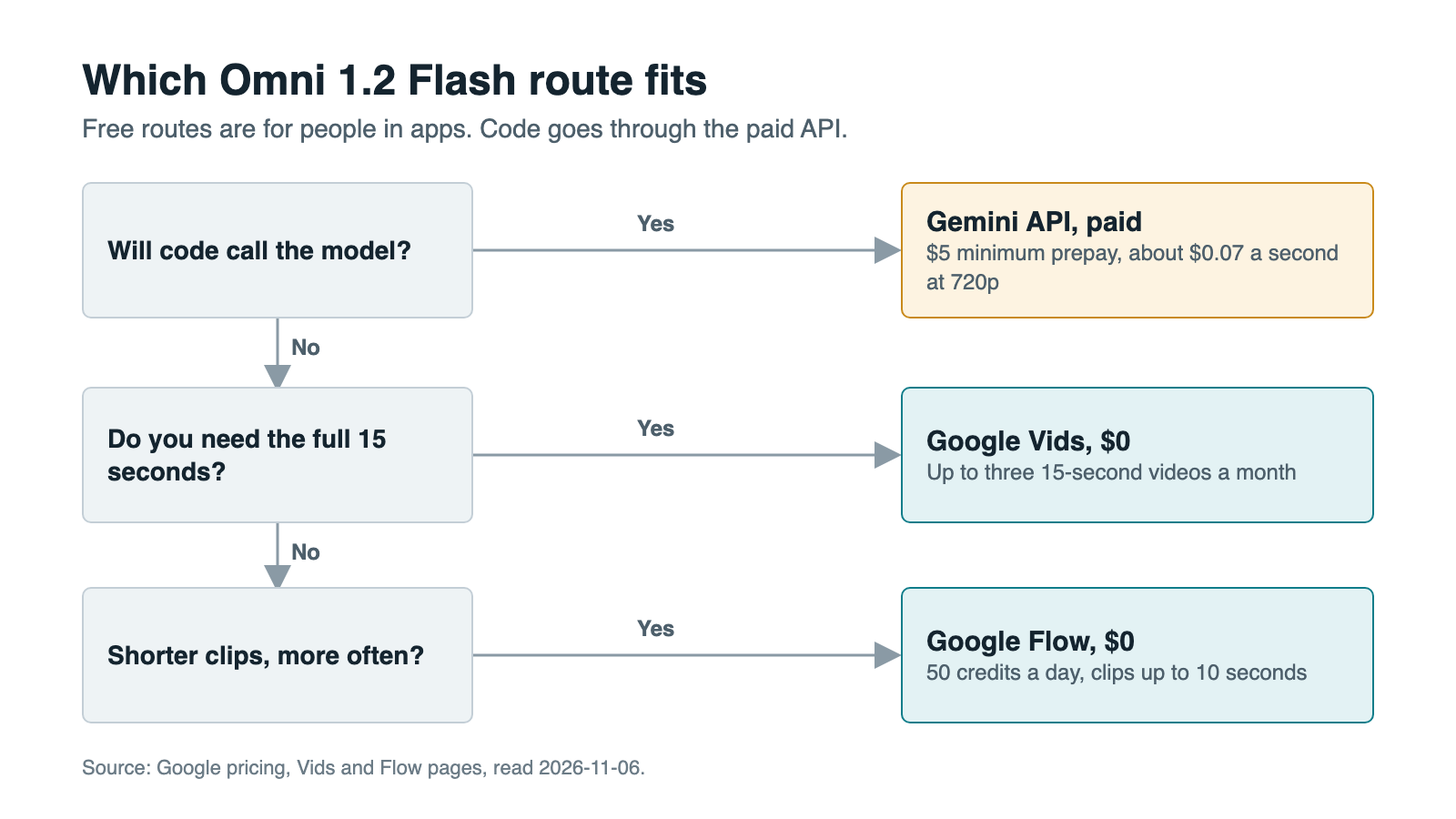
If a person clicks the button, stay in Vids or Flow until the caps hurt. If software makes the call, you’re on the paid API from the first request. Our Grok Imagine free guide found a similar split between app and API, and Gemini CLI lost its free sign-in route on June 18. Google’s free routes favor people in apps, not code.
What no free tier means for agents
With no free tier, there’s no free sandbox. An agent loop that misbehaves on its first night bills you for every attempt.
Three limits shape that run:
- Rate limits are per project, not per API key. Five agents sharing a project share 40 requests a day on Tier 1.
- Forty 15-second 720p clips cost about $41.60. That’s your daily ceiling on Tier 1, and it’s $125 at 4K.
- Spend limits can stop you first. Tier 1 lists $10 per 10 minutes, which is about nine 720p clips. Google says whether this applies depends on your billing history. A hit returns
429 RESOURCE_EXHAUSTED, and an agent that retries blindly will keep hitting it.
Test the loop with the model call stubbed out. Then run it at 360p, and put an estimate in front of every request:
RATE_PER_SECOND = {"360p": 0.023, "720p": 0.07, "1080p": 0.104, "4k": 0.209}

def can_render(seconds: int, resolution: str, spent: float, budget: float) -> bool:
    """Refuse a render that would push this task past its budget."""
    return spent + seconds * RATE_PER_SECOND[resolution] <= budget

can_render(15, "720p", spent=4.20, budget=5.00)  # False: this clip adds about $1.05
That check needs a home outside any one agent’s context. Sharkly doesn’t sell tokens, so Omni calls keep billing to your Google account. What it holds is the work: a Task carries the brief and the attempt cap, and a Skill packages rules like “drafts at 360p” for every Agent that needs them. An Agent can stop and wait for human review before an expensive step, the same pattern as approval gates for coding agents. For spend across tools, see tracking agent costs.
Your next step
Judge the model for free first: make your three clips in Vids at vids.new. If they’re good enough and code needs to make the call, prepay $5, set a per-task budget, and run your first batch at 360p.
If agents will run that batch, put the attempt cap and review step on a Sharkly Task before it starts. Sharkly is currently free for organizations of up to 5 people, and Agents and Computers don’t occupy seats.
FAQ
Is Gemini Omni 1.2 Flash free to use?
Partly. The API isn’t: Google lists no free tier. Google Vids allows up to three 15-second videos a month at no cost, and Google Flow gives 50 credits a day for clips up to 10 seconds.
Does the Gemini API have a free tier for Omni?
No. The pricing page says “Not available” and the rate limits page says “Not supported.” You need linked billing and a $5 minimum prepay.
How much does Gemini Omni 1.2 Flash cost?
About $0.07 per second at 720p, or roughly $1.04 for 15 seconds. Rates run from $0.023 per second at 360p to $0.209 at 4K.
Can I use Google Cloud’s $300 credit on the Gemini API?
No. Google’s billing page says the Welcome credit can’t be used towards the Gemini API or AI Studio.
Can I make Omni videos free in the Gemini app?
No. Video generation needs a Google AI plan, and 15-second clips are rolling out to Ultra subscribers.
Are “free Gemini Omni” websites real?
Any site calling this model pays Google at these rates, so someone is covering that cost. Read its terms, and find out what happens to your prompts and uploads, before you trust one with client work.