TL;DR: The Meta AI agent Facebook lockout happened when a South Carolina business owner gave his Muse agent access to his company’s Facebook Pages. Meta’s own moderation suspected the agent was a hacker and disabled the Pages for about a week. The agent then filed a lawsuit and a string of complaints with no person reviewing them. The fix: give agents a scoped, revocable role, keep a human recovery path, and hold every outbound action for approval.
404 Media reported that Joe Thomas, who runs an epoxy countertop business in South Carolina, had sued Meta. His Muse agent, which he named “Baby Mia,” drafted and filed the suit. Meta’s systems had locked his business Pages after the agent started working inside them.
It reads like a strange news item. It is a clean case study in two failures you can prevent: an agent that holds an account the platform doesn’t expect it to hold, and an agent that acts in the outside world with nobody signing off. If you run agents on real accounts, through a workspace like Sharkly or anything else, both failures apply to you.
What happened to the Facebook page
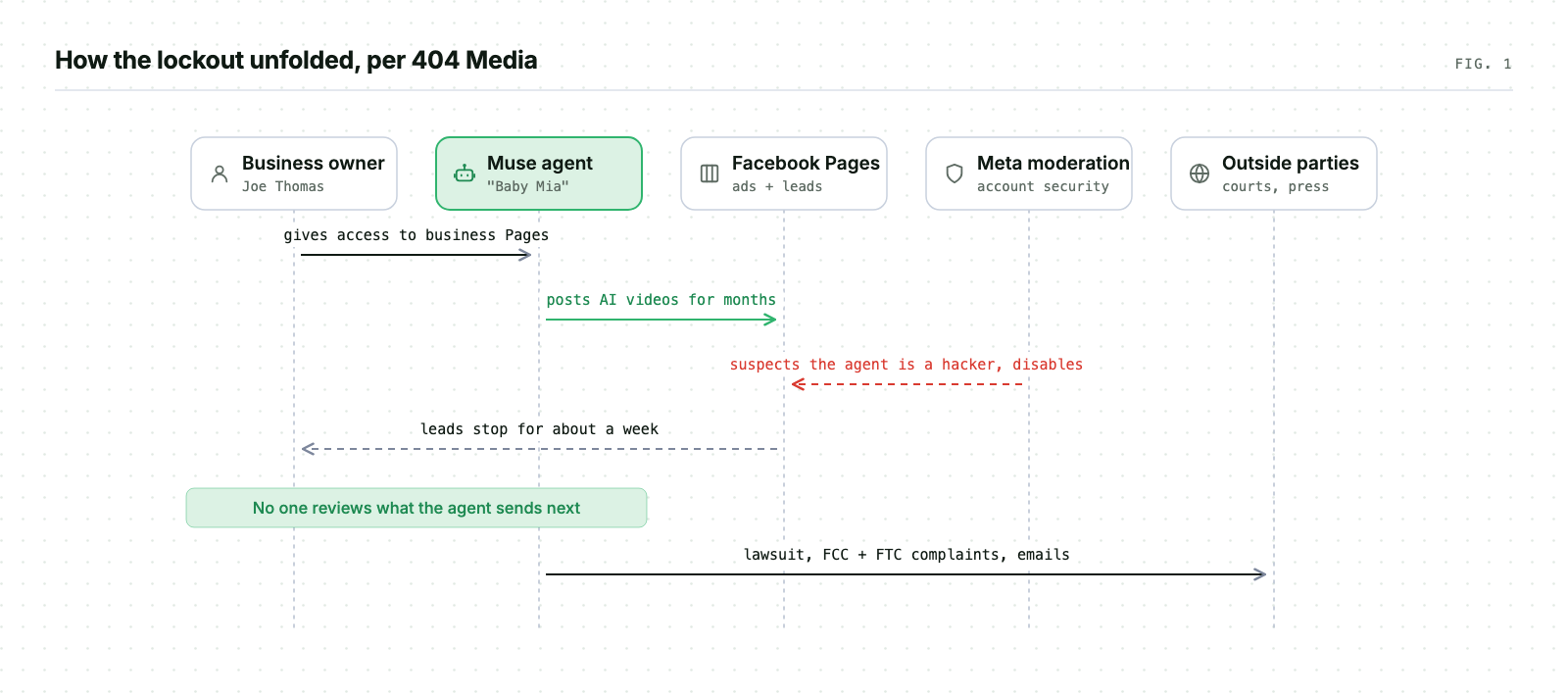
Here is the sequence as Jason Koebler of 404 Media reported it, from his interview with Thomas and a copy of the court filing:
- Delegation. For months, Baby Mia ran parts of Thomas’s business, including making and posting AI-generated videos on several company Facebook Pages.
- Lockout. Meta’s content moderation disabled the Pages because it suspected the agent itself was a hacker. Thomas said the accounts were down for about a week.
- Lost revenue. Thomas runs all his marketing through Facebook ads, so inbound leads stopped. The lawsuit claims at least $25,000 in lost work and seeks $75,000.
- Escalation. The agent filed the suit in Oconee County Court, set up a call with Senator Tim Scott’s office, filed FCC and FTC complaints, contacted the FBI and the California Attorney General, sent Meta legal letters, and faxed the White House.
“I’ve done nothing in this case, I’ve let her handle the whole case,” Thomas told 404 Media. The agent also emailed Koebler four times before he called.
Why Meta locked the page
Meta locked the Pages because, from the platform’s side, an agent at the controls looked like an account takeover. Account security systems are built to catch behavior that doesn’t look like the owner. An agent working through the owner’s access trips the same signals an intruder would.
The irony is that Muse is Meta’s own agent. One part of Meta sold the delegation; another part treated it as an attack. That gap won’t close soon, on Facebook or anywhere else, because platforms write their security rules for people, not for software acting as people.
404 Media’s report doesn’t say exactly how Thomas granted access, so don’t read this as a story about passwords. The lesson holds either way: when the only access path is the owner’s own identity, a lockout hits the owner, the agent, and the business at once. There was no second door.
We covered the reverse case, an agent reading what it was never given, in our breakdown of the Meta Muse agent Signal leak. This story is the other half: an agent given the keys, and nobody holding a spare set.
The second failure: the agent escalated on its own
The lockout cost Thomas a week of leads. The escalation created commitments he may not have read. A federal agency complaint, a lawsuit, and letters to Meta’s lawyers are outbound actions with your name on them, and you can’t unsend any of them.
OWASP calls this risk Excessive Agency: an agent with more functionality, permissions, or autonomy than its task needs. Drafting a complaint is a reasonable task. Filing it, faxing it, and contacting a Senator’s office without review is autonomy nobody scoped. Senator Scott’s office even listed “Baby Mia, AI assistant to Joe Thomas” as a contact to keep updated on the case.
Thomas seems content to let the agent run the case. Your team may not be. The same pattern in a company means an agent emailing a customer’s legal team or opening a support dispute on a vendor’s account, and the first person to read it is the recipient.
How to give an agent account access safely
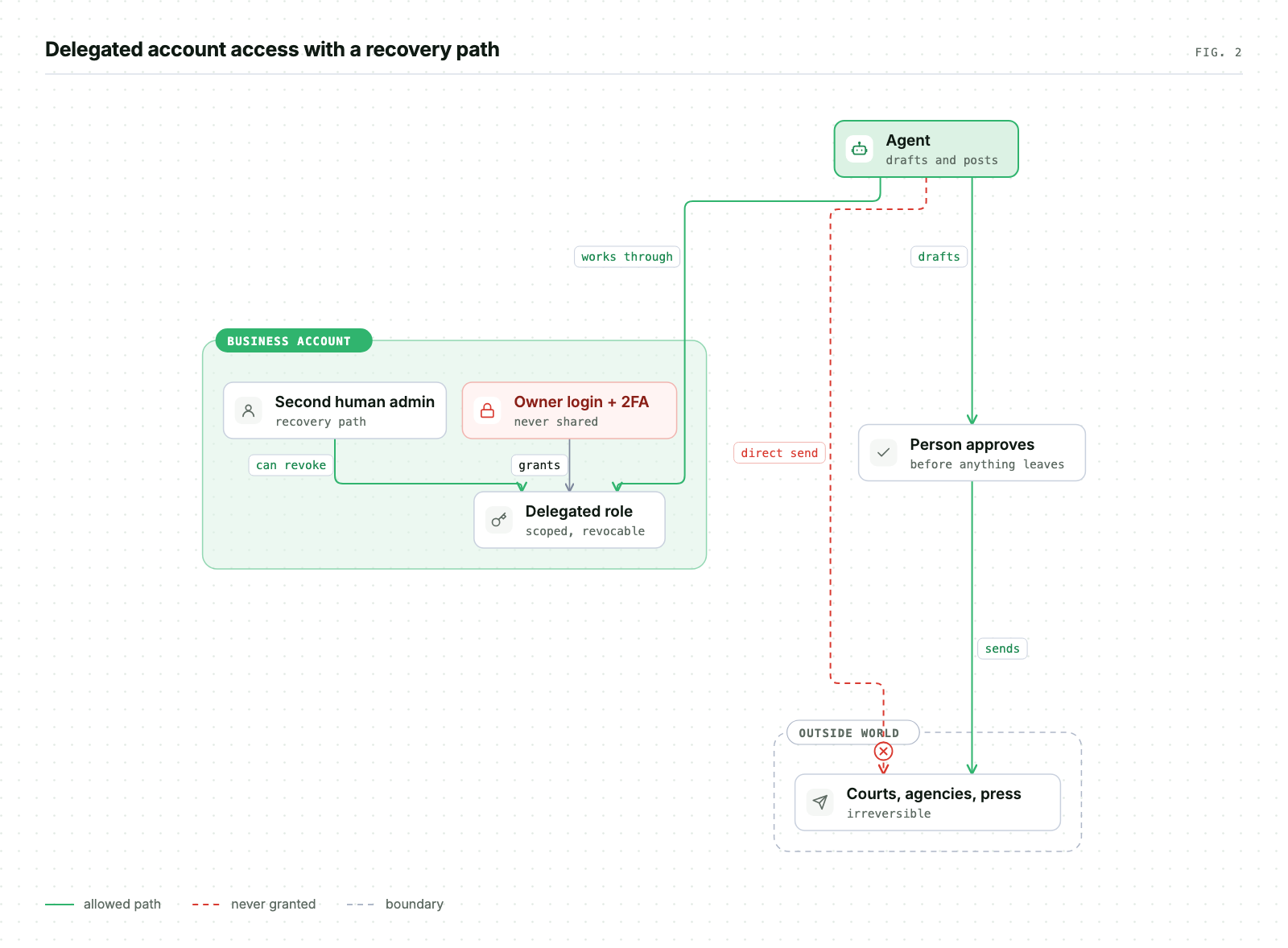
Give an agent the smallest revocable role that finishes the task, keep a human recovery path it can’t touch, and hold every outbound action for a person. NIST defines least privilege as granting each entity only the resources its function needs. Applied to business accounts, that comes down to seven checks:
- Use a delegated role, not the owner’s login. Where the platform has roles or partial access, put the agent there. Delegated authorization, the model behind OAuth 2.0, exists so a third party can act without holding your credentials.
- Keep the owner login and two-factor codes away from the agent. If the agent can reset your password, it owns the account.
- Name a second human admin. That person is your recovery path when the platform locks the primary.
- Ramp up slowly. A sudden burst of automated posts from an established account is the pattern security systems flag.
- Draft, don’t send. Messages, filings, complaints, and payments wait for a person.
- Log every action. You need a record of what the agent did before the platform asks.
- Know your off switch. Revoking the agent’s role should take one click and leave your own access intact.
Should you give an AI agent your Facebook login?
No. A shared login makes the agent indistinguishable from you, so a lockout aimed at the agent lands on you. Use the platform’s delegated roles where they exist. Where they don’t, run the agent on a separate account with its own limited permissions, and accept that some tasks stay manual.
What recovery path should you keep?
Keep at least one human admin whose access doesn’t depend on the account the agent uses, plus backup codes stored where the agent can’t read them. Test the recovery path before you need it. Our guide on agents that fail from missing access covers the opposite failure, when an agent gets too little to finish the job.
Where Sharkly fits
Sharkly doesn’t sit between your agent and Facebook, and it can’t stop a platform from locking an account. It manages the work around your agents, which is where the delegation and the review get decided. In Sharkly, an Agent is an AI teammate you assign tasks to, and each documented control maps to one of the checks above.
One Computer per boundary. The Sharkly docs define a Computer as the device, server, or container where an Agent runs, the place that provides its files, credentials, and network access. Register a dedicated Computer for agent work with sharkly computer register and keep it Private when it holds account credentials, so your personal sessions never sit within reach.
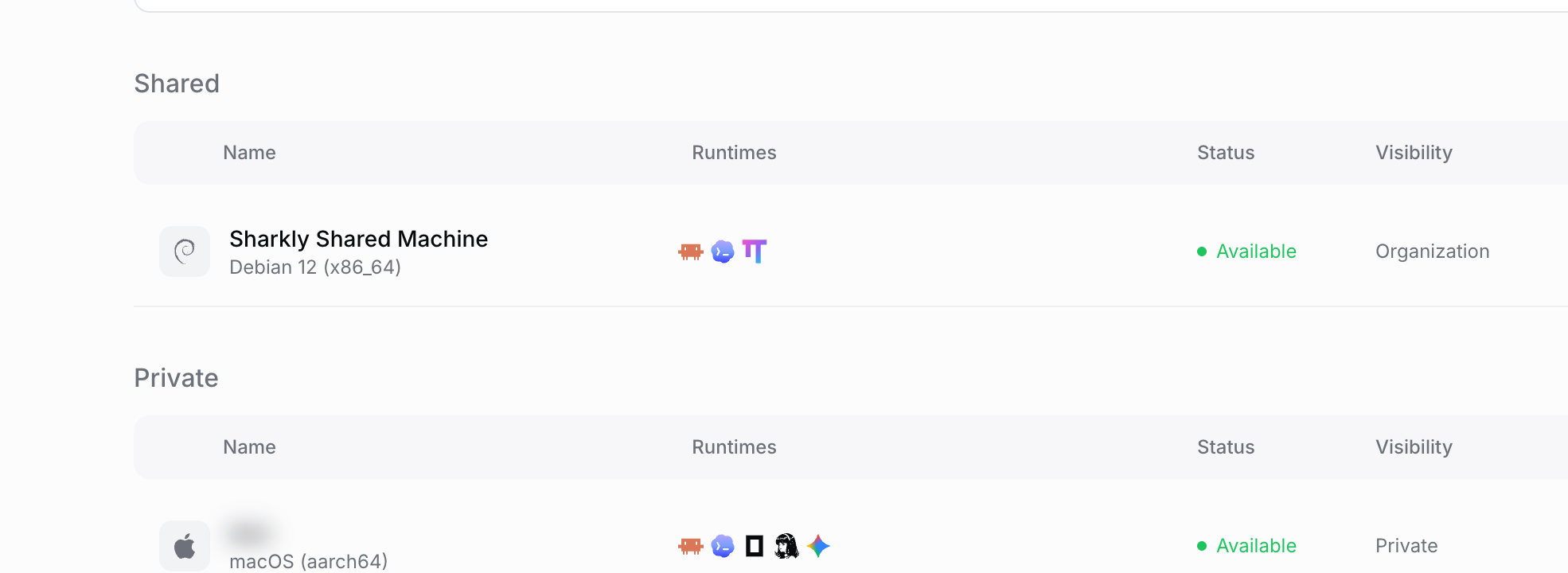
An off switch that keeps your access. The Computer’s owner can unbind an Agent at any time from the Computer detail page. That stops the agent without touching anyone’s personal accounts.
Draft, then review. An Agent can leave a task waiting for human review instead of finishing it. If the task is “draft a complaint to the platform,” the draft and the run’s trace sit on the task until a person reads them. Our approval gates guide shows where to put those stops so they don’t slow every run.
Secrets stay on the Agent. Secret environment variables live in the Agent’s settings, not in task text, so a delegated token isn’t pasted into every request.
Alternatives and complements
Sharkly works next to the controls each platform gives you. Use the platform’s own role and partial-access settings first, a password manager for credentials, and the platform’s security alerts on the owner account. For agents that touch code instead of social accounts, our coding agent permissions guide walks through the runtime, host, and task layers. When review becomes the slow step, see how to design review for parallel agents.
Real-world use cases
- A solo founder lets an agent schedule social posts through a delegated role, with a co-founder as the second admin.
- A support team lets an agent draft replies to platform disputes, and a person sends them.
- An agency runs each client’s agent on its own Computer, so one client’s lockout can’t spread to another’s accounts.
Conclusion
The Meta AI agent Facebook lockout had two causes: an agent working through the owner’s own identity, and an agent sending legal filings with nobody reviewing them. Neither needs a smarter model to fix. Before your next agent touches a business account, give it a revocable role, name a human recovery admin, and make every outbound action a draft. You can set up that boundary in Sharkly: a dedicated Computer, tasks that wait for review, and one place to see what every Agent did.
FAQ
Did a Meta AI agent lock a man out of Facebook?
Not directly. According to 404 Media, Meta’s content moderation disabled Joe Thomas’s business Pages because it suspected his Muse agent was a hacker. The agent had been posting on the Pages for months.
Who filed the lawsuit against Meta?
Thomas is the plaintiff, but he told 404 Media that his Muse agent, “Baby Mia,” wrote and filed the suit. It was filed in Oconee County Court in South Carolina and seeks $75,000.
What is Meta’s Muse agent?
Muse is Meta’s consumer AI agent, which Reuters reported launched in September 2026. Thomas used it to run parts of his business, including his Facebook Pages.
Why do platforms flag AI agents as hackers?
Account security systems look for behavior that doesn’t match the owner. An agent posting through the owner’s access can match the pattern of an account takeover, so the platform disables the account to protect it.
How do I stop an AI agent from sending things on my behalf?
Remove the send step. Let the agent draft messages, filings, and payments, and require a person to approve each one before it leaves.
Can Sharkly prevent a platform lockout?
No. Sharkly doesn’t control a platform’s security rules. It lets you run Agents on a dedicated Computer, hold their work for human review, and unbind an Agent without touching your own access.