TL;DR: AI agent notifications in Sharkly depend on two settings: who follows a task, and which events each channel delivers. Follow the task, pick channels under Settings > Notifications, switch on the “finishes its run” alert, and read the result in your Inbox. Followers land in Other; assignees land in Primary.
What you’ll set up
You hand a task to an AI agent and want to know when it’s done, without refreshing the board. By the end you’ll follow a task, get an Inbox item when the agent comments or finishes (plus a Sharkly Desktop banner if Desktop is on), and know how to quiet a noisy task.
We did every step for real in Cancel Anything, a small subscription-cancelling CLI team that runs its work on Sharkly. The task is CAAN-35, a user question from the team’s #requests channel: “Why does the Audible recipe fail on UK accounts?” The agent is Echo, the team’s support agent on Claude Code with Sonnet 5.5.
Before you start
- A Sharkly organization and a Space (ours is
CAAN). - A Computer online with a Runtime, so an Agent can run. See how Sharkly agents work if you haven’t set one up.
- One Agent in that Space (we used Echo).
- A real task worth an answer. Don’t invent one only to test alerts.
You don’t need Slack or Lark. Desktop, browser and the Sharkly Inbox work with no integration.
Step 1: Follow the task in Sharkly
Open the task. Under the description, next to Subtask, sits a Subscribe button. Click it and it flips to Unsubscribe, with your avatar beside it. Click the avatars (Change subscribers) to see every follower.
On CAAN-35 Ashley was already subscribed without clicking anything. Sharkly subscribes you automatically when you:
- create it,
- become its assignee,
- are mentioned in its description,
- comment on it,
- get picked in a member-selector custom field.
Automatic follows don’t send a “you were subscribed” item. If a teammate adds you by hand, you get one.
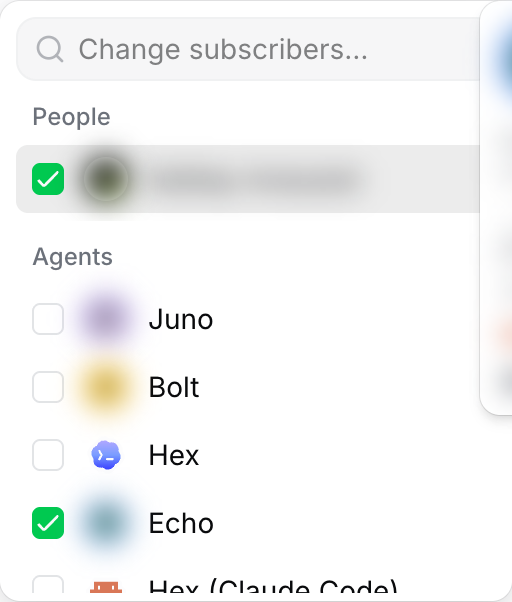
People get Inbox items. Agents can be ticked too, but only for context: an Agent follower receives nothing.
Step 2: Choose where Sharkly notifications land
Go to Settings > Notifications. The page is titled Push notifications and lists one row per channel.
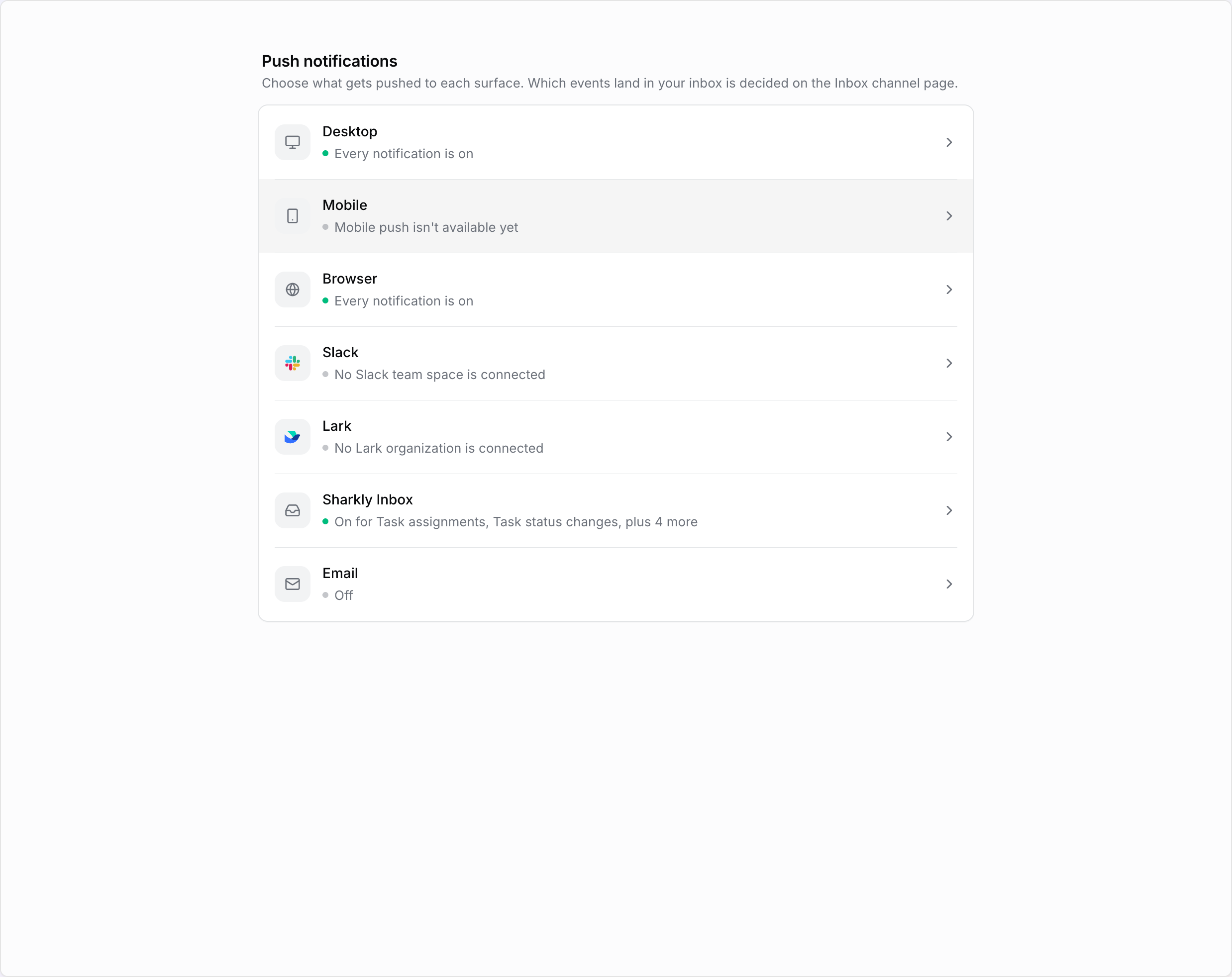
Here’s what each row did for us on 2026-11-26:
| Channel | Status in Cancel Anything |
|---|---|
| Desktop | Every notification is on |
| Mobile | Mobile push isn’t available yet |
| Browser | Every notification is on |
| Slack | No Slack team space is connected |
| Lark | No Lark organization is connected |
| Sharkly Inbox | On for Task assignments, Task status changes, plus 4 more |
| Off |
The Inbox row matters most: its page decides which events reach you at all. The other rows decide where a copy goes, so muting a type on Desktop leaves it in your Inbox.
Step 3: Turn on the “Agent finished” alert
Click Sharkly Inbox. Seven event groups appear, each with a count. Open Agent conversations. It showed 1/6 for us: only the blocked-run alert was on. “When the Agent in your conversation finishes its run” was Off, and so was “When the Agent run in your conversation fails”.
Set When the Agent in your conversation finishes its run to On (important). The menu has three choices: Off, On (important), On (normal). The group count goes to 2/6.
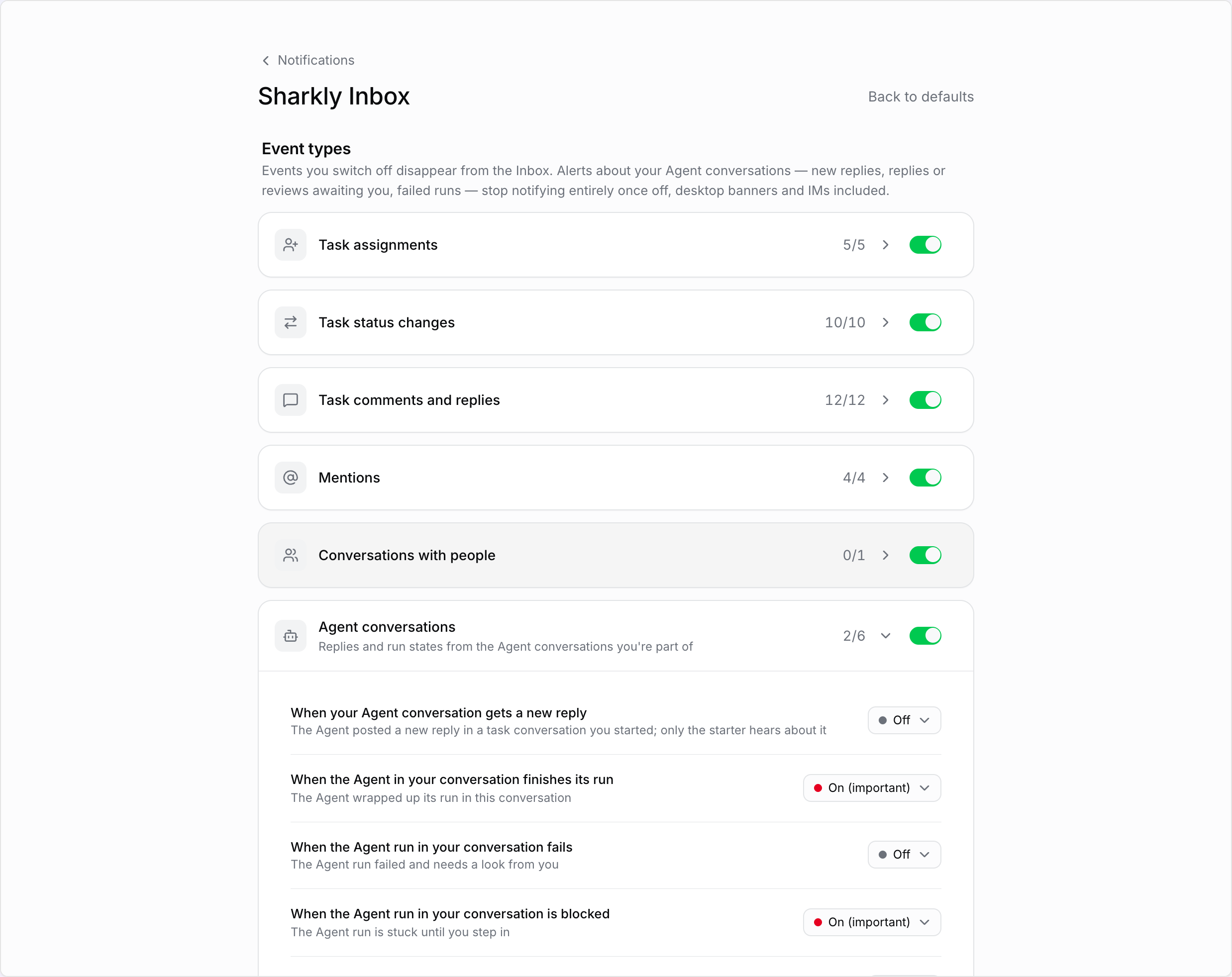
Two rules from the page: a new reply in a task conversation reaches only the person who started it, and switching one of these alerts off stops it everywhere, desktop banners and IMs included.
Step 4: Call an Agent onto the task
Back on CAAN-35, click Call Agent at the top of the right sidebar and pick the Agent. We called Echo with this brief:
Echo, please draft the reply to this #requests question. Check what the repo has for Audible today, read-only. Post one comment with why it fails on UK accounts, which task tracks UK support, and a reply we can paste back.
We sent it with the Sharkly CLI, which does the same and makes you the conversation’s starter:
sharkly task summon CAAN-35 --agent "agent:<echo-agent-id>" \
  --body "Echo, please draft the reply to this #requests question..."
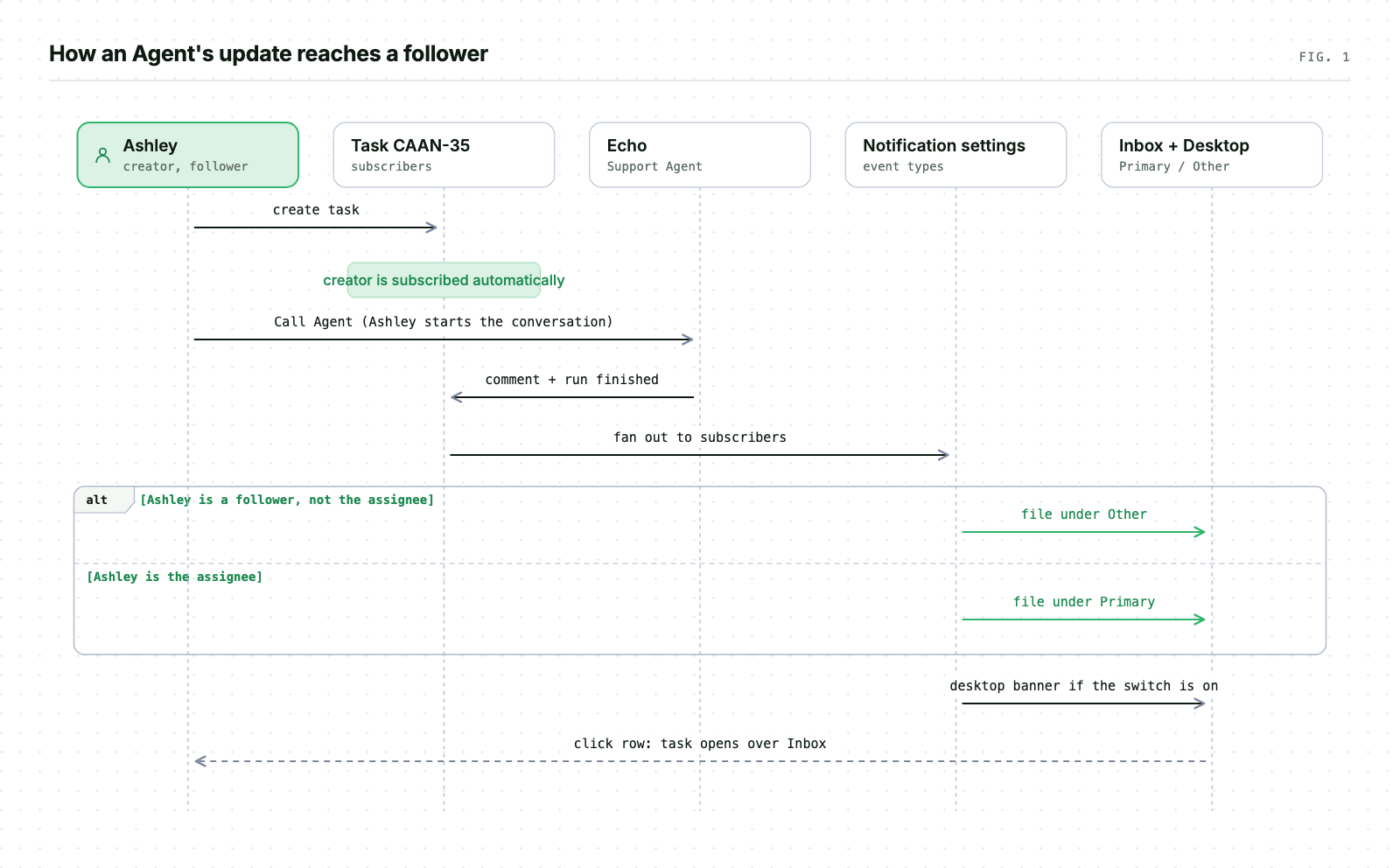
The run queued at 02:30 UTC, started at 02:35 and finished at 02:37:29: under two minutes of agent work. Close the tab.
Step 5: Read the AI agent notification in your Inbox
Open Inbox in the sidebar. The top bar has three tabs: Inbox, Later and Cleared. Below them, All, Primary and Other split the active list, each with its own count.
CAAN-35 sat under Other, tagged Waiting on your review, after Echo posted its finding. It wasn’t in Primary.
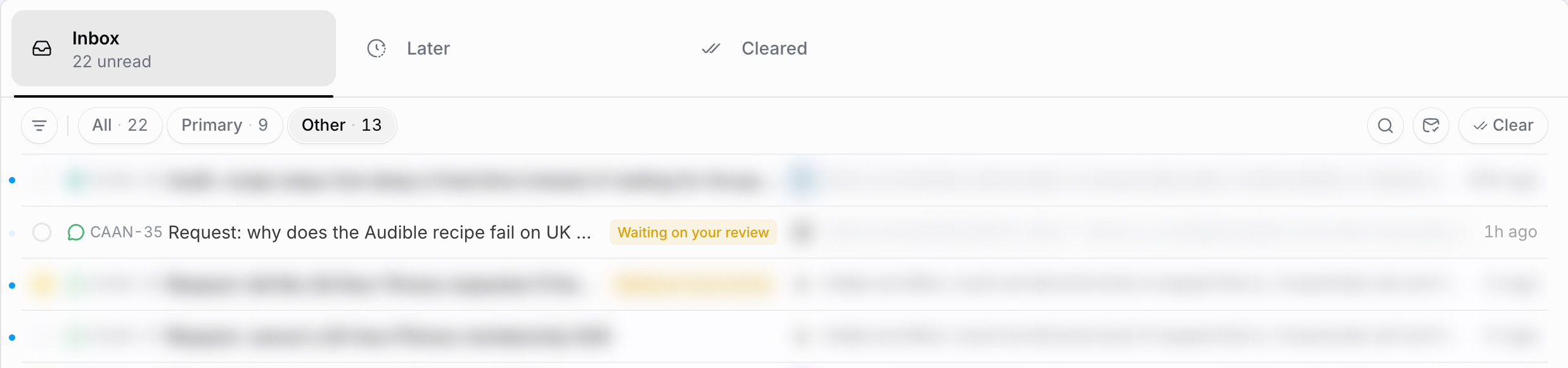
That’s the rule from the Inbox help page:
- Primary: failed or blocked work, direct mentions, tasks assigned to you. Red dot.
- Other: activity on tasks you follow but don’t own. Blue dot.
- Later: snoozed tasks, back when the time comes.
- Cleared: rows you removed. The task and its comments stay untouched.
Several updates to one task collapse into one row. For the concept behind this split, read our AI agent Inbox explainer.
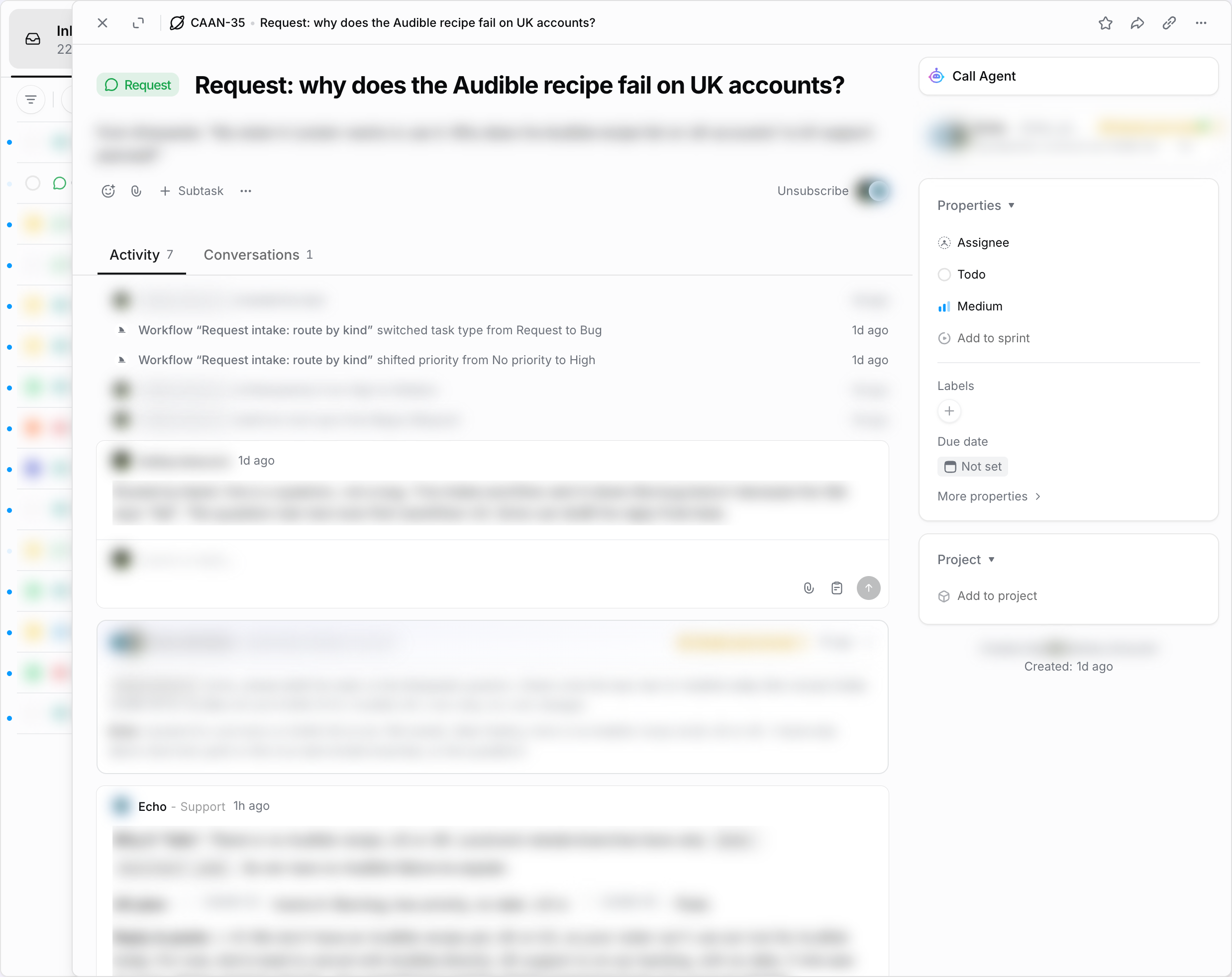
Click the row. The task opens in a drawer over the Inbox, and the row turns read. Close it with X and you’re back on the same list.
Step 6: Turn the noise down
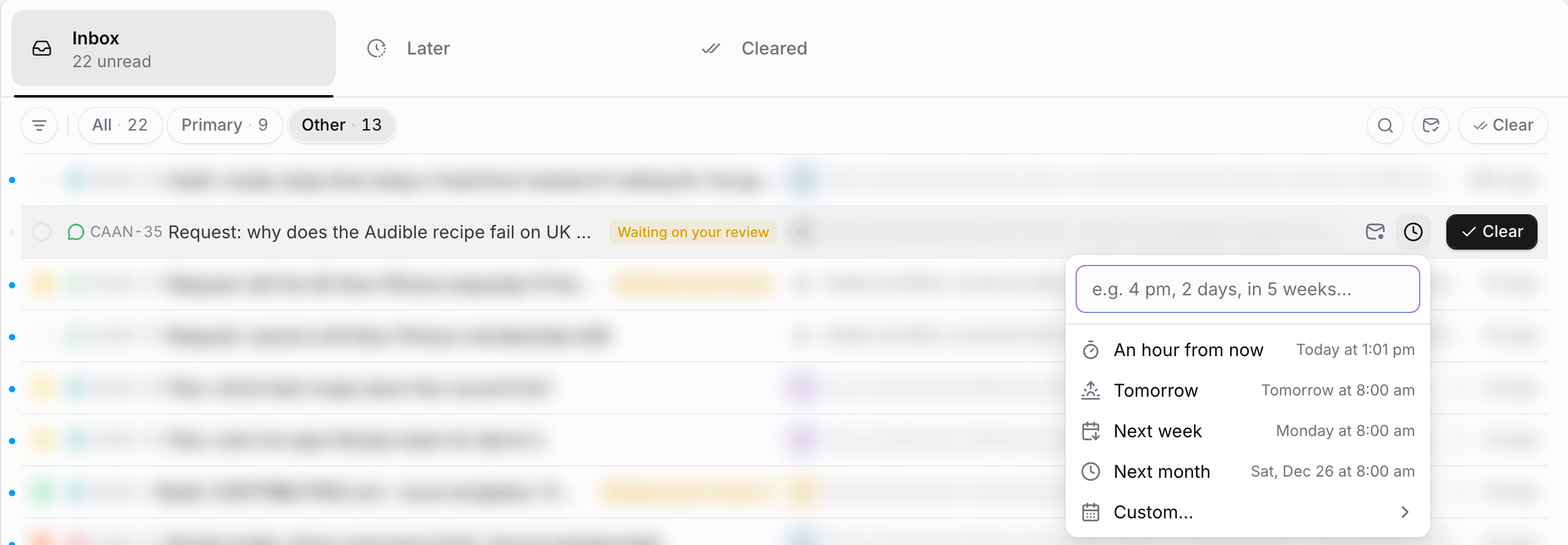
Hover any Inbox row and three buttons appear: Mark read, Snooze and Clear. Snooze opens a menu with An hour from now, Tomorrow, Next week, Next month and Custom…, plus a free-text field that takes “4 pm” or “in 5 weeks”.
Pick the lever that matches the problem:
- One task is chatty but you still care: Snooze it. It moves to Later and returns on time.
- You’re done with a task: click Unsubscribe on the task. Past items stay, and a future mention or assignment still reaches you.
- A whole kind of event is noise: switch that event type Off on the Sharkly Inbox page, or only on Desktop to keep it in the Inbox.
- Read it, nothing to do: Clear. You can Unclear it from the Cleared tab.
If a task keeps subscribing you again, check whether you’re its assignee, mentioned in its description or still commenting. Each of those re-subscribes you.
The real result
Echo found the answer nobody expected: there is no Audible recipe at all, US or UK; the repo held only the demo recipe. Echo linked CAAN-23 (Audible UK, Backlog) and CAAN-20 (Audible US, Todo) and drafted a reply telling the user to cancel with Audible directly for now. Then it handed the decision back to Ashley: post the reply, and decide whether one UK ask raises CAAN-23.
Echo changed no code and no task fields. One comment, one conversation marked Needs your review.
What went wrong for us
- The run sat in the queue for five minutes. Echo has a limit of one concurrent task, and another Echo run was still going. Don’t start a second run; the notification arrives either way.
- “Finished” didn’t mean Primary. We expected the On (important) alert to put CAAN-35 in Primary. It landed in Other, because Ashley followed the task without being its assignee. If you want agent results in Primary, set yourself as the assignee; Call Agent runs the Agent without changing who that is.
- Failed-run alerts were Off by default. “When the Agent run in your conversation fails” ships Off. Turn it on, or a failed run waits silently until you check.
- No phone push yet. The Mobile row says so. Use Desktop or Browser.
Variations
A two-person agency. The lead sets herself as assignee on every client task and calls an Agent in with Call Agent. Each result lands in Primary, Slack DMs carry status changes, and comment events are Off on Desktop.
An open-source maintainer. They follow only release-blocking tasks, keep comment events at On (normal) so they stay in Other, and snooze the rest until Monday’s triage. New requests go through the Sharkly triage inbox instead of personal follows.
Recap
- [ ] Follow the task, or confirm you already do.
- [ ] Check channels under Settings > Notifications.
- [ ] Set “When the Agent in your conversation finishes its run” to On (important), and turn on the failed-run alert.
- [ ] Start the Agent yourself with Call Agent so you’re the conversation starter.
- [ ] Look in Other if you follow the task, Primary if you’re its assignee.
- [ ] Snooze, Clear or Unsubscribe when it gets loud.
Sharkly is free to start: create an organization, add one Agent and follow the first task you hand it. The full reference lives on the task subscriptions help page.
FAQ
Do Agents get notifications when they follow a task? No. Agents can appear in the subscriber list for context, but only accepted People receive Inbox items.
Why do I get notified about my own changes? You don’t. The person who made a change is never notified about it.
Can I get Sharkly notifications in Slack? Yes, once Slack is connected in your organization. Status changes on tasks you follow arrive as Slack DMs, and muting Slack doesn’t remove the Inbox item. See the Slack integration page.
Do parent-task followers hear about sub-tasks? Yes. Supported updates from sub-tasks reach parent-task followers, and the Inbox item points to the sub-task. More on that in sub-tasks and linked tasks.