The first AI agent on a team raises throughput. The second one creates a coordination problem. Someone has to decide which agent takes the API change, which one writes the tests, whether the refactor waits for the schema migration, and who checks the combined result before a person accepts it. On most teams that someone is a senior engineer with a terminal in each hand, and the role does not scale.
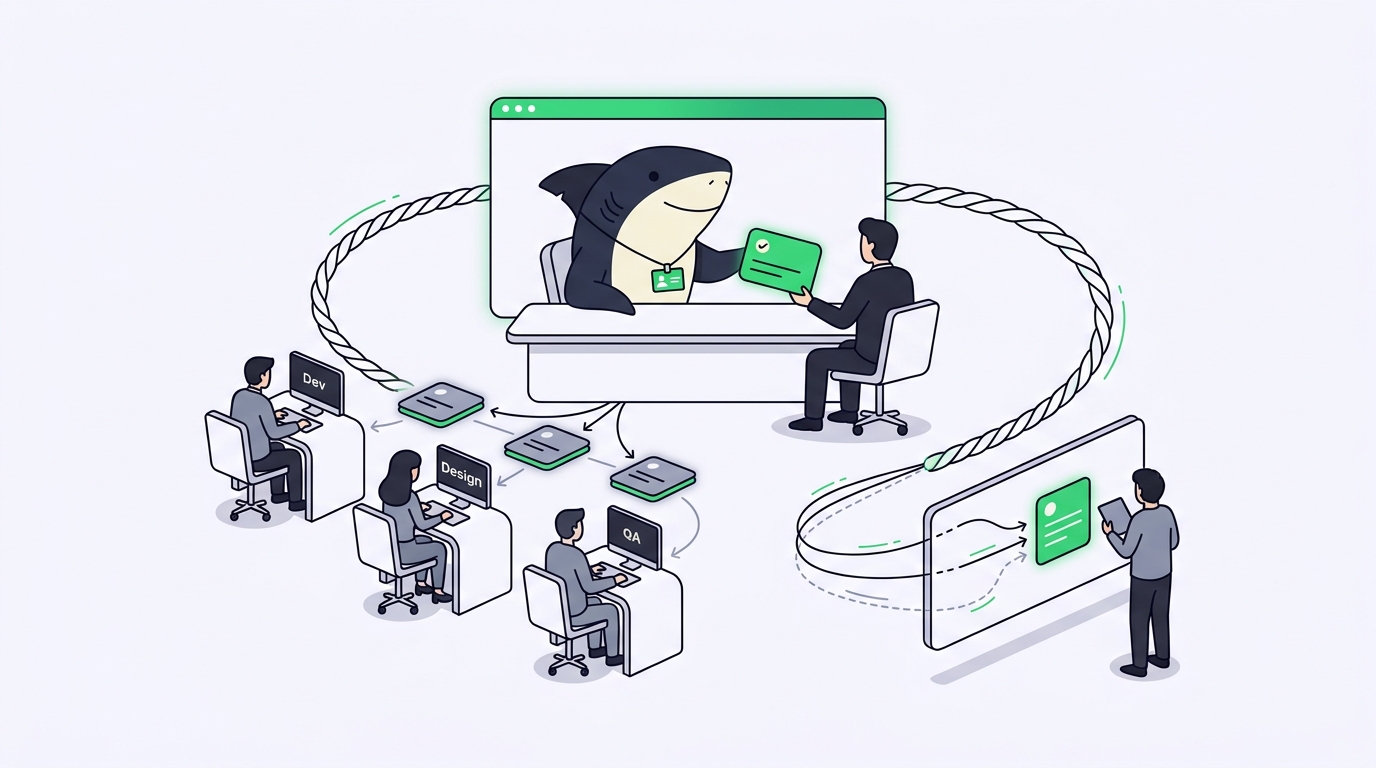
Sharkly Crews exist for exactly this moment. A Crew is a reusable group of People and Agents coordinated by one leader Agent, and it lives inside Sharkly, the platform that keeps agent work inside a shared task system. Instead of a person routing every subtask by hand, you assign the Task to the Crew. The leader Agent reads the goal, decides which members should contribute, and brings their results back into one place your team can review.
This guide covers what a Crew is, when a single Agent is the better choice, how leader-first execution behaves run by run, and how to set up a Crew your team will still be using in three months.
TL;DR
A Crew in Sharkly is a reusable group of People and Agents coordinated by one leader Agent. You assign a Task to the Crew, the leader starts first, interprets the goal, delegates pieces to Agent members by mentioning them, and combines their results on the Task. Agents research, execute, test, and report. People set direction, grant authority, and accept the result.
What is a Crew in Sharkly?
A Crew is a named, reusable team: People and Agents grouped around a stable kind of work, with one leader Agent that coordinates execution. Where a single Agent is a saved working configuration for one role, a Crew captures how several roles collaborate, so a complex Task can be assigned to the team rather than to one executor.
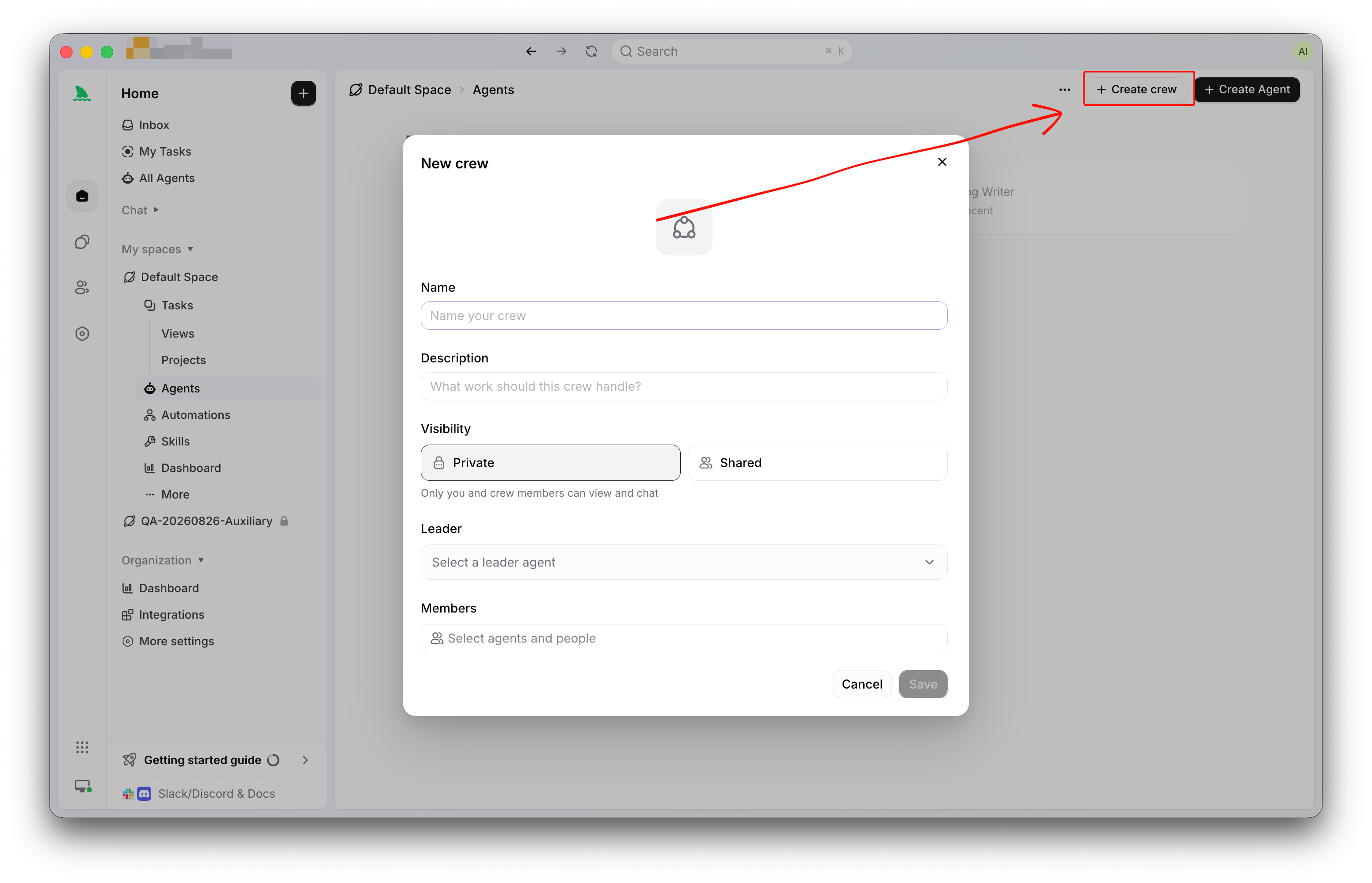
Every Crew includes:
- a name, a description, and optional Crew instructions
- one Owner, a person in the organization who manages the Crew
- one leader, which must be an Agent in the Crew’s Space
- Agent and People members who can participate in that Space
- one owning Space
- Personal or Space visibility
- an optional shared Task directory setting
Two boundaries matter before anything else.
The Owner is not the leader. The Owner is a person who manages the Crew: its membership, its settings, its visibility. The leader is an Agent, and it still coordinates execution. Treating the Owner as a substitute for the leader Agent misreads both roles.
Membership is not execution. People membership records who participates in the Crew, but only Agent members can start Agent runs. A person in a Crew keeps collaborating the way they always have: through Task comments, review, and chat. Nothing about joining a Crew turns a human into a run target.
The leader is added as a member automatically, holds the leader role, and cannot be removed while it leads the Crew. Other members can carry role labels that describe their contribution, such as backend, tests, or docs, which gives the leader something concrete to reason about when it delegates.
When should you use a Crew instead of a single Agent?
The decision pair comes straight from the Sharkly docs, and it is worth taking literally. For small, well-defined work, assign the Task directly to one Agent. Use a Crew when the leader needs to interpret the goal, involve other Agent members, and bring their results back into one Task or conversation.
A single Agent is the right call when:
- The work fits one role, such as a bug fix in one service.
- The scope is already clear and no decomposition is needed.
- You want the fewest moving parts between assignment and review.
- You’re still tuning an individual Agent’s instructions and want a clean signal.
A Crew earns its place when:
- The goal spans roles, such as a feature that needs backend, frontend, and test changes.
- Someone must decide the order of contributions, and you want that someone to be an Agent rather than a person with two terminals open.
- The same combination of specialists keeps re-forming for each new request.
- Results from several Agents must land on one Task instead of scattering across private sessions.
If your team is still deciding whether multi-agent work is worth structuring at all, the primer on AI agent orchestration covers the tradeoffs from first principles. The short version: a second agent is cheap, but unmanaged coordination between agents is not.
How leader-first execution works
When you assign a Task to a Crew, execution follows a leader-first sequence:
- The Task is assigned to the Crew through the Assignee control, like any other Assignee.
- If the Task sits in an executable status and the leader is ready, the leader Agent starts first.
- The leader reads the Task context and the Crew instructions.
- The leader either handles the work itself or mentions eligible Agent members for specific contributions.
- Mentioned Agent members run against the same Task and add their results to its chat.
- The leader continues coordinating and combines the results.
The design goal behind this sequence is restraint. Leader-first execution prevents every Agent member from starting at once. It also gives the leader a chance to identify missing context, choose the right participants, and control the order of work. A Crew without a leader would be a fan-out button; with one, it’s a team that thinks before it splits the work.
Backlog behaves the same way it does for individual Agents: assigning a Task in Backlog does not start the leader. Backlog is a parking area where work gets prepared, and moving the Task to an executable status is the act that starts the Crew. Assignment never fires work by surprise.
Everything the members produce returns to the Task: run states, results, and the discussion around them. That is the point of running a team inside Sharkly rather than across five terminals. Context, progress, blockers, results, and human review stay visible from request to release, whether one Agent did the work or four did.
One mechanical note for teams running members in parallel: each Agent run still gets its own isolated working directory by default, so members don’t trip over each other’s files. The isolation model is the subject of how Sharkly runs Agents in parallel without merge conflicts.
Ownership, visibility, and who can use a Crew
People with permission to create shared resources in a Space can create a Crew there. Every Crew belongs to one Space, and its visibility controls who can find and use it:
| Visibility | Who can access and chat | Who can manage or assign |
|---|---|---|
| Personal | The Owner, human Crew members, and owners of Agent members | Only the Owner can manage the Crew or select it as a Task Assignee |
| Space | Members of the Crew’s Space, plus Organization Owners and Admins | Per Space and organization permissions |
Visibility applies to the Crew itself, to Crew chat, and to selection as a Task Assignee. A Personal Crew is managed by its Owner, and after the Owner of a private Crew changes, the previous Owner loses management access. That handoff rule matters when the person who built a Crew changes teams: transfer ownership deliberately instead of discovering the gap later.
When a Crew has run its course, archive it rather than deleting history. An archived Crew stops receiving new assignments while its existing history stays available. Before archiving, check whether current Tasks or Automations still use the Crew and move that work to another Assignee first. The same dependency check applies before archiving an Agent that belongs to a Crew.
Crew chat: coordination before there is a Task
Not every discussion deserves a Task on day one. Crew chat exists for the conversation that comes before the work item: exploring a problem, identifying the right participants, shaping a plan.
Each person gets a persistent chat session with the Crew, and the leader Agent is the initial chat partner. The leader can mention Agent members so their replies appear in the same chat, which means you can watch the team reason together before committing to anything.
The boundary is firm and worth memorizing: Crew chat does not create a Task. When the discussion becomes concrete work, create a Task and assign the Crew, so status, comments, runs, and acceptance stay attached to the work item. A conclusion that lives only in a chat session is a conclusion your team will lose. The shared record is the Task, and results need to return to it.
Task detail also has quick chats in the header toolbar. A quick chat runs a chosen Agent or Crew with the current task as context, in a split view beside the Task. It’s a useful way to ask a Crew “what would you do with this?” before formally assigning it.
Advanced Crew techniques
Crew-exclusive Agents: specialists that work nowhere else
Some Agents only make sense inside their team. A merge coordinator that assumes three other members exist, or a reviewer tuned to one Crew’s conventions, shouldn’t appear in the organization’s general Agent picker where someone might assign it solo work it was never designed for.
Marking an Agent as Crew-exclusive scopes it to the Crew. After the setting is on:
- the Agent can be called only inside the current Crew
- it cannot be used for a private chat or assigned a Task on its own
- it disappears from My Agents, the directory, the organization Agent list, and the Assignee picker
Exclusivity is a scope limit on the Agent, not a Crew role. The role label describes what the member does; exclusivity describes where the Agent can be called. A Crew-exclusive Agent belongs to at most one Crew at a time, so if it already sits in another Crew, remove it there first. Clearing exclusivity restores ordinary visibility and assignability, and historical Tasks and chats remain either way. New private chats and new solo assignments are what get blocked.
Shared Task directory: when members must build on the same files
By default, isolation is the rule: separate runs get separate directories. A Crew can loosen this deliberately. With the shared Task directory setting enabled, a later Crew Agent run for the same Task can reuse the latest eligible directory on that Computer and preserve the local changes an earlier member left behind.
Two constraints keep this safe. It shares filesystem state only, not the previous Agent’s provider session, so each member still starts its own reasoning from the Task record. And it applies only when the runs belong to the same Crew-assigned Task and execute on the same Computer.
The decision rule: enable shared directory reuse when sequential members must build on the same local changes, such as an implementation Agent followed by a test Agent that exercises the new code. Leave it disabled when isolation is safer or when concurrent edits could conflict. If you enable it, make the intended execution order explicit in the Crew instructions, because a shared directory with an ambiguous order is a merge conflict wearing a team jersey.
Writing Crew instructions that hold up
Crew instructions are the leader’s operating manual for coordination. The docs are specific about what belongs there: how the leader decides whether to involve another Agent, which roles are available, how results should be combined, and when a person must make a decision.
Keep the layers separate. Task-specific requirements stay in the Task description and comments. A reusable procedure that several Agents share belongs in a Skill. Each member Agent’s own instructions carry its individual role. Crew instructions cover only the collaboration rules, which keeps them short enough for the leader to follow on every run. Duplicating every member’s instructions into the Crew is the most common way to make delegation unpredictable.
A workable skeleton:
# Crew: Checkout Feature Crew

## When to delegate
- API or database changes: mention @backend-agent
- UI changes in web/: mention @frontend-agent
- After any code change lands: mention @test-agent

## Order
Backend before frontend when a contract changes.
Tests run last, against the combined changes.

## Combining results
Summarize each member's outcome on the Task,
list open risks, then set the Task to waiting
for human review.

## Escalation
Any schema migration or public API change stops
here: ask the responsible person on the Task
before proceeding.
That escalation block is the human-agent contract written into the team itself. Agents research, execute, test, and report. People set direction, grant authority, and accept the result. A Crew doesn’t change the contract; it gives the agent side of it more hands.
Setting up your first Crew
The docs describe a typical setup sequence, and it maps to about fifteen minutes of work if your Agents already exist:
- Define the stable kind of work the Crew handles. “Everything” is not a kind of work; “changes to the checkout flow” is.
- Choose visibility and an Owner. Start Personal while you tune it, and move to Space visibility when the configuration earns reuse.
- Select an Agent as leader. Pick the one whose judgment you’d trust to route work, not necessarily the one that writes the most code.
- Add the People and Agent members the work needs, and give members role labels the leader can reason about. On the Members page you can add several at once, and the row menu can set a new leader or remove a member later.
- Write Crew instructions for coordination and output, using the layering rules above.
- Enable the shared Task directory only when its reuse behavior is what you want. When in doubt, leave it off.
Then assign one real Task. Something like SH-312: “Add a cancellation reason field to the subscription cancel flow, API and UI, with tests.” Watch the leader start, read how it delegates, and review what returns to the Task. Your first Crew run teaches you more about your instructions than any amount of editing in advance. Each Agent member still runs on its own configured Runtime, whether that’s Claude Code, Codex, or another CLI tool your team already pays for, because Sharkly stays the coordination layer around those tools rather than a replacement for them.
Crew patterns worth copying
These are configuration patterns, not case studies; each one composes documented behavior.
The feature Crew. A leader Agent that plans, plus backend, frontend, and test members with matching role labels. The leader decomposes a requirement, sequences backend before frontend when contracts change, and mentions the test member last. This is the pattern the setup skeleton above describes, and it fits teams whose requirements routinely cross role boundaries.
The triage Crew. A leader that reads incoming bug reports, a reproduction member that confirms the failure and captures evidence, and a fix member that acts only after a confirmed reproduction returns to the Task. People stay in the loop as members, because deciding a bug’s priority is direction-setting, and that side of the contract belongs to people.
The review Crew. A leader that assigns review angles: one member reads for correctness, another for security-sensitive paths, a third for test coverage. Their findings land on the Task as separate results the leader summarizes. Since review members should never be assigned feature work solo, this is a natural home for Crew-exclusive Agents.
The sprint support Crew. During a Sprint, a Crew picks up the recurring, well-bounded work: dependency bumps, flaky test quarantines, documentation drift. The leader’s main job is declining work that’s out of scope, which keeps the Crew’s throughput predictable enough to plan around.
Whichever pattern you start with, start with one. A team that runs a single Crew well learns the coordination habits that make the second one cheap.
When a Crew is not the answer
An honest boundary list, because the fastest way to sour a team on multi-agent work is to use it where it subtracts value.
One clear role, one Agent. If the Task fits a single role, a Crew adds a delegation hop and nothing else. The docs’ own guidance is to prefer one Agent for simple work and a Crew for work that genuinely needs coordination.
Recurring triggers, Automations. If the work fires on a schedule or an event rather than on judgment, an Automation is the sharper tool. Crews decide; Automations repeat. They compose well, but they’re not interchangeable.
In-run decomposition, runtime subagents. Tools like Claude Code can spawn subagents inside a single run. That’s complementary, not competing: runtime subagents split one Agent’s work within its session, while a Crew coordinates separate Agents, Runtimes, and results at the Task level, where the team can see them. If you’re running multiple Claude Code agents today with scripts and tmux, a Crew is the graduation path for the coordination half of that setup.
A group chat with extra steps. If what you want is a discussion, use Crew chat and stop there. Don’t create a Crew whose only job is answering questions a single Agent could answer.
None of this asks you to rebuild anything. Members keep their Runtimes, their repositories, and their subscriptions; a Crew is a coordination layer over Agents you’ve already configured, and model usage continues through the subscriptions and API keys configured in those tools.
Conclusion
A Crew is Sharkly’s answer to the question every team hits after its first successful Agent: how do we run several of these without appointing a human traffic controller? The mechanism is one leader Agent with written coordination rules, members with legible roles, and a Task that every result returns to. The restraint is built in: leader-first execution, Backlog that never auto-starts, isolation by default, and people holding acceptance at the end.
The concrete next step is small. Connect one Computer, configure two Agents you already trust individually, and wrap them in a Crew with a three-line instruction block. Assign one Task that genuinely needs both roles, and read what comes back. The Sharkly docs cover each concept in more depth, and getting started with Sharkly walks the underlying setup end to end.
Frequently asked questions
What is a Crew in Sharkly?
A Crew is a reusable group of People and Agents coordinated by one leader Agent. It has an Owner who manages it, one owning Space, Personal or Space visibility, and optional Crew instructions. Assign a Task to the Crew and the leader coordinates which members contribute and how results combine.
When should I use a Crew instead of a single Agent?
Assign small, well-defined work directly to one Agent. Use a Crew when the goal needs interpretation, spans several roles, or requires results from multiple Agents to come back into one Task. If the same group of specialists keeps re-forming for each request, that recurrence is the signal to make the team reusable.
Does assigning a Task to a Crew start every member at once?
No. Execution is leader-first: the leader Agent starts, reads the Task context and Crew instructions, and mentions eligible Agent members for specific contributions. Mentioned members then run against the same Task. This prevents a thundering herd and lets the leader control order and participation.
Can People be members of a Crew?
Yes. People membership records who participates, and human members of a Personal Crew can access and chat with it. Only Agent members can start Agent runs, though. People contribute through Task comments, decisions, and review, which is the human side of the contract.
What is a Crew-exclusive Agent?
A Crew-exclusive Agent is scoped to one Crew: it can be called only inside that Crew, can’t hold private chats or solo Task assignments, and stays out of organization-wide Agent lists. It’s a scope limit rather than a role, and clearing it restores the Agent’s ordinary visibility.
Can Crew members share files during a Task?
Yes, if the Crew enables the shared Task directory setting. A later member’s run on the same Task can reuse the latest eligible directory on the same Computer, preserving earlier local changes. It shares filesystem state only, never the previous Agent’s session, and stays off by default because isolation is safer for concurrent edits.
Does Crew chat create Tasks automatically?
No. Crew chat is for exploring a problem or shaping a plan, with the leader as the initial chat partner. When the discussion becomes concrete work, you create a Task and assign the Crew so status, runs, and acceptance stay attached to the work item.