
Yes, Linear is free: its Free plan costs $0 for unlimited members, with a cap of 2 teams and 250 issues. And yes, AI agents can use it on that plan. Linear’s pricing table marks MCP access and API access as included on Free, so Claude Code, Codex or OpenCode can read and write your issues through Linear’s official MCP server without an upgrade. The part that usually costs money is the agent, not Linear, and there is one route where that line is $0 too.
TL;DR
Add https://mcp.linear.app/mcp to your coding agent, sign in with OAuth (or pass a Linear API key), and the agent can find, create and update issues, projects and comments. Linear’s Free plan includes the MCP server, the API and Linear’s own agent platform; its cloud coding sessions are paid-only. For a fully $0 setup, run OpenCode with a model OpenCode currently lists as free. Watch the 250-issue cap: an agent that files issues fills it faster than a person does.
| Piece | Free option | The cap that matters | What you pay beyond it |
|---|---|---|---|
| Linear | Free plan | 2 teams, 250 issues, 10MB uploads | Basic at $10 per user/month, billed yearly |
| Linear MCP server | Included on Free | No MCP limit published; API keys get 2,500 requests/hour | $0 |
| Coding agent | OpenCode with a free Zen model | Free “for a limited time”, OpenCode only | Claude Code: a paid Claude plan or API credits. Codex: a ChatGPT plan or API key |
| Sharkly board | Free for organizations up to 5 people | Agents and Computers take no seats | Team at $7 per person/month, billed yearly |
Linear free plan limits that matter for agents
The Free plan’s headline numbers come straight from the pricing page: unlimited members, 2 teams, 250 issues and 10MB file uploads. On Linear’s pricing past Free, paid tiers are Basic at $10 and Business at $16 per user per month, billed yearly.
For agent work, four details matter more than the headline:
- MCP access, API and webhook access, and integrations are all checked on Free in the pricing comparison table. You don’t need a paid plan to connect an agent.
- The API has hourly limits. Linear’s rate limits give API keys 2,500 requests per hour per user, shared across that user’s keys, and OAuth apps 5,000 per hour. Linear doesn’t publish a separate MCP limit.
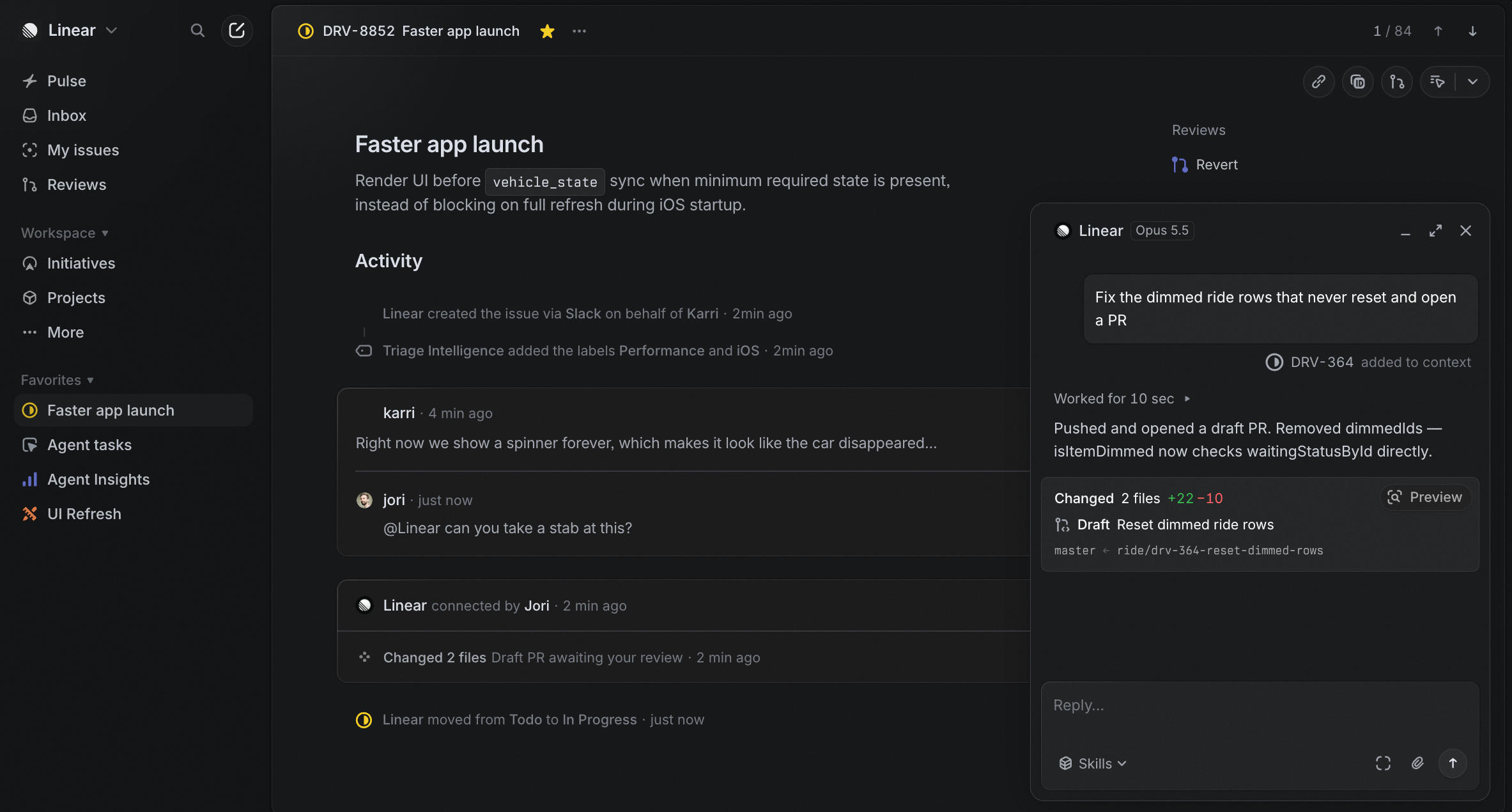
- Linear Agent and the Agent platform are listed on Free. Linear Agent is built in and “available by default in your workspace”; it searches and updates issues and projects. Third-party agents install from the Integrations Directory, and Linear’s agent docs say “Agents are not counted as billable seats in Linear.”
- Coding sessions are not free. When you delegate an issue to Linear Agent with coding sessions on, Linear runs Claude Code or Codex in a cloud sandbox and returns a draft pull request. The page says coding sessions are “supported on paid plans,” and they draw on AI credits.
The 250-issue cap is the one to plan around. An agent that turns a vague request into five sub-issues, or files a bug for every failing test, can burn through it in a week. Ask the agent to comment on an existing issue before it creates a new one.
Connect Linear to Claude Code, Codex or OpenCode
Linear’s server speaks Streamable HTTP at https://mcp.linear.app/mcp. A read-only endpoint, https://mcp.linear.app/mcp/readonly, exposes only the read tools, which is the safer place to start. Authentication is OAuth 2.1, or a Linear API key sent as Authorization: Bearer <key>.
1. Claude Code. Linear’s docs give this command:
claude mcp add --transport http linear-server https://mcp.linear.app/mcp
Start a session, run /mcp, and finish the OAuth sign-in in the browser. To share the server with everyone who clones the repo, add --scope project so the entry lands in a .mcp.json file at the repo root. Each person (and each Computer) still signs in once; the OAuth token isn’t in the file.
2. Codex. Add the server by URL, then log in:
codex mcp add linear --url https://mcp.linear.app/mcp
codex mcp login linear
The server lands in ~/.codex/config.toml under [mcp_servers.linear]. Linear’s page also shows an experimental_use_rmcp_client feature flag; OpenAI’s current Codex MCP docs no longer mention it, so add it only if an older Codex build refuses the URL.
3. OpenCode. Put the server in opencode.json (per OpenCode’s MCP docs, remote servers use "type": "remote"):
{
  "$schema": "https://opencode.ai/config.json",
  "mcp": {
    "linear": {
      "type": "remote",
      "url": "https://mcp.linear.app/mcp",
      "enabled": true
    }
  }
}
Then run opencode mcp auth linear to sign in, and opencode mcp list to check its status. If you’d rather use an API key, add "headers": { "Authorization": "Bearer {env:LINEAR_API_KEY}" } and "oauth": false. Create the key under Settings > Administration > API; admins can stop members from creating keys.
4. Smoke-test with a read. Ask the agent: “List my three most recent Linear issues with their status.” A correct answer proves auth and tools. Only then switch from the read-only endpoint to the full one and let it write.
The $0 route
Linear’s side is already free. The agent side is where “free” usually ends: Claude Code needs a paid Claude plan or API credits, and Codex signs in with a ChatGPT account or an API key whose included usage depends on the plan.
OpenCode is the exception. Its Zen docs list several models as free “for a limited time” today, including deepseek-v4.1-flash-free and glm-5.3-flash-free. On October 16, 2026, a clean OpenCode 1.19.2 install (via npx opencode-ai@latest) ran opencode/deepseek-v4.1-flash-free with no sign-in and no API key, and a write-and-run task finished in 32 seconds. Add one line to the config from step 3:
"model": "opencode/deepseek-v4.1-flash-free"
That gives you Linear Free plus a free model plus OpenCode: $0 on every line. The honest limits:
- The free tier answers only the OpenCode program. Direct API calls return HTTP 403
FreeTierError, so you can’t point another agent at it. - “Limited time” means it ends. Check the Zen page before you rely on it, and keep the model in one config line so the switch is one edit.
- Free models change their data terms; Zen’s page describes each one, so read it before a private repo goes near one.
- A small model makes more mistakes when it writes to Linear. Keep it on the read-only endpoint until you trust its updates.
From chat to assignment
Everything above happens in one terminal: you ask, the agent reads Linear, you watch. That works until you have three agents, two repos and a teammate asking which issue the agent already fixed.
Sharkly doesn’t connect to Linear yet (coming soon). What Sharkly adds is the layer around the agents: a board where a Sharkly Agent is an assignable teammate, running Claude Code, Codex or OpenCode on your own Computer, with each Task in an isolated git worktree.
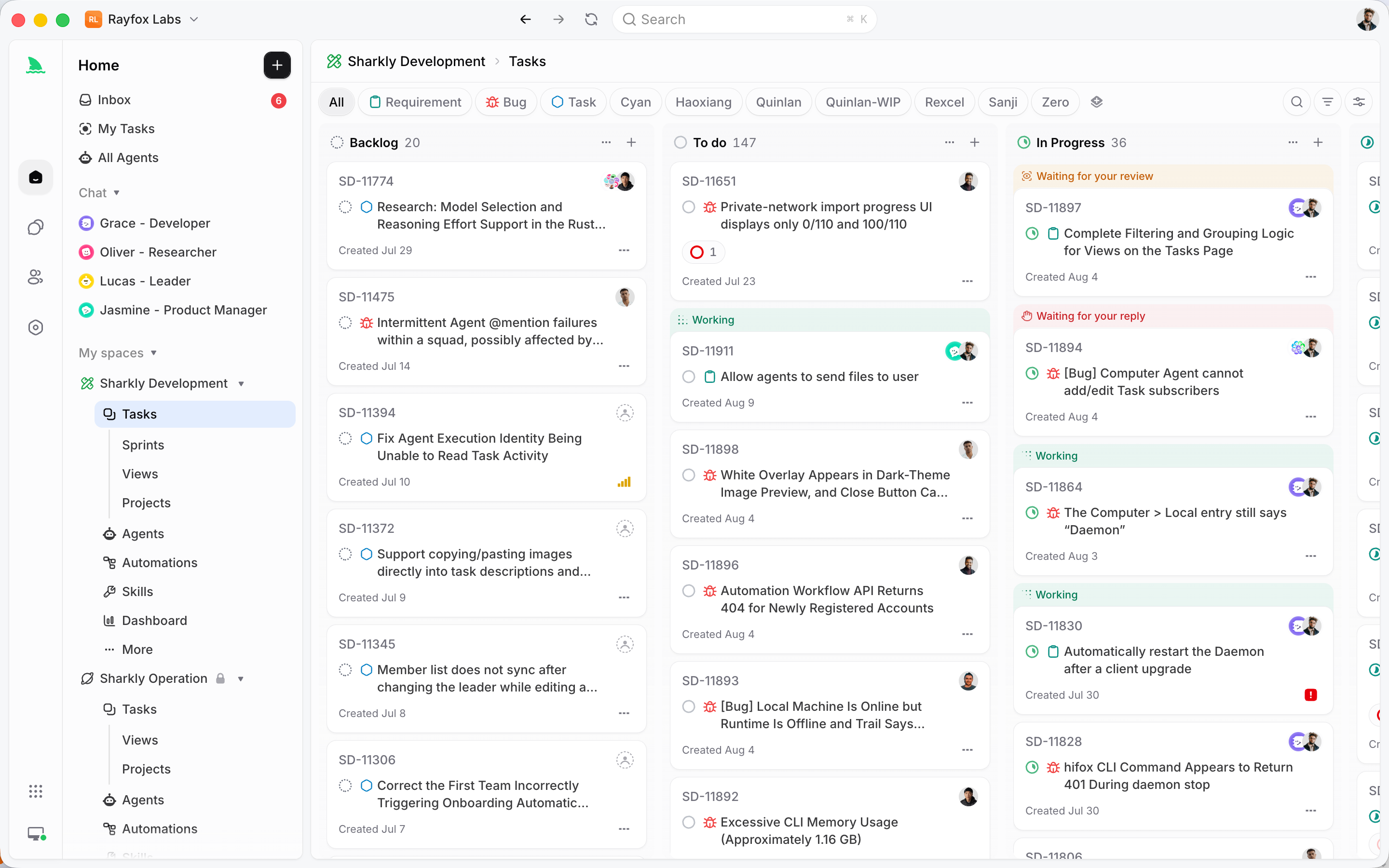
The Linear connection travels with the repo, as an inference rather than a tested result. A Sharkly Agent runs the agent CLI itself inside the repo’s worktree, so the MCP servers that CLI loads should be available to the run: a project-scoped .mcp.json for Claude Code, or the user-level config on that Computer. The OAuth sign-in has to exist on that Computer for the user the local service runs as. Smoke-test one small Task first, such as “read issue ENG-42 and summarize it in a Task comment”, before you hand over real work.
The result is a split that keeps both tools doing their job. Linear stays the record your team plans in. Agents research, execute and report on the Sharkly board; people set direction and accept the result. If you’re comparing the two as planning tools, Sharkly vs Linear covers it, and Linear alternatives for engineering teams has the wider field.
Sharkly is currently free for organizations of up to 5 people, and model usage stays on the accounts your agents already use. Connect one Computer, create one Agent, and assign it something boring.
Gotchas
- The 250-issue cap counts agent output. Tell the agent to search before it creates, and to comment instead of filing duplicates.
- OAuth sign-in stays on one Computer. A
.mcp.jsonin the repo shares the server entry, not the sign-in. Every Computer that runs the agent needs its own login. - Start read-only.
/mcp/readonlyor a Read-only API key keeps an eager agent from editing statuses across the board. - API key quotas are shared. All of one user’s keys share the 2,500 requests per hour, so a looping agent can slow your other scripts.
- Coding sessions are a separate product. Linear Agent’s cloud coding sessions need a paid plan and AI credits; the MCP route above doesn’t touch them.
FAQ
Is Linear free? Yes. The Free plan costs $0 for unlimited members, with 2 teams, 250 issues and 10MB uploads. Basic starts at $10 per user per month, billed yearly.
Is the Linear MCP server free? Yes. The server itself costs nothing, and Linear’s pricing table includes MCP access on the Free plan. You pay only for the agent that calls it.
Can I use Linear with Claude Code for free? Linear’s side is free, but Claude Code needs a paid Claude plan or API credits. For $0 on both sides, use OpenCode with one of its currently free models and the same MCP server. Claude Code project management covers the paid route in more depth.
Do AI agents take paid seats in Linear? No. Linear’s docs say agents are not counted as billable seats, though the agent’s provider may bill separately. Agents don’t take Sharkly seats either; running an agent crew on free and cheap tiers adds up both lines.