TL;DR: Coding agents leaking secrets is now a measured problem, not a hypothetical one. Apiiro found 2,539 real credentials in 1,994 public GitHub repositories, most of them sitting in agent settings files that record approved commands word for word. The fix for a team is ownership: one person owns shared agent settings, approvals get reviewed like code, secrets travel as variable references, scanners learn to catch passwords inside commands, and someone is named to rotate.
Why coding agents are leaking secrets now
Coding agents leaking secrets is a team problem that looks like an individual mistake. One developer clicks an approval, one file gets committed, one key goes public. The pattern repeats across thousands of repos because nobody owns the step where it happens.
In November 2026, Apiiro published a study of public GitHub. It counted 104,185 copies of .claude/settings.local.json, the per-project file where Claude Code stores standing approvals. Of those, 1,122 held a real secret. Counting git history, shared settings files and saved agent transcripts, the total came to 2,539 distinct secrets across 1,994 repos. Most belonged to individual developers, and 63 organizations were affected. The Hacker News thread passed 590 points.
This article is the team version of the response. If you want the per-agent permission model first, read what a coding agent should and shouldn’t be allowed to do. Here the question is narrower: who on your team owns each guardrail, and what does each one check?
How an approved command becomes a public secret
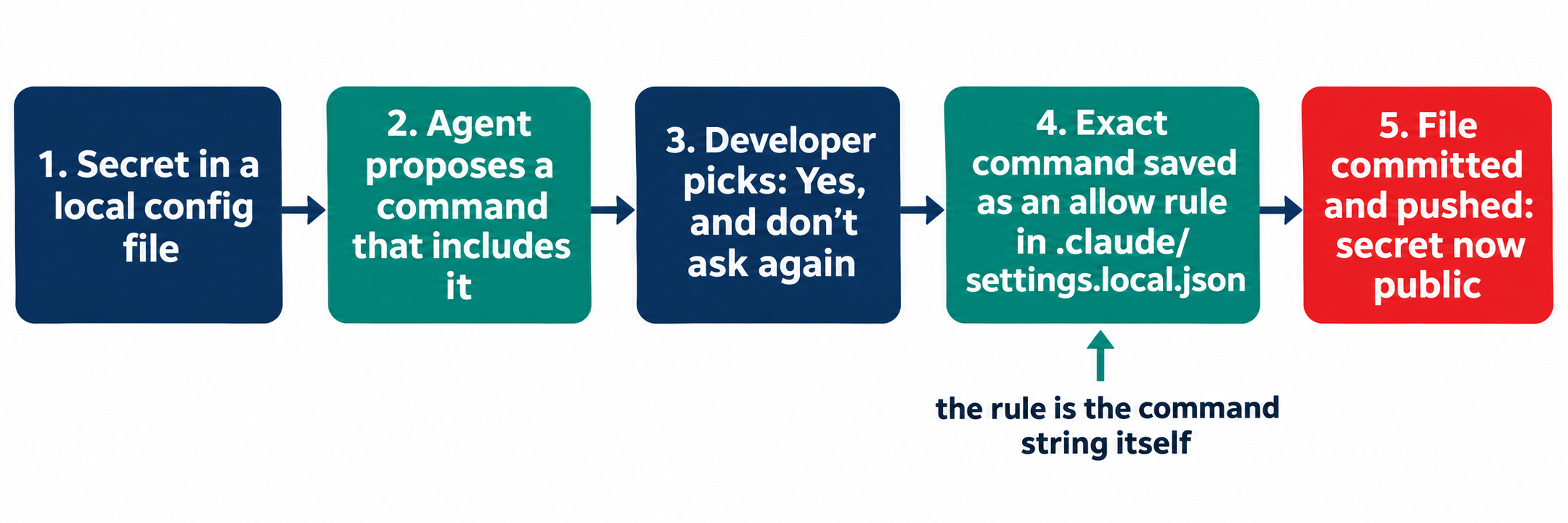
A standing approval is a rule that lets an agent run a command again without asking. Claude Code’s settings documentation says that choosing “Yes, and don’t ask again” on a Bash prompt saves an allow rule in .claude/settings.local.json at the repository root.
The rule is the command string. If the command was PGPASSWORD=<real password> psql -h db.example.com, the password is now in the file.
Claude Code does try to keep that file private. The docs say it adds **/.claude/settings.local.json to your global git excludes the first time it writes the file. Boris Cherny, who leads Claude Code at Anthropic, made the same point on Hacker News and said the team is prototyping fixes, including basic secret scanning.
The global exclude lives on one laptop, though. Apiiro lists the gaps: a folder that becomes a repo later, a clone on another computer, a file someone already committed. The repo’s own .gitignore never gets the entry, so the protection doesn’t travel with the code.
Three numbers from the study shape the checklist below:
- Agents commit the file themselves. In 539 of 1,105 traced repos, a commit co-authored by Claude changed it.
- Scanners miss command passwords. gitleaks and TruffleHog together missed 215 of the 1,122 files with a real secret.
- Deleting doesn’t help. Earlier versions of the file held 734 secrets in no current copy.
The habit isn’t specific to one tool. Apiiro also found secrets in agent chat transcripts, memory files and handoff notes. Anywhere an agent records what it ran, a typed secret gets recorded too.
The guardrail checklist for teams
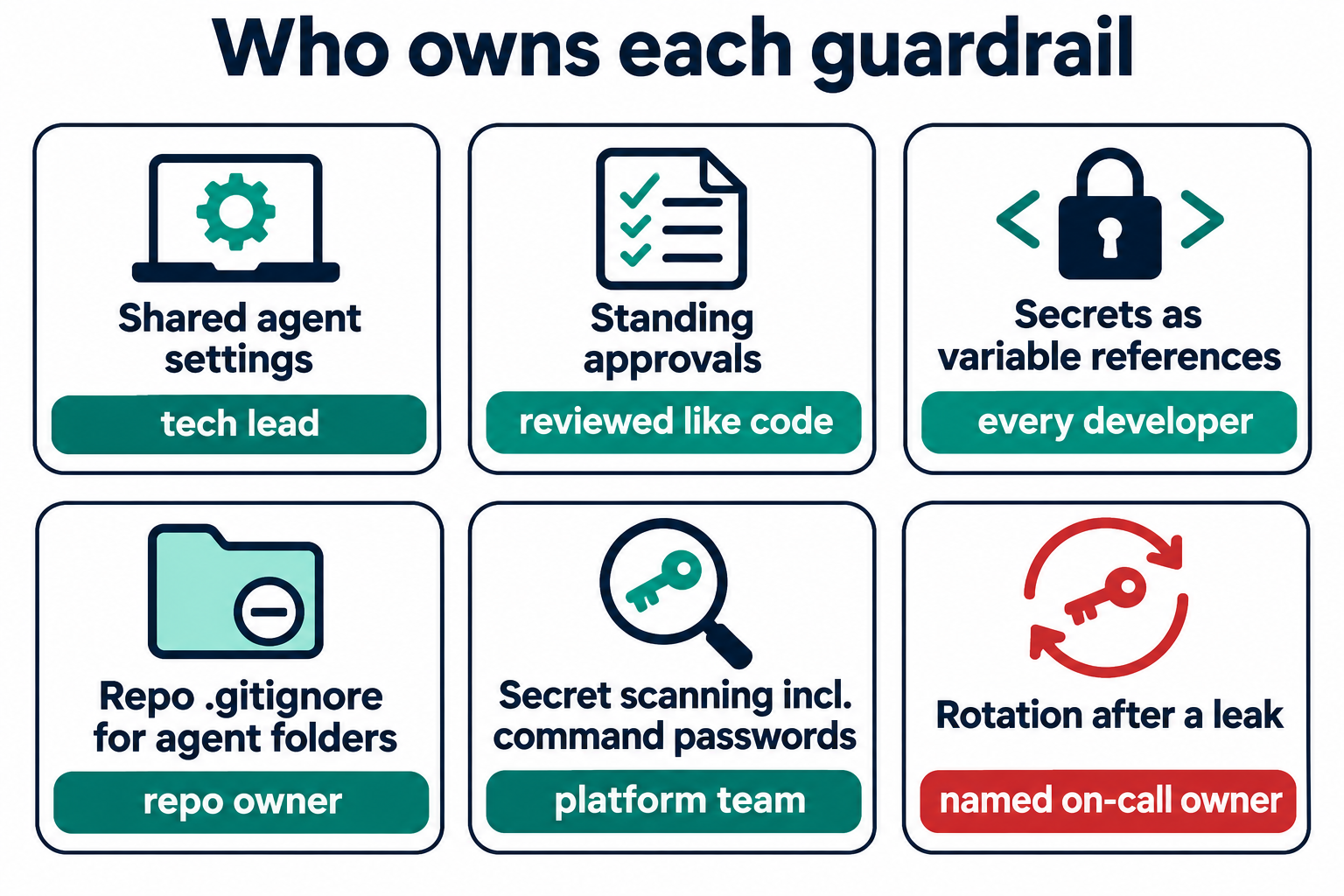
Each item below names an owner, because an unowned guardrail is the one that fails. The owners are suggestions; the point is that every row has exactly one.
1. Who approves agent permissions?
The tech lead owns the shared .claude/settings.json that the team commits on purpose. Apiiro found 298 of those shared files with a real secret, so committing on purpose is not the same as reviewing.
Write permissions as patterns, not literal commands. A pattern approves a class of action and never contains a value:
{
  "permissions": {
    "allow": ["Bash(npm run test:*)", "Bash(npm run lint)"],
    "deny": ["Read(./.env)", "Read(./.env.*)"]
  }
}
Use a pattern rule when the action is safe in every form it takes. Use a per-run prompt when the command touches production, credentials or anything you would want to read before it runs.
2. Review standing approvals like code
Treat any change to an agent settings file as a code change that needs a second reader. Add the agent folders to CODEOWNERS so a pull request that touches them requests the right reviewer:
/.claude/   @your-org/platform
/.cursor/   @your-org/platform
/.gemini/   @your-org/platform
This catches the agent-authored commits. A reviewer who sees a 40-line diff to an allow list will ask why, which is the question nobody asked at approval time. Our post on approval gates for coding agents covers where else to put a human stop.
3. Secrets travel as variable references
Every developer owns this one. Never type a secret into a command an agent might record. Reference the variable instead, so the approval stores the name and not the value:
# Recorded with the password inside it
PGPASSWORD=hunter2-prod psql -h db.example.com -U app

# Recorded as a reference: the value never enters the rule
psql "$DATABASE_URL" -c 'select 1'
Load DATABASE_URL from your secrets manager or a local .env that the agent is denied from reading. The same rule covers bearer tokens in curl calls and sshpass -p logins.
4. Ignore agent folders in the repo, not only on the laptop
The repo owner adds the local settings file to the repository’s own .gitignore, and to the org’s template for new repos. That entry ships with every clone:
echo '.claude/settings.local.json' >> .gitignore
git rm --cached .claude/settings.local.json 2>/dev/null
git commit -m "Stop tracking local agent settings"
Untracking stops future leaks. It does nothing for the copies already in history, forks and clones, which is why item 6 exists.
5. Scan for passwords inside commands
The platform team owns scanning in pre-commit and CI, including history. Default rules look for key formats: a provider prefix and a long random string. A password after PGPASSWORD= is an ordinary word on an ordinary line, so add rules for it. A starting point for a gitleaks config:
[extend]
useDefault = true

[[rules]]
id = "password-in-command"
description = "Password passed inline to a database or SSH client"
regex = '''(?:PGPASSWORD=|MYSQL_PWD=|sshpass\s+-p\s*)['"]?([^\s'"]{6,})'''
secretGroup = 1

[[rules]]
id = "bearer-in-command"
description = "Bearer token inside a curl command"
regex = '''(?i)authorization:\s*bearer\s+([A-Za-z0-9._\-]{20,})'''
secretGroup = 1
Run it against full history once with gitleaks git ., then on every push. Turn on GitHub secret scanning and push protection as well; it catches provider formats before they land. Apiiro’s advice on triage holds: credentials paired with a public host come first, because those are the ones that grant access.
6. Name a rotation owner before the leak
Rotation is the step that gets skipped, because removing the file feels like the fix. It isn’t. Pick a named on-call owner who rotates first and cleans up second.
To find what needs rotating, search your organization and your history:
gh search code --owner your-org --filename settings.local.json
git log --all --oneline -- .claude/settings.local.json .claude/settings.json
Then read every allow list on every laptop. A file that never reached GitHub is still plain JSON in a project folder, and Apiiro points to credential-stealing npm malware that already scans developer disks.
Where Sharkly fits
Sharkly is the layer around your coding agents, not a replacement for Claude Code, Codex or the runtime you already use. It doesn’t scan your repos for secrets; keep the scanners above. What it changes is where credentials live and who sees the work.
In Sharkly, an Agent carries plain and secret environment variables in its own configuration, and the local service on the Computer projects only the allowed environment and credentials into each run. The Agent docs describe that flow. Your task description says “check why login fails on staging”; it never needs to contain the password.
The second change is visibility. A run’s execution log records its tool calls and Runtime events, and results return to the Task where the team reviews them. An agent’s commit that touches .claude/ shows up on a shared board instead of one terminal. That’s the same evidence trail we describe in reviewing AI-generated code with task-level evidence.
Agents research, execute, test and report. People grant authority, review the allow list and accept the result.
Conclusion
The Apiiro numbers say the leak isn’t one careless click. It’s a missing owner at six points: shared settings, standing approvals, how secrets get typed, the repo’s ignore file, scanning and rotation. Assign each one this week, starting with the history search, because the copies already public matter more than the next commit.
If your team runs several coding agents, put their work on one board where the commits and the approvals are visible. Start with Sharkly and connect one Computer and one Agent first.
FAQ
Is this a Claude Code bug?
It’s a behavior of how standing approvals are stored, which Apiiro reproduced on current models. Claude Code adds the file to your global git excludes when it creates it, and Anthropic says it’s prototyping fixes. The team-level gaps (clones, old commits, shared files) need your own guardrails either way.
Does deleting .claude/settings.local.json remove the leak?
No. Git history, forks and clones keep the old versions. Apiiro found 734 secrets that exist only in earlier versions of the file. Rotate the credential first, then untrack the file.
Do secret scanners catch this?
Partly. gitleaks and TruffleHog flagged most files with provider-format keys but missed 215 of 1,122, mostly passwords inside commands. Add custom rules for PGPASSWORD=, sshpass -p and bearer headers.
Which agent files should we treat as secret-bearing?
Treat .claude/, .cursor/, .gemini/, .specstory/, agent memory files and handoff notes like .env, on laptops and in repos.
Should we stop using “don’t ask again”?
Not necessarily. Approve patterns such as Bash(npm run test:*) instead of literal commands, and keep secrets out of the commands themselves. A pattern never contains a value.
Who should own rotation?
One named person per team or service, decided before an incident. Rotation is the only step that makes a leaked credential useless.