An AI agent missing access looks exactly like an AI agent that can’t reason, so check its access before you blame the model. A November 2026 field study of Claude Code debugging eight database incidents found an access gap in every incident whose root cause depended on concurrency. The agent’s wrong guesses matched the evidence it could see. Give it read-only, scoped access to the state it lacks, and many “reasoning” failures disappear.
Your agent announced a root cause, shipped a fix, then walked it back two deploys later. The easy conclusion is that the model isn’t smart enough. A new paper suggests you’re fixing the wrong layer.
If you run several coding agents on shared work, Sharkly is where we keep that access configuration per agent and per task, so it’s visible to the whole team.
What the paper found about an AI agent missing access
In “Where LLM Agents Get Stuck Debugging Databases: Access More Than Reasoning”, Gustavo Pinto reports a field observation of Claude Code diagnosing eight database incidents in a production message-dispatch engine. The numbers are small and specific:
| Finding | Count |
|---|---|
| Incidents observed | 8 |
| Incidents whose root cause depended on runtime concurrency | 5 |
| Concurrency incidents with an access gap | 5 of 5 |
| Access gap as the only cause | 1 |
| Access gap combined with a reasoning error | 4 |
| Non-concurrency incidents that needed more access | 0 of 3 |
In every concurrency incident, the agent shipped a fix and later retracted it. Each wrong guess cost a deploy-and-observe cycle.
The missing access was concrete: live lock views, untruncated deadlock reports, read-only execution, and an explicit statement of which environment the agent was in. The reasoning errors that did appear (anchoring on an early cause, partial exploration of the configuration) always came on top of an access gap.
The line worth pinning to your team wiki: the agent’s wrong hypotheses “were consistent with the evidence it could see; they were not fabrications.”
Eight incidents from one system is a field report, not a benchmark. Treat it as a hint about where to look first.
Why missing access looks like bad reasoning
A model that can’t see a lock graph reasons from the code and logs it has. If those logs are truncated, it fills the gap with the most plausible story, and a wrong story reads exactly like a reasoning failure.
From the outside, three different problems produce the same symptom:
- Missing access: the evidence exists, but the agent can’t reach it.
- Missing context: the agent can reach it, but nobody told it which environment, service or incident it’s looking at.
- Reasoning error: the agent had the evidence and still drew the wrong conclusion.
Only the third is fixed by a stronger model. The first two are configuration problems. If you want to compare models anyway, test the new model on your real tasks after you’ve ruled out access, so you’re comparing reasoning and not luck.
The AI agent access checklist
Before you mark a run as “the model got it wrong,” walk this list against the run’s transcript:
- Logs: can the agent read the full log for the failing window, untruncated, with timestamps?
- Live state: can it query current state read-only, such as
pg_locksin PostgreSQL or the latest deadlock report in MySQL InnoDB? - Schemas and config: can it see the schema, migrations and the effective runtime configuration, and not the repo defaults alone?
- Environment context: does it know whether it’s looking at staging or production, and which service version is deployed?
- Staging data: can it reproduce the failure against realistic data without touching production?
- Docs: does it have the runbook, the architecture notes and the incident history for this service?
- Task history: can it read what was already tried, by people or other agents, and why it failed?
If any answer is “no,” fix that first. A run that guessed wrong without item 2 or item 4 tells you nothing about the model.
How do you check what access an agent had in a run?
Read the transcript, not the summary. Permission errors, files the agent couldn’t find, and outputs cut off mid-line all mark an access gap. Our guide to spotting a stuck coding agent covers the run signals in more detail.
How to grant access safely
The goal is the paper’s own framing: give the agent the access it lacks inside existing security controls.
- Read-only first. Create a database role that can only read, or set
default_transaction_read_onlyfor the agent’s session. Turn onlog_lock_waitsso lock waits land in logs the agent can read. - Least privilege per agent. Follow the NIST definition of least privilege: each agent gets only what its role needs. A debugging agent gets read access to state; a fixing agent gets write access to a branch.
- No borrowed credentials. A dedicated service account, not your own login, makes every query attributable.
- Secrets stay out of prompts. Never paste tokens into a task description, a comment, agent instructions or a reusable skill file.
- Say the environment out loud. Put “this is staging, service version X” in the task itself. The paper lists explicit environment context as missing access, and it costs one line.
There’s an opposite failure too. Too much access turns a wrong guess into a production incident. We covered that side in coding agent permissions: what an agent should and shouldn’t be allowed to do. Use that guide when an agent can do too much; use this checklist when it can see too little.
-- A read-only role for a debugging agent (PostgreSQL)
CREATE ROLE agent_debug_ro LOGIN PASSWORD 'set-from-your-secret-store';
GRANT CONNECT ON DATABASE dispatch TO agent_debug_ro;
GRANT USAGE ON SCHEMA public TO agent_debug_ro;
GRANT SELECT ON ALL TABLES IN SCHEMA public TO agent_debug_ro;
GRANT pg_read_all_stats TO agent_debug_ro;  -- lock and activity views
ALTER ROLE agent_debug_ro SET default_transaction_read_only = on;
Where Sharkly fits
Sharkly doesn’t replace Claude Code, Codex or the runtime you already use. It manages the work around them, and that includes the access each agent starts every run with. Per the Agent task execution docs, a task-backed run can include the task description, recent comments, the agent’s instructions and Skills, its repositories, and configured environment variables and secret bindings.
That gives you one place to answer the checklist above for each agent:
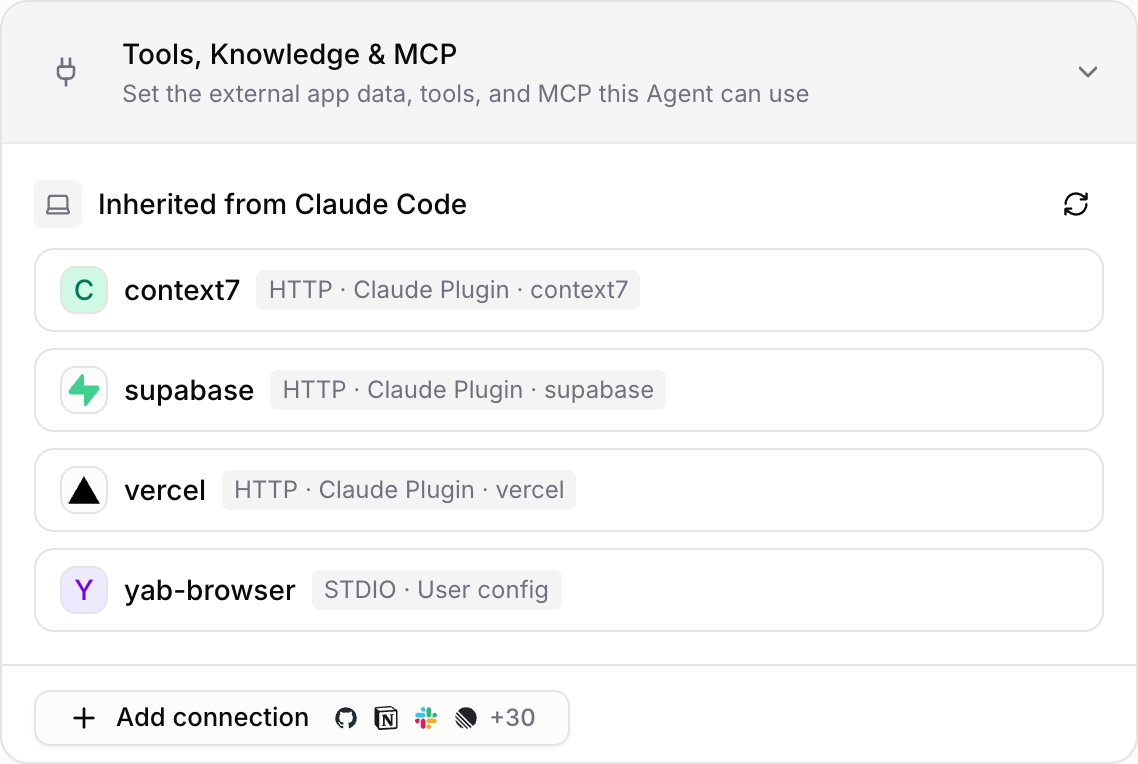
- Tools and MCP connections. Each Agent has a Tools, Knowledge & MCP panel showing what it can reach, including the MCP servers it inherits from the runtime on its Computer. MCP is the open protocol most coding agents use to connect to external tools and data.
- Repositories. Per the Repositories docs, an Agent’s own repository bindings narrow or replace the Space defaults, so a debugging agent can see only the codebase it needs.
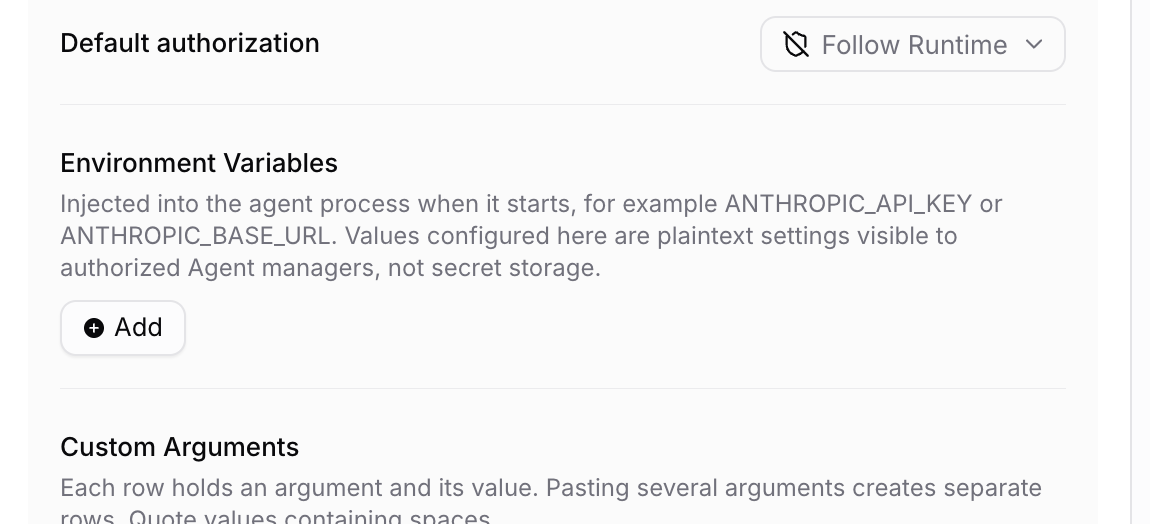
- Environment variables. Runtime environment variables are injected into the agent process at start. The settings say plainly that plain values are visible to authorized Agent managers and aren’t secret storage, so keep credentials in secret bindings.
- Skills for runbooks. A Skill packages reusable instructions and supporting files, such as an incident runbook, for every run that needs it.
- Task history. Comments and run history stay on the task, so the next agent sees what the last one tried. More in keeping context across AI sessions.
The Repositories docs suggest a read-only check before any code-changing task. Apply the same idea to debugging: ask the agent to list what it can and can’t reach before it proposes a cause.
Run the access check before you switch models
Here’s the order we use when an agent’s diagnosis goes wrong:
- Read the run transcript and mark every permission error, missing file and truncated output.
- Score the run against the seven-item checklist above.
- Grant the missing access read-only, through the agent’s configuration, not through a pasted credential.
- State the environment in the task.
- Rerun the same task with the same model.
- Only if it still fails with full evidence, call it a reasoning problem and try another model.
It’s tempting to jump straight to step 6. In the study, each wrong guess cost a deploy-and-observe cycle, so every skipped check gets expensive.
Conclusion
A wrong answer built from partial evidence looks identical to one built from bad reasoning, and only the second is fixed by a bigger model. Check logs, live state, environment context, docs and task history first, then grant what’s missing read-only and per agent.
If you want that access configuration visible per agent and tied to each task, set up Sharkly and start with one debugging agent and a read-only role.
FAQ
Why does my AI agent keep guessing the wrong root cause?
Often because it can’t see the evidence that would rule its guess out. In the study, every concurrency-dependent incident had an access gap, and the agent’s wrong hypotheses were consistent with what it could see. Check its access to logs, live state and environment context first.
Is a missing-access failure different from a hallucination?
Yes. A hallucination invents facts; a missing-access failure draws a plausible conclusion from incomplete facts. The fix is more evidence, not a different model.
Should I give a debugging agent production database access?
Give it read-only access to the views it needs, through a dedicated role, inside your existing controls. Write access to production isn’t required to diagnose most incidents.
What access does an AI coding agent need to debug a database?
At minimum: untruncated logs, read-only lock and activity views, the schema and effective configuration, and a clear statement of which environment it’s in. Runbooks and prior attempts on the task help too.
Will a stronger model fix these failures?
Only the ones that are true reasoning errors. If the evidence is missing, a stronger model produces a more convincing wrong answer.