TL;DR
The GLM-5.4 API is live only through Z.ai’s GLM Coding Plan for now. Create a Coding Plan key, point your agent at the endpoint that matches its protocol (/api/anthropic for Claude Code, /api/v1 for Codex, /api/coding/paas/v4 for OpenAI-compatible tools), and set the model to glm-5.4. A standard pay-as-you-go key can’t reach it yet.
What GLM-5.4 is, and why the API setup is different this time
Z.ai released GLM-5.4 in late November 2026. It’s the lab’s first flagship built on a Loop Transformer: a block of weight-shared layers runs more than once per forward pass, so the network gets deeper without adding parameters. Per the GLM-5.4 model page, it reuses 28 layers of the GLM-5 base model in two passes, at roughly 750B parameters.
The numbers you’ll plan around:
| Spec | GLM-5.4 |
|---|---|
| Context window | 1M tokens |
| Max output | 128K tokens |
| Input | text, image, video, file |
| Output | text |
| Throughput (Z.ai’s figures) | up to 200 tokens/s off-peak, 70 to 80 at peak |
| Open weights | not released |
The catch is access. The model page says GLM-5.4 is available to all Coding Plan users, and that “the Model API will be made available upon completion of the security assessment.” Simon Willison hit the same wall on launch day: he had to subscribe to the Coding Plan because the regular API couldn’t serve the model.
So this guide is a coding-agent setup guide first. If you run several agents, it also shows where GLM-5.4 fits next to the models you already use; Sharkly is where we’ll wire it into a team workflow later on.
Which GLM-5.4 API endpoint and key to use
Use a GLM Coding Plan key with one of three endpoints, picked by your tool’s protocol:
- Anthropic Messages,
https://api.z.ai/api/anthropic: Claude Code, Goose. - OpenAI Responses,
https://api.z.ai/api/v1: Codex. - OpenAI Chat Completions,
https://api.z.ai/api/coding/paas/v4: Cline, OpenCode, Kilo Code and other OpenAI-compatible tools.
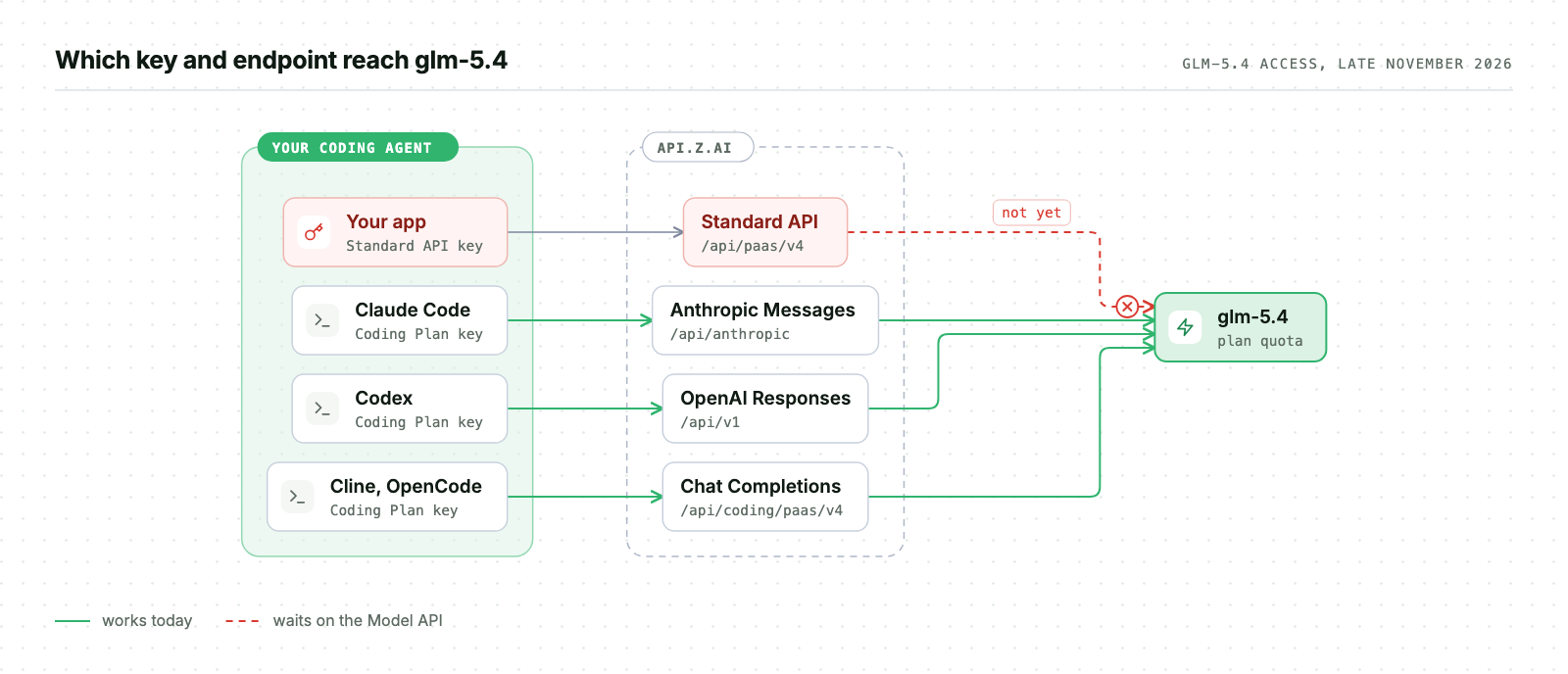
Which key type bills your plan?
Since October 16, 2026, Z.ai manages Standard keys and Coding Plan keys separately, and the key type decides billing, not the URL. A Standard key in a coding tool won’t touch your plan quota and may charge your balance. Create the key under API Keys, Personal Coding Plan (or Team Coding Plan, My Plan for team seats).
Plans start at $18 per month (Lite, Pro, Max). On weekly-quota plans, Z.ai sets the GLM-5.4 allowance at 1.5x that of GLM-5.3.
Check the key before you touch any agent
Confirm the key and model name with one raw request against the Anthropic-compatible endpoint:
export ZAI_API_KEY="your-coding-plan-key"

curl https://api.z.ai/api/anthropic/v1/messages \
  -H "x-api-key: $ZAI_API_KEY" \
  -H "anthropic-version: 2023-06-01" \
  -H "content-type: application/json" \
  -d '{
    "model": "glm-5.4",
    "max_tokens": 512,
    "messages": [{"role": "user", "content": "Reply with the word ready."}]
  }'
A wrong or expired key returns a 401 with “token expired or incorrect.” If the key passes but the call still fails, check that it came from the Coding Plan page and that the model name is exactly glm-5.4.
Set up GLM-5.4 in Claude Code
Claude Code reads its provider from ~/.claude/settings.json. Add or update these keys inside env; don’t replace the whole file if it holds other settings:
{
  "env": {
    "ANTHROPIC_AUTH_TOKEN": "your-coding-plan-key",
    "ANTHROPIC_BASE_URL": "https://api.z.ai/api/anthropic",
    "ANTHROPIC_DEFAULT_OPUS_MODEL": "glm-5.4[1m]",
    "ANTHROPIC_DEFAULT_SONNET_MODEL": "glm-5.4[1m]",
    "ANTHROPIC_DEFAULT_HAIKU_MODEL": "glm-5.3-flash[1m]",
    "CLAUDE_CODE_AUTO_COMPACT_WINDOW": "1000000",
    "API_TIMEOUT_MS": "3000000"
  }
}
The [1m] suffix turns on the 1M context window, and the compact window setting stops Claude Code from compacting at its default size. Z.ai’s model-switching guide maps all three slots to glm-5.4[1m]; we keep Haiku on GLM-5.3-Flash so cheap background calls don’t eat GLM-5.4 quota. If Claude Code rejects the suffix, upgrade it.
Open a new terminal, run claude, and type /status. The model line should read glm-5.4 or glm-5.4[1m].
How does GLM-5.4 effort map to Claude Code’s /effort?
GLM-5.4 has three real levels: low, high and max. Z.ai converts whatever your tool sends:
| Your tool sends | GLM-5.4 runs at |
|---|---|
thinking unset, enabled or adaptive |
max (default) |
thinking disabled or off |
low (still thinks lightly) |
reasoning_effort minimal, light, low |
low |
reasoning_effort medium, high |
high |
reasoning_effort xhigh, max, ultra |
max |
Explicit effort wins over the thinking toggle. Z.ai recommends max for coding, which is also the default.
Set up the GLM-5.4 API in Codex
Codex needs the Responses endpoint and a model catalog entry. Z.ai’s Codex guide gives a full ~/.codex/models.json with a glm-5.4 entry (1,048,576-token window, low/high/max reasoning levels); copy it as published. Then point ~/.codex/config.toml at it:
model_provider = "ZAI"
model = "glm-5.4"
model_reasoning_effort = "max"
model_catalog_json = "~/.codex/models.json"

[model_providers.ZAI]
name = "ZAI"
base_url = "https://api.z.ai/api/v1"
experimental_bearer_token = "your-coding-plan-key"
wire_api = "responses"
wire_api must be responses. For Cline or OpenCode, pick an OpenAI Compatible provider, set the base URL to https://api.z.ai/api/coding/paas/v4, enter glm-5.4 as a custom model, and set the context window to 1,000,000.
One limit to respect: the Coding Plan is restricted to Z.ai’s list of supported tools. Claude Code, Codex, OpenCode, Cline and Cursor are on it. A custom script calling the endpoint directly is outside that scope.
Run GLM-5.4 as a Sharkly Agent
Wiring one terminal is the easy half. The harder question is how GLM-5.4 behaves on your team’s real backlog, next to the model you already trust. Sharkly runs your existing agents on your own Computers, so a GLM-5.4 Agent is a Claude Code Agent with different environment variables.
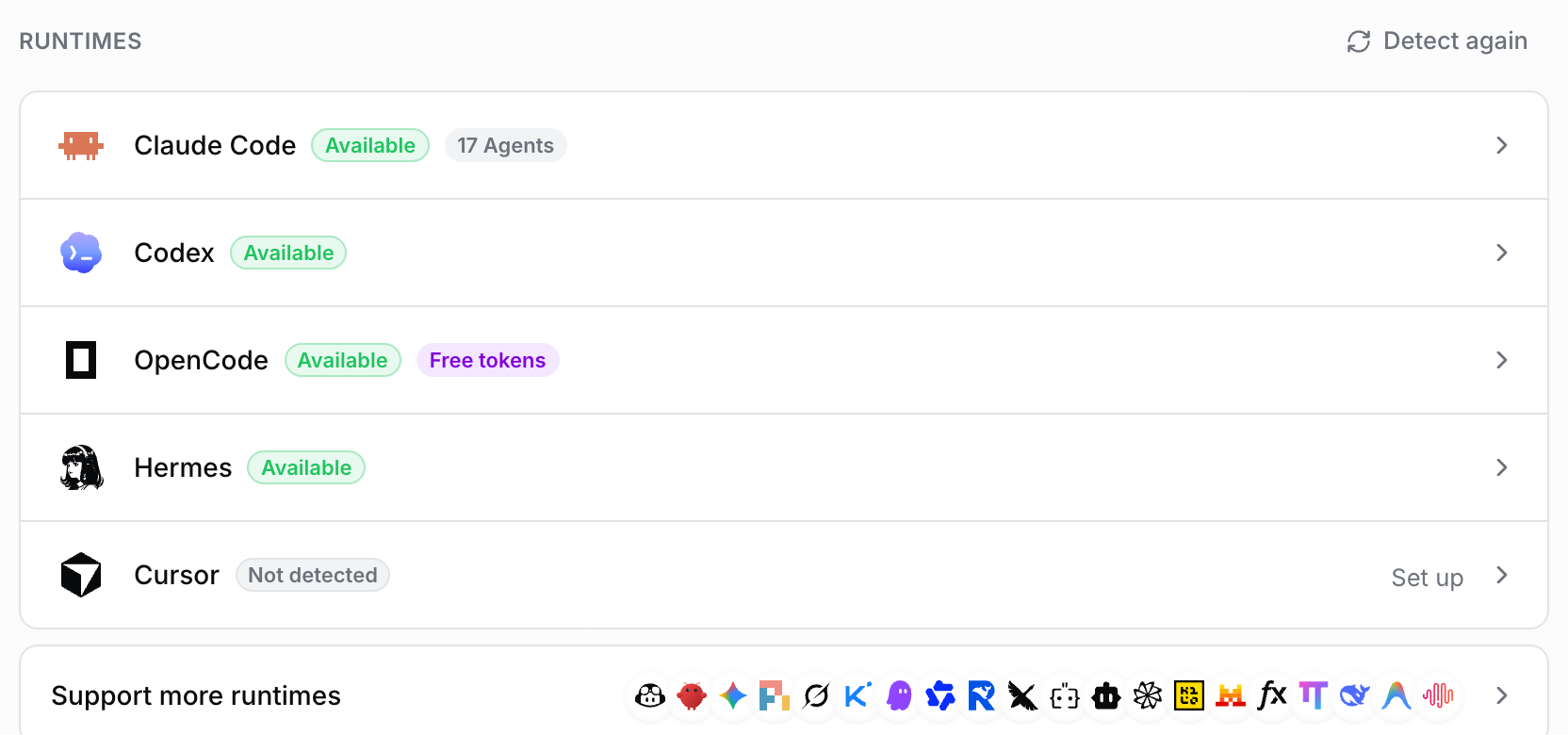
- Confirm the Runtime. Open the Computer in Sharkly and check that Claude Code shows as Available under Runtimes.
- Create an Agent on that Runtime. Give it a clear name, such as “Claude Code on GLM-5.4”, so nobody mistakes its output for your default model.
- Add the provider as Agent environment variables. Set
ANTHROPIC_BASE_URLand the two model slots as plain variables, andANTHROPIC_AUTH_TOKENas a secret. Per the Agent docs, an Agent-specific variable overrides the Runtime default, so your other Claude Code Agents on the same Computer keep their own provider. - Set a run limit. Keep Max concurrency (assigned tasks) low while you learn how fast your plan quota drains.
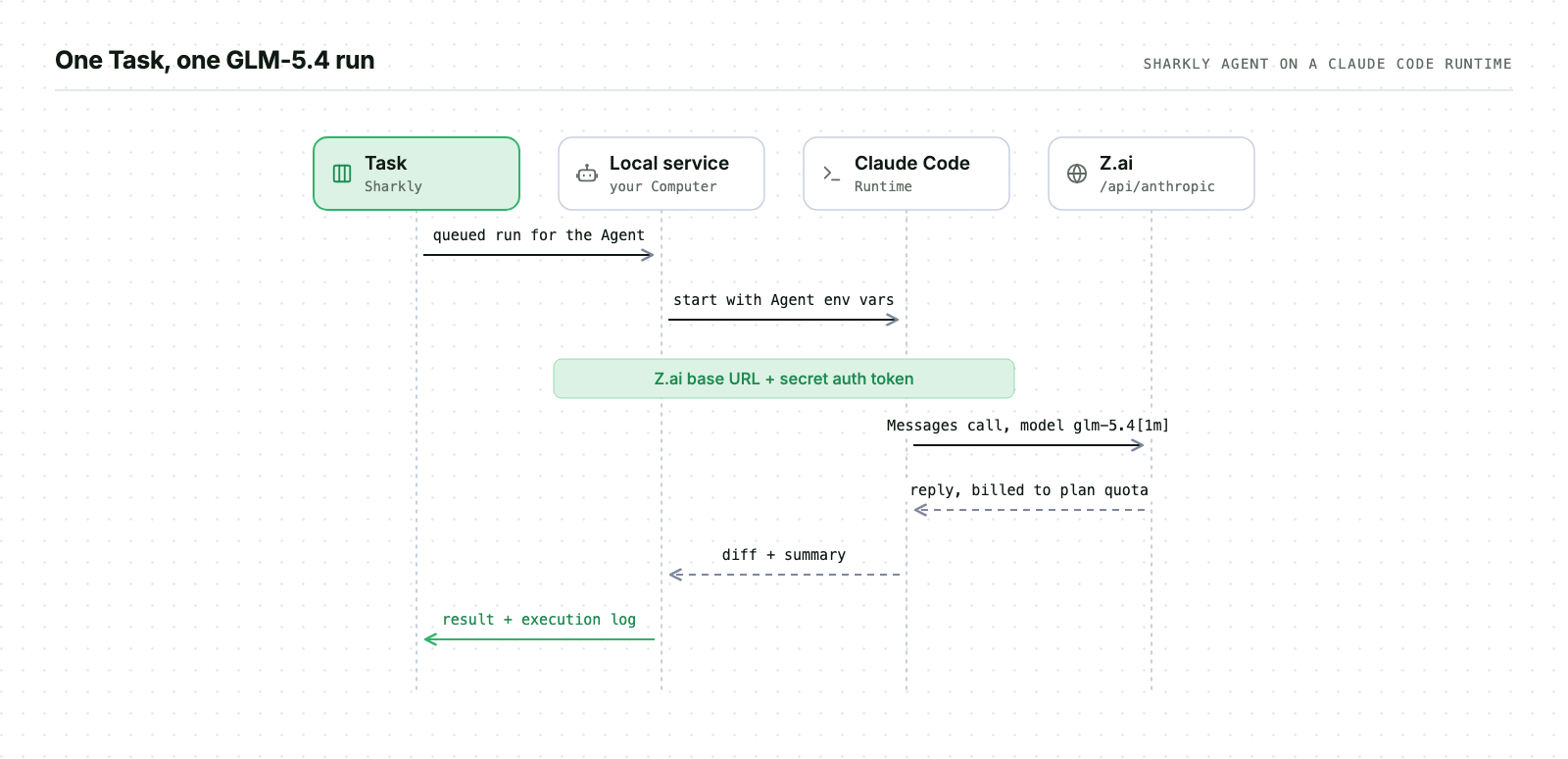
Now assign the same three or four Tasks to the GLM-5.4 Agent and to your usual Agent, and compare the diffs in review. That side-by-side is the method from our guide on testing a new coding model on real tasks. Sharkly doesn’t sell tokens: every run bills your Coding Plan key, as with any BYOK setup.
GLM-5.4 limits to plan around
Marathon thinking. Z.ai’s own write-up says the model “tends to get caught in overly long ‘marathon thinking’ loops.” That’s why the docs set API_TIMEOUT_MS to 3,000,000 ms (50 minutes). In Sharkly, check that the Agent’s Max run duration (180 minutes by default) leaves room, and drop effort to high for small edits.
No standard API yet. Anything outside a supported coding tool waits for the Model API. Don’t build a production service on a Coding Plan key.
Benchmarks are Z.ai’s. The “comparable to 2T-3T parameter models” claim and the 10 to 14% shorter outputs come from Z.ai’s own tests (the output figure is from a 30B ablation). Your repo is the benchmark that counts; compare cost per accepted change, as in when a cheaper model costs more.
Where GLM-5.4 fits next to GLM-5.3-Flash
GLM-5.3-Flash stays the cheap, fast option for routine work; see running coding agents on GLM-5.3-Flash. GLM-5.4 is the model for long reasoning chains: multi-file refactors, tricky debugging, and the large-context tasks that use the 1M window. Two Agents on one Computer, one per model, lets you route each Task to the one it needs.
Conclusion
The GLM-5.4 API comes down to three choices: a Coding Plan key, the endpoint that matches your agent’s protocol, and glm-5.4 as the model, with [1m] if you want the full window. Run the curl check first, then wire Claude Code or Codex. When you’re ready to compare it with your default model on real work, connect a Computer to Sharkly and give GLM-5.4 its own Agent.
FAQ
Is the GLM-5.4 API available on the standard Z.ai API?
Not yet. Z.ai says the Model API opens after a security assessment. Today, only GLM Coding Plan keys reach glm-5.4.
What is the GLM-5.4 model name in API calls?
Use glm-5.4. In Claude Code, glm-5.4[1m] turns on the 1M-token context window.
What base URL does GLM-5.4 use?
https://api.z.ai/api/anthropic for Anthropic-protocol tools, https://api.z.ai/api/v1 for Codex, and https://api.z.ai/api/coding/paas/v4 for OpenAI-compatible tools.
How much does GLM-5.4 cost?
GLM Coding Plans start at $18 per month. There’s no per-token GLM-5.4 price yet because the pay-as-you-go API isn’t open.
Is GLM-5.4 open source?
Not at launch. Z.ai hasn’t released GLM-5.4 weights.
Can I use GLM-5.4 with Claude Code and Codex at the same time?
Yes. One Coding Plan key works on all three endpoints, and both runs draw from the same plan quota.