TL;DR: GPT-6.2 pricing is $8 per million input tokens and $40 per million output tokens for Astra, and $2 and $10 for Sol. Cached input reads cost $0.40 and $0.10. One illustrative 20-turn agent task costs about $3.23 on Astra and $0.81 on Sol with prompt caching working, and four times that without it.
OpenAI released GPT-6.2 Astra and GPT-6.2 Sol on November 17, 2026. Astra is the frontier model for the hardest work. Sol is the everyday model, and its model page says it is built for “powering agents at scale.”
A price per million tokens tells you little about what an agent team will spend. Agents resend their context every turn, so the bill depends on caching, context length, and how many agents run at once. This guide turns the GPT-6.2 price list into per-task and per-month numbers, then shows the caps that keep them predictable. If you already run coding agents side by side, Sharkly is where you set those caps per Agent.
GPT-6.2 pricing for Astra and Sol
Here is the standard API price list from the Astra model page and the Sol model page, checked on November 20, 2026. All prices are per million tokens.
| Price per 1M tokens | GPT-6.2 Astra | GPT-6.2 Sol |
|---|---|---|
| Input | $8.00 | $2.00 |
| Cached input (reads) | $0.40 | $0.10 |
| Cache writes (30-minute retention) | $10.00 | $2.50 |
| Cache writes (12-hour retention) | $20.00 | $5.00 |
| Output | $40.00 | $10.00 |
| Context window | 1,050,000 | 1,050,000 |
Sol costs exactly a quarter of Astra on every line. Both models share the same context window and the same rate limits, so price is what separates them on a bill.
The pricing rules that change the total
Five rules on the model pages move an agent bill more than the headline rate does:
- Long context surcharge. A request with more than 272K input tokens pays double for input and cache, and 1.5 times for output, on the whole request.
- Cache writes cost extra. Writing a prefix to the cache costs 1.25 times normal input for 30 minutes, or 2.5 times for 12 hours.
- Cache reads are cheap. On GPT-6.2 a cached read costs 0.05 times normal input, per OpenAI’s prompt caching guide.
- Batch costs 50 percent of standard rates.
- Speed costs more. Fast mode is 2 times the standard rate. Ultrafast is 3 times through February 28, 2027, and 6 times from March 1, 2027.
GPT-6.2 does not support Flex processing. Its replacement is a discounted background completion window, covered below.
What one agent task costs on GPT-6.2
Take one illustrative coding task: 20 turns, 60,000 input tokens per turn, and 2,000 output tokens per turn. That is 1.2 million input tokens and 40,000 output tokens for the whole task. Your numbers will differ, so swap in your own.
| Scenario | GPT-6.2 Astra | GPT-6.2 Sol |
|---|---|---|
| No cache hits | $11.20 | $2.80 |
| 90 percent cache hits | $3.23 | $0.81 |
| 90 percent cache hits, 8-hour background window | $1.94 | $0.49 |
The cached rows assume 90 percent of input is read from cache and the other 10 percent is billed as a 30-minute cache write. That is the pessimistic case, so a real cached run should land at or below these numbers.
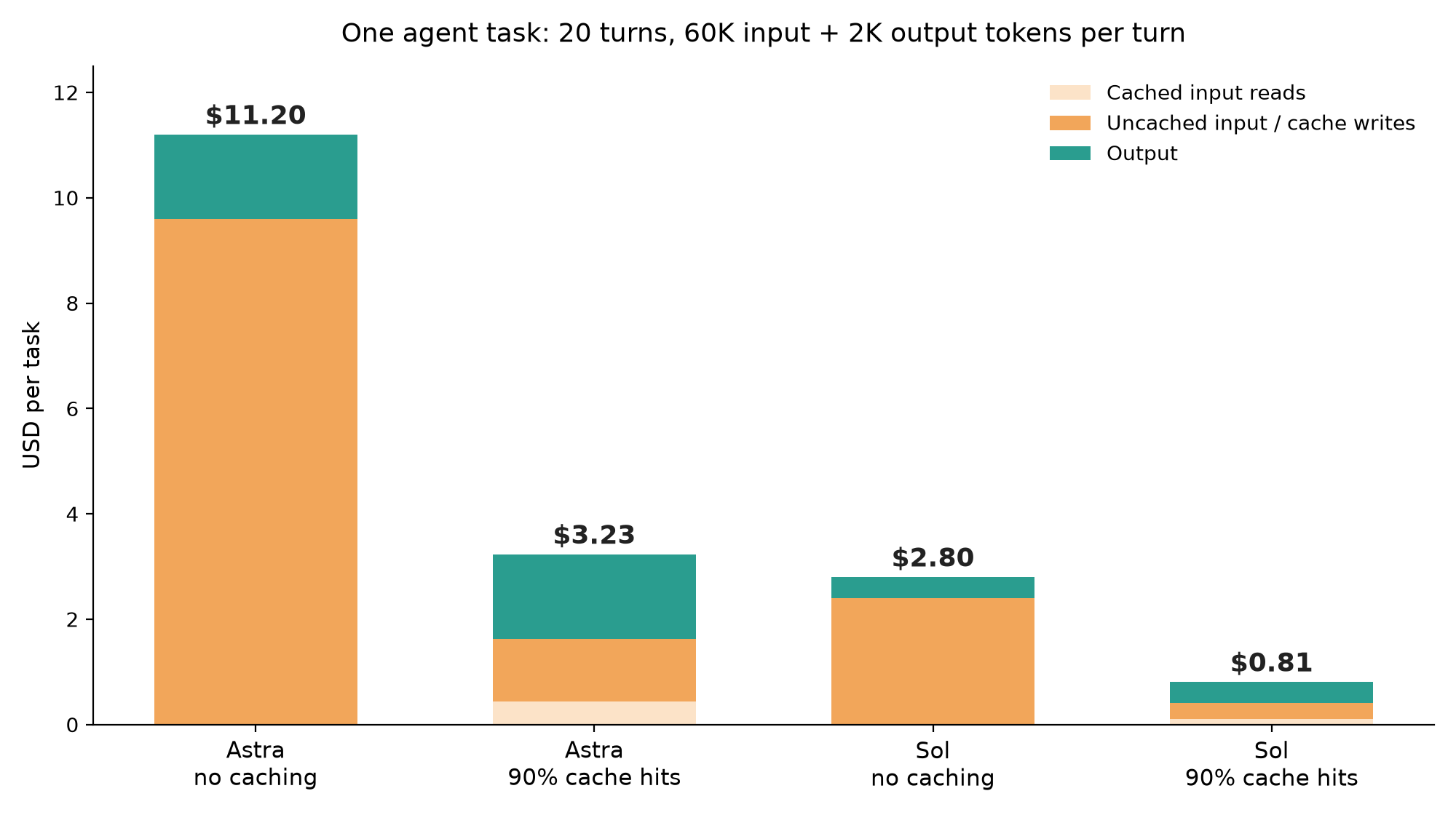
Two numbers stand out. Caching cuts the task cost by about 71 percent on both models. And a cached Astra task costs only a little more than an uncached Sol task. The cheap model with a broken cache costs nearly as much as the expensive model with a working one.
Where the long context surcharge bites
Coding agents that read half a repository can cross 272K input tokens per turn. Compare two Sol turns, both with 2,000 output tokens and no cache:
- 270,000 input tokens: $0.54 input plus $0.02 output, $0.56 total.
- 300,000 input tokens: $1.20 input plus $0.03 output, $1.23 total.
An 11 percent bigger context costs more than twice as much. If your agent harness compacts context, keep it under 272K. The same logic sits behind our piece on why cheap models can cost more: price per accepted change beats price per token.
GPT-6.2 cost for an agent team per month
Now scale the cached numbers. Say five agents each finish 8 tasks a day for 22 working days. That is 880 tasks a month.
| Team setup | Tasks per month | Monthly model cost |
|---|---|---|
| All five agents on Astra | 880 | $2,842 |
| One Astra lead, four Sol agents | 176 + 704 | $1,139 |
| All five agents on Sol | 880 | $713 |
The mixed setup costs 60 percent less than all-Astra. It keeps the frontier model on planning and hard reviews and sends routine work to Sol. We cover the lead role in GPT-6 Astra as your Crew leader, and the same reasoning drives same budget, more agents with GPT-6 Sol.
Price is only one cap. Tokens per minute stop an agent team before money does on the lower usage tiers, which the GPT-6.2 rate limits guide works through tier by tier.
Codex plans versus API keys
If your agents run Codex on a ChatGPT plan, you don’t pay per token. You spend an allowance. The Codex pricing page estimates 6 to 50 local messages per five-hour window for GPT-6.2 Astra on Plus and Standard Business, and 17 to 180 for Sol. Long sessions drain the allowance faster, so the token math above still predicts which tasks run out first.
Our GPT-6.2 Codex guide covers setup for both models.
How to cut GPT-6.2 cost for agent teams
The order below moves the most money first:
- Make caching work. Put stable instructions in a
developermessage at the start of the input, and never rewrite earlier turns. A changed prefix is a cache miss. - Default to Sol. Promote a task to Astra only when it crosses services or Sol fails the same kind of task twice.
- Stay under 272K input tokens per request.
- Push bulk work into background windows when you call the API from your own harness.
- Use Batch for evals and offline jobs, never for an interactive agent.
- Leave Fast and Ultrafast off unless someone is waiting on the result.
Discounted background windows replace Flex
OpenAI’s background mode guide lists two discounted completion windows for the Responses API, in public beta on GPT-6.2: 2h at 30 percent below standard and 8h at 40 percent below. They share the Batch rate limit, not your live token limit.
from openai import OpenAI

client = OpenAI()

response = client.responses.create(
    model="gpt-6.2-sol",
    input=[
        {"role": "developer", "content": "You write unit tests for the payments service."},
        {"role": "user", "content": "Add tests for refund edge cases in refunds.py."},
    ],
    background=True,
    background_options={"completion_window": "8h"},
)
print(response.id, response.status)
Poll the response ID later, or use a webhook. This suits test generation, dependency bumps, and doc passes that nobody needs before morning.
Control GPT-6.2 spend per Agent in Sharkly
Sharkly does not resell tokens. Each run bills against the Codex plan or API key already attached to the Runtime, so your OpenAI invoice stays the single source of truth. What Sharkly gives you is control over how much work reaches that invoice.
Each Agent has a Default model row that lists the models its Runtime reports. Set your routine Agents to Sol and your lead Agent to Astra. When one task needs more, the Sharkly docs describe a per-task override: hover the Agent in the Assignee picker and pick a model for that run only.
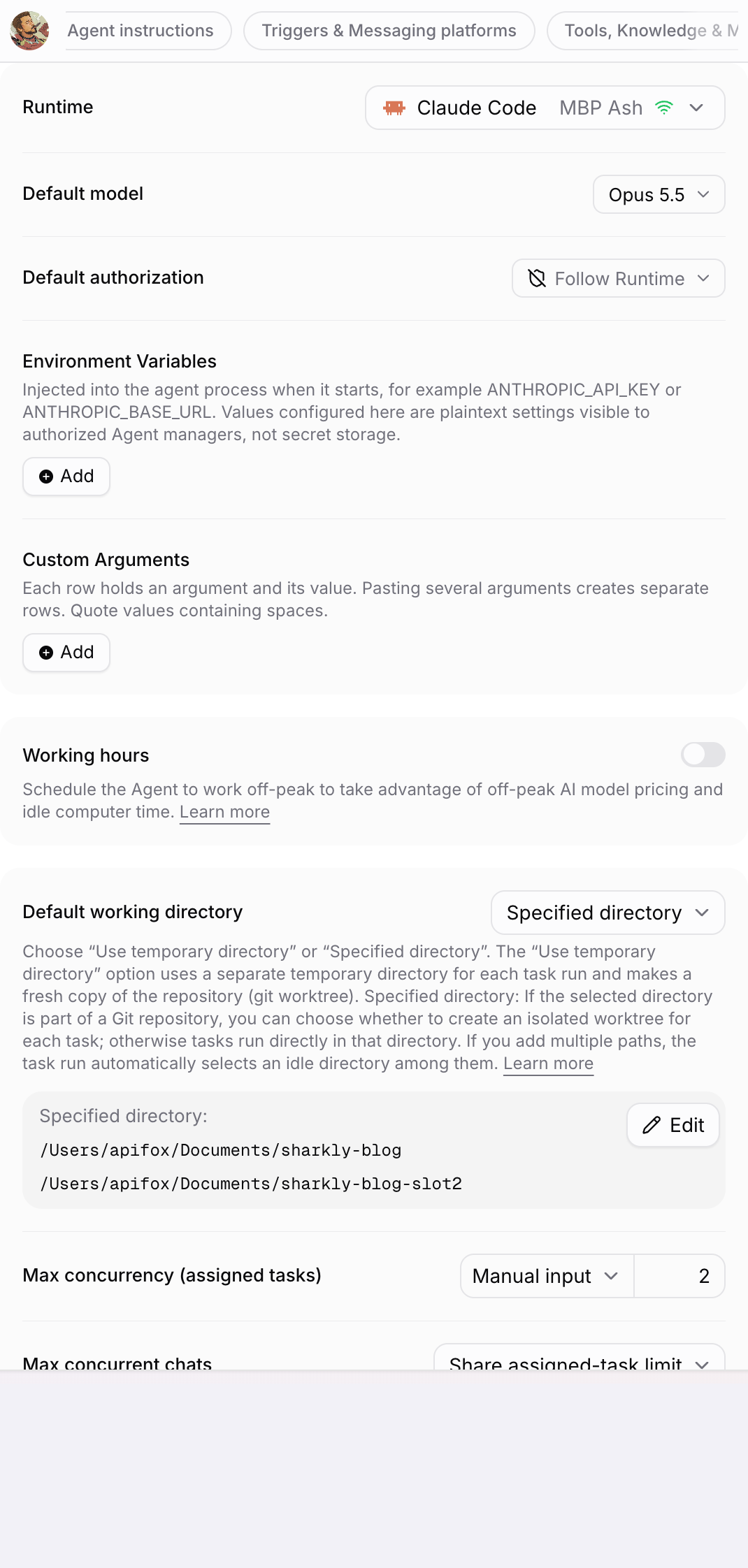
The same panel holds Environment Variables, injected into the agent process at start. Give each Agent group an API key from its own OpenAI project, and your OpenAI usage page splits spend by group. Working hours schedules an Agent into off-peak windows, so bulk tasks run at night and leave daytime capacity for people who are waiting.
Spend also needs a ceiling. Max concurrency caps how many tasks an Agent runs at once, Max run duration stops a run that loops, and Queue timeout drops work that waited too long.
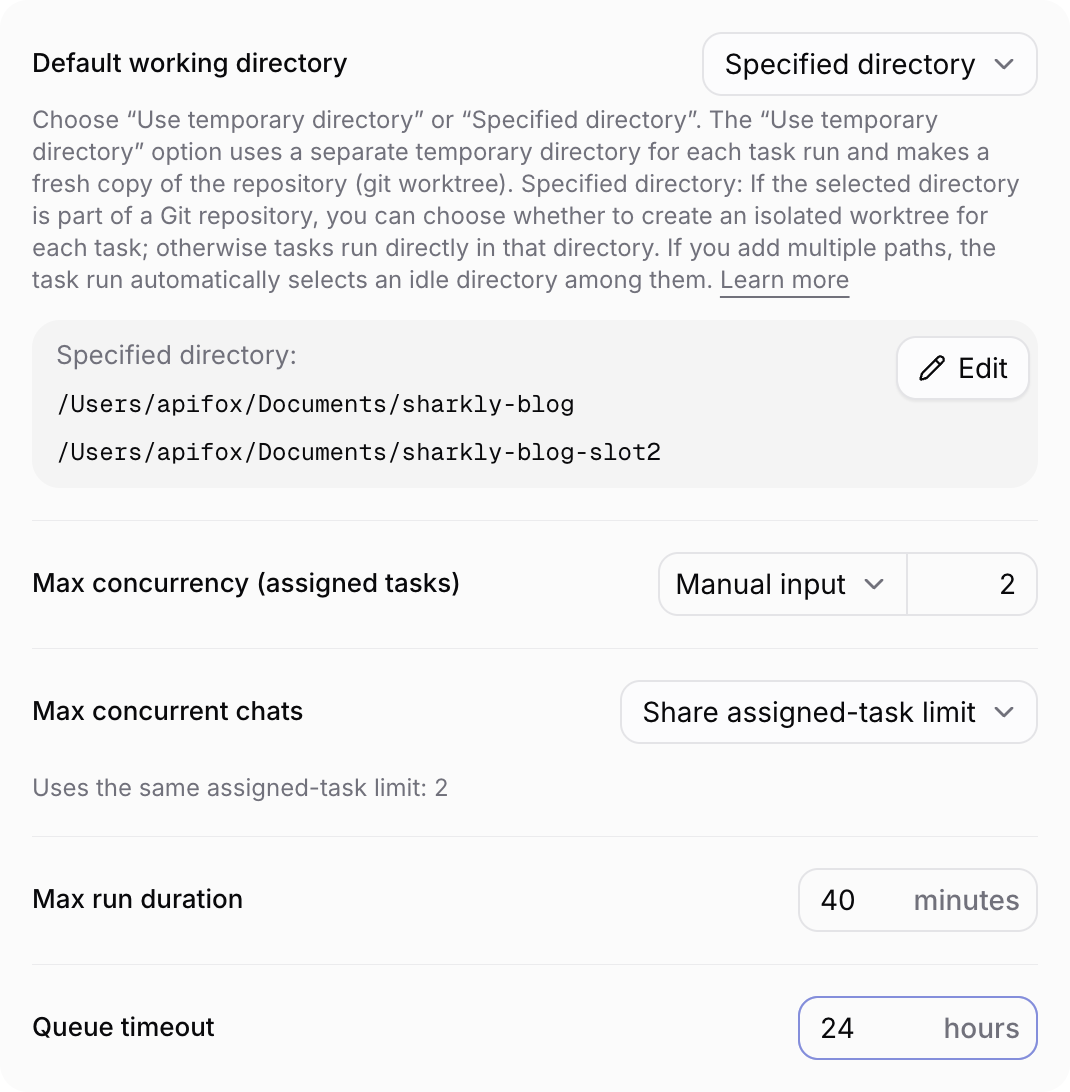
A 40-minute run cap on a Sol Agent bounds the worst case. The run list on each Agent shows the tokens every run used, so you can spot the task type that burns three times the others. That task needs a tighter description or a cheaper model.
Conclusion
GPT-6.2 pricing looks simple: Astra costs four times Sol on every line. The agent bill is not simple. Caching moves a task by about 71 percent, the 272K threshold can double a turn, and concurrency multiplies all of it. Measure one real task, get your cache hit rate up, put routine work on Sol, and cap what runs at once.
Try it on one Agent first. Connect a Computer, create a Codex Agent on GPT-6.2 Sol, set Max concurrency to 2 and Max run duration to 40 minutes, and assign it a routine task. Then read the tokens on the run. More on running a team side by side in how to run 10 AI coding agents at once.
FAQ
How much does GPT-6.2 cost?
GPT-6.2 Astra costs $8 per million input tokens and $40 per million output tokens. GPT-6.2 Sol costs $2 and $10. Cached input reads cost $0.40 on Astra and $0.10 on Sol.
Is GPT-6.2 Sol cheaper than Astra?
Yes. Sol costs a quarter of Astra on input, output, cached reads, and cache writes. Both share a 1,050,000-token context window and the same rate limits.
What is the GPT-6.2 long context price?
Requests above 272K input tokens pay double for input and cache, and 1.5 times for output, on the whole request, not only the tokens above the threshold.
Does GPT-6.2 support Flex processing?
No. OpenAI points long-running work to discounted background completion windows instead: 2h at 30 percent off and 8h at 40 percent off, in public beta.
How much does GPT-6.2 Batch cost?
Batch costs 50 percent of standard rates on both models. It suits evals and offline jobs, not interactive agents.
Does Sharkly charge for GPT-6.2 tokens?
No. Sharkly runs the coding agents you already use, and model usage bills against your own Codex plan or API key. Sharkly controls which model each Agent uses and how many tasks run at once.