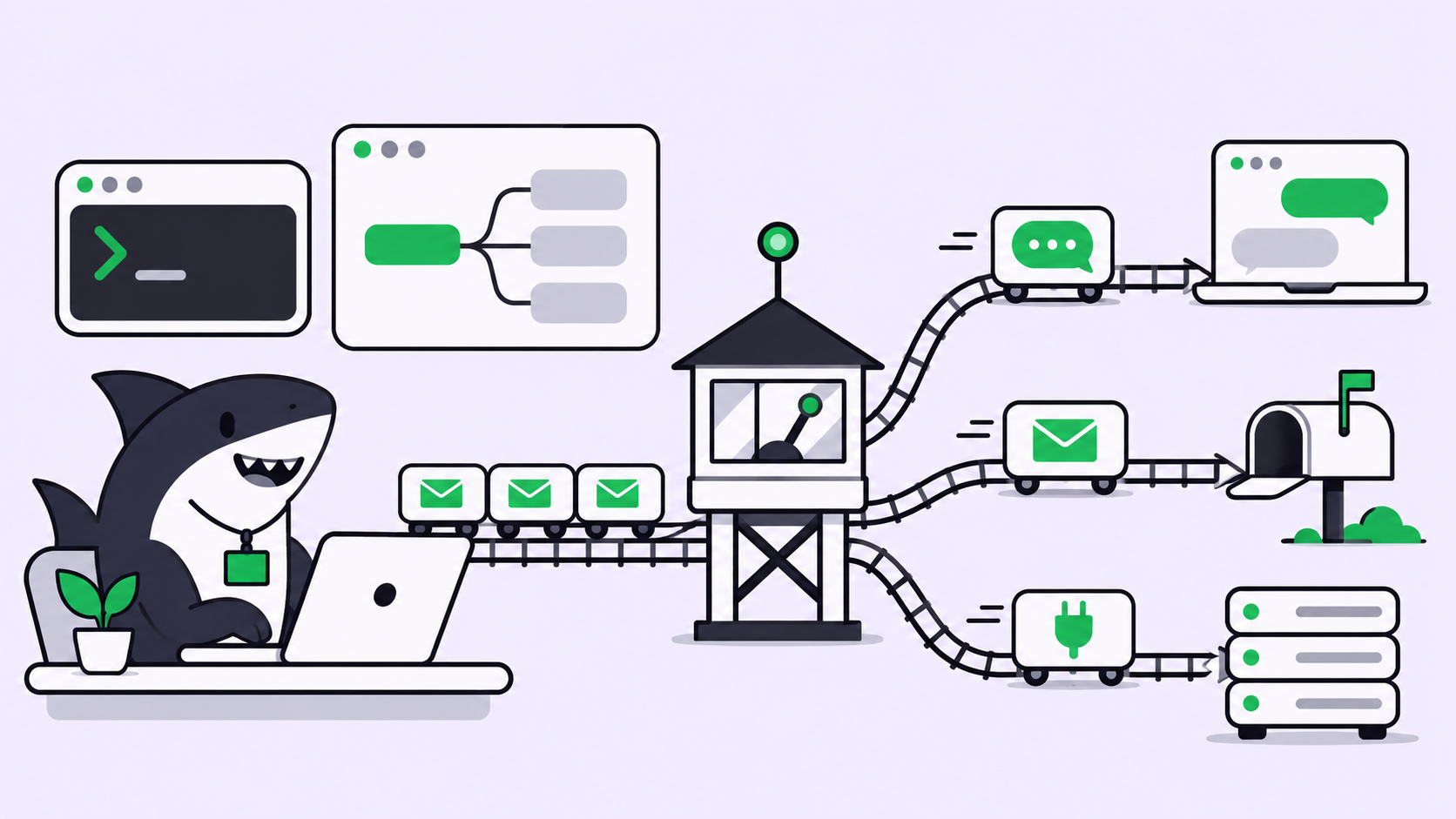
Claude Code mods are plugins whose JavaScript or TypeScript handlers run inside Claude Code itself. A mod can draw a pane or a band above the prompt, add a /command that runs your code with no model turn, and hold, rewrite or refuse a tool call before it runs. Mods shipped in Claude Code v2.1.287 and are on by default.
Claude Code mods are the deepest customization layer Claude Code has had so far. Settings hooks run a script from the outside. Skills hand Claude instructions. A mod runs in the same process as Claude Code, so it can change what the interface draws and step into a tool call while it’s still pending.
That reach is the reason to learn mods, and it’s also the reason to slow down before you install one. This guide covers what a mod is, how to install and write one, a working tool-call guard, and the managed settings that keep a team’s mods under control. If you already run several Claude Code agents on shared Computers, Sharkly is where the work around those agents lives; we’ll get to how the two fit.
What Claude Code mods are
A mod is a Claude Code plugin with a hooks module: a .js or .ts file that exports a register function. Claude Code calls that function once when the mod loads, and each on(...) call inside it registers a handler for one event, such as a tool call, a submitted prompt or a part of the interface being drawn.
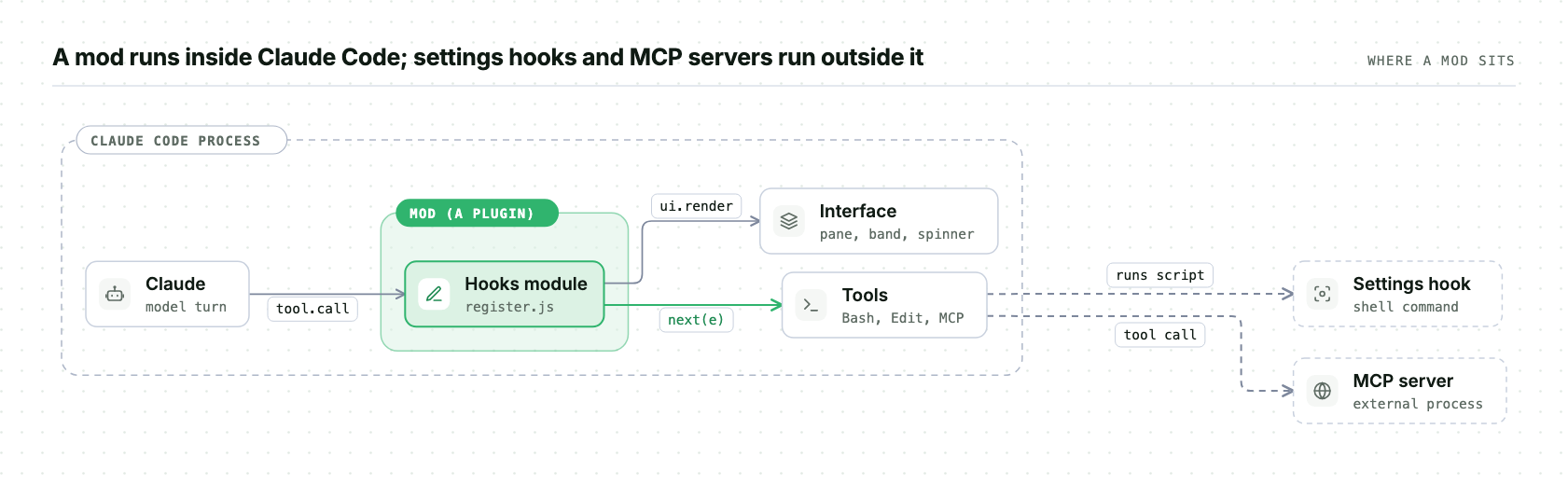
Every handler gets the event and a next function, and it picks one of three moves, per the mods overview:
- Observe: record the event and call
next(e)so it continues unchanged. - Rewrite: call
nextwith a changed event, such as new tool arguments or a spinner with extra text. - Answer: return without calling
next, so Claude Code’s usual behavior never runs.
Anything outside the handler’s own code (reading a file, starting a process, calling a model, drawing) goes through the mods API, written $. That single door is what lets Claude Code list a mod’s capabilities before it ever runs.
How mods differ from settings hooks, skills and MCP
The docs draw the line in one table. Here’s the short version:
| Mod | Settings hook | Skill | MCP server | |
|---|---|---|---|---|
| Runs where | Inside Claude Code | A script Claude Code starts | Text Claude reads | External process |
| Can draw in the interface | Yes | No | No | No |
| You write | JS or TS | A script + settings.json entry |
Markdown | A server, any language |
| Pick it for | Panes, custom commands, rewriting events | Block, allow or log with an existing script | Instructions you keep repeating | Reaching an external system |
If a settings hook or a permission rule already does the job, use it. Reach for a mod when you need a view, a command that runs instantly, or a decision that depends on state another hook recorded.
How to install a Claude Code mod
A mod installs like any plugin, from a marketplace, as name@marketplace:
# from your shell
claude plugin install token-chart@your-org

# or inside a session
/plugin install token-chart@your-org
If you install from the shell while a session is open, run /reload-plugins in that session. Then run /plugin: a dim line under the tabs shows the count and names, such as 1 mod active · token-chart. You need Claude Code v2.1.287 or later in the terminal; check with claude --version.
Check what a mod can do before you trust it
A mod runs with your permissions and isn’t sandboxed. The docs say it can read your files and environment variables, see every prompt and tool call, approve tool calls before you’re asked, and spend your model usage. Before installing one, clone it and run:
claude plugin validate ./some-mod
The output lists the events it hooks and the API methods it calls:
❯ ./register.js hooks: session.start, tool.call, ui.render{component=Pane}
❯ ./register.js calls: $.fs.read, $.http.fetch, $.store.set, $.ui.open
Read every calls: line. $.http.fetch means network access, $.process.run starts programs, and $.env.get can read API keys. A spinner mod that calls $.http.fetch deserves a second look.
Anthropic publishes sample mods in the claude-code-playground repository, including blast-radius, which holds a risky shell command and shows what it would change. To try one for a single session, clone the repo and run claude --plugin-dir <path-to-mod>.
Write your first mod
You have two routes. The fast one: describe the mod in a session (“make a mod that shows the current git branch above the prompt”), and Claude writes it using the built-in plugin-authoring skill. It saves the mod under ~/.claude/dev-mods/<session-id>/ and asks whether to turn on hot reloading. Those files get cleaned up with old sessions, so copy any mod you want to keep somewhere permanent.
The manual route takes three files and no build step:
first-mod/
├── .claude-plugin/plugin.json
└── hooks/
    ├── hooks.json
    └── register.js
hooks.json is what makes the plugin a mod. Its modules key points at your code:
{
  "description": "The first-mod hooks module",
  "modules": ["./register.js"]
}
Then the code. This module counts tool calls and shows the count beside the spinner, adapted from the create a mod tutorial:
let calls = 0

export function register(on) {
  on('tool.call', async ($, e, next) => {
    calls += 1
    $.ui.invalidate('ui.render') // redraw so the count updates
    return next(e)               // let the tool run as usual
  })

  on('ui.render', { component: 'Spinner' }, async ($, e, next) => {
    return next({ ...e, props: { ...e.props, suffix: ' · tool calls: ' + calls + '…' } })
  })
}
Load it for one session with claude --plugin-dir ./first-mod. Both hooks share the calls variable, which is the trick settings hooks can’t match: one hook records, another displays.
Guard tool calls with a mod
The most useful mod for a team is often the smallest one: a guard on a dangerous tool call. A tool.call hook fires before any tool runs, including subagent calls and MCP tools. Return { deny } without calling next, and the tool never runs.
export function register(on) {
  on('tool.call', { tool: 'Bash' }, async ($, e, next) => {
    if (/git push .*--force/.test(e.command)) {
      return { deny: 'Force pushes are not allowed here. Push to a new branch instead.' }
    }
    return next(e) // everything else goes to the permission check, then Bash
  })
}
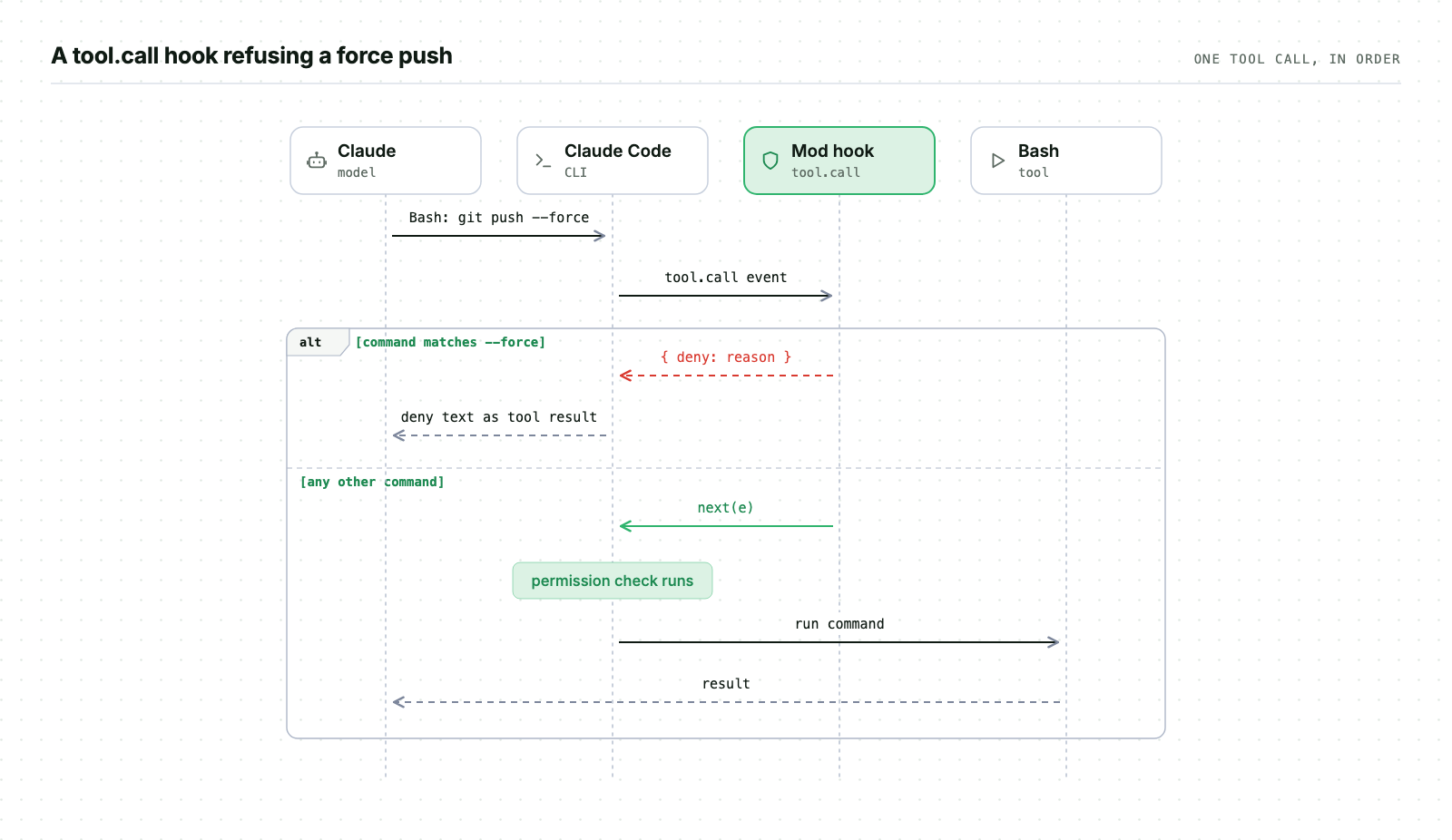
Claude reads the deny text as the tool’s result, so write it as an instruction it can act on. Three details from the events docs matter before you rely on this:
- Failures open by default. If the hook throws or passes its 10-second limit, Claude Code skips it and the command runs. Chain a
.catchhandler that returns a deny if you want it to fail closed. - You can ask first.
$.ui.ask('Run this command?', ['Run it', 'Refuse'])holds the call until someone picks. Inclaude -pthere’s nobody to ask, so the call rejects; default to refusing. - Regex is a reminder, not a wall. The pattern above misses
git push -f. To protectmainfor everyone, protect the branch on your Git host as well.
For decisions that depend on live state, such as the current branch, hook tool.check instead. It runs where Claude Code makes the allow, ask or deny call, after PreToolUse hooks and before the permission prompt.
Roll out Claude Code mods across a team
One developer’s mod is a convenience. Ten developers with ten different mods means ten different sets of guards nobody can see. Claude Code’s answer is managed settings. The admin guide gives this policy for “only our organization’s mods”:
{
  "extraKnownMarketplaces": {
    "acme-tools": { "source": { "source": "directory", "path": "/opt/acme/claude-plugins" } }
  },
  "enabledPlugins": { "acme-guard@acme-tools": true },
  "prependPlugins": ["acme-guard@acme-tools", "sec-default@builtin"],
  "pluginConfigs": {
    "cc-plugin-sec-default@builtin": { "options": { "allowManagedModsOnly": true } }
  },
  "disableSideloadFlags": true
}
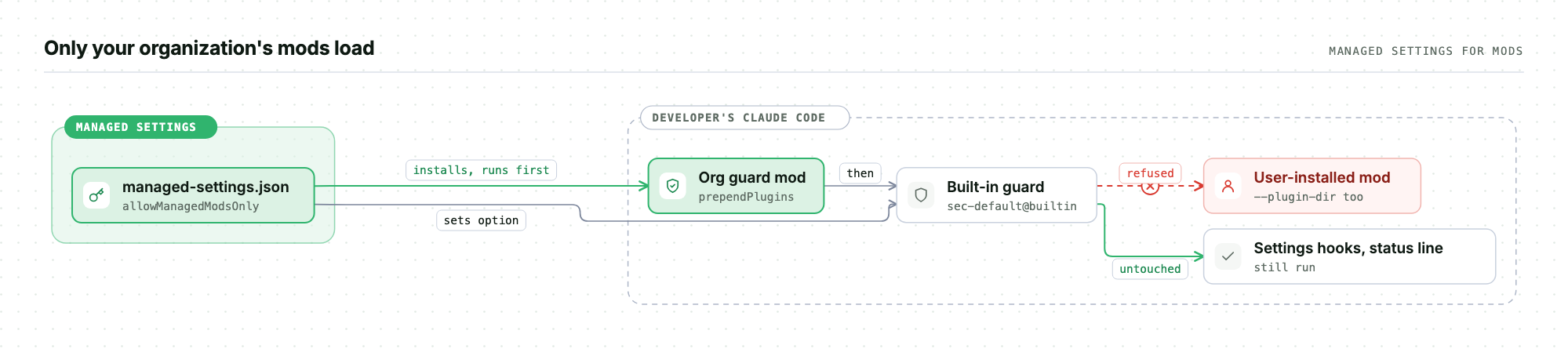
With that file, your guard mod runs first and the built-in guard refuses mods a user installed, loaded with --plugin-dir, or had Claude write mid-session. Users’ settings hooks and status lines keep working. To confirm it on a test computer, start claude --debug and look for your mod’s tier prepend line.
Two narrower switches help as well. disableAllHooks stops every mod and hook, managed ones included. --safe-mode turns off installed mods for one session, and it’s your first move when a mod misbehaves.
Where mods stop and Sharkly starts
Mods govern one Claude Code process on one computer. They don’t tell you which agent is working on what, which run is blocked, or who reviewed the result. That’s the gap a coding agent work-management layer fills, and it’s the one Sharkly is built for.
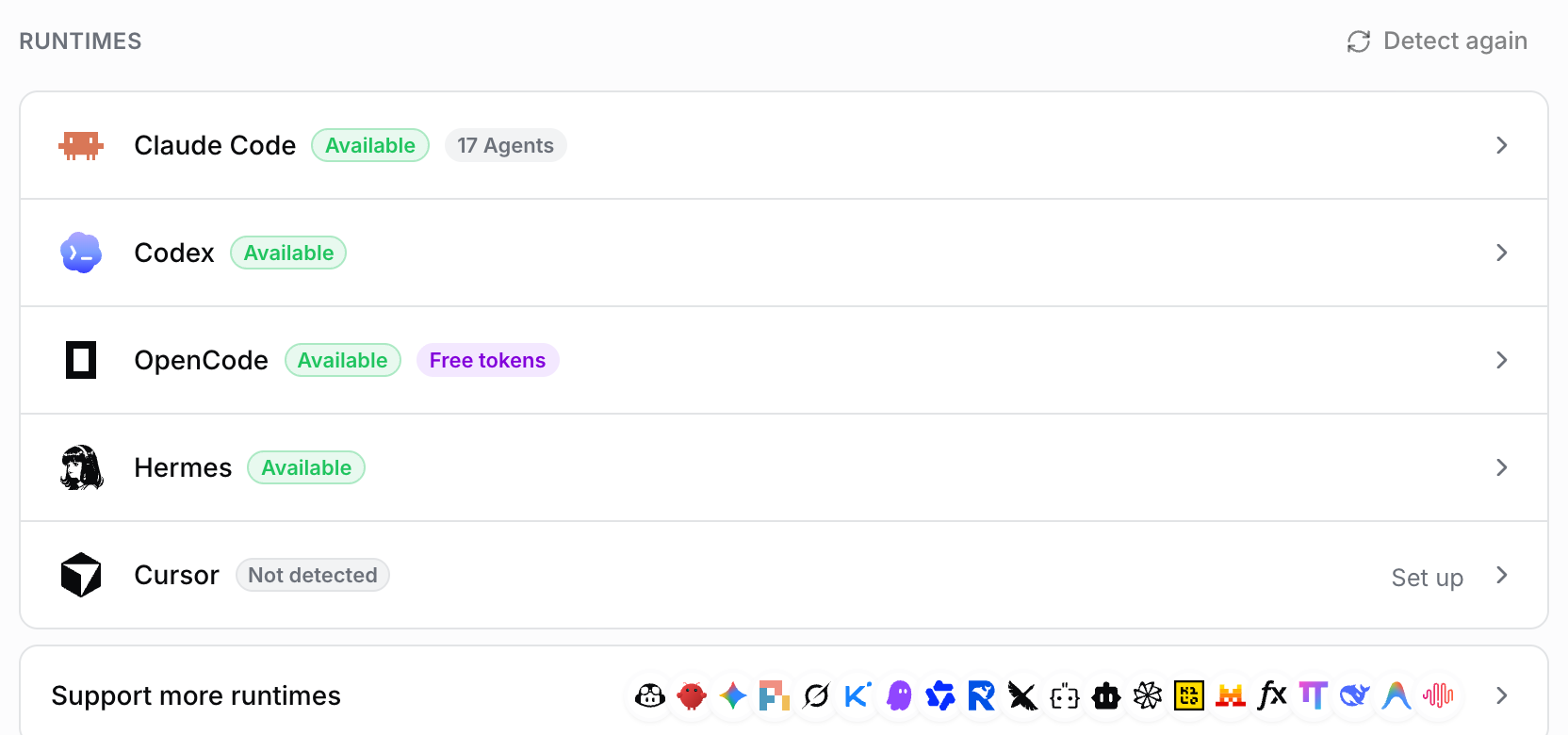
In Sharkly, Claude Code runs as a Runtime on a Computer, the workstation or server you connect with the sharkly CLI. Your Agents run on that Computer’s Claude Code, and in our own runs that Claude Code loaded the plugins installed on that Computer. So the place to install a team guard is the Computer itself, through managed settings, not each developer’s laptop alone.
Agent runs are unattended, so plan for the docs’ headless case: guard hooks still fire, but panes and bands have no one to show them to, and a $.ui.ask question gets no answer. Write your guards to refuse by default and to put a clear reason in the deny text. The refusal then lands in the task’s run in Sharkly, where a person reviews it instead of finding out from a broken branch. The Computers guide covers connecting one; for running several Claude Code agents side by side, see how to run multiple Claude Code agents in parallel.
Use cases that earn their keep
- Context meter: a band above the prompt that charts context use after each request, like the
token-weathersample. - Force-push and
rm -rfguard: the hook above, extended with$.ui.askfor interactive sessions. - Instant commands: a
/tallyor/branchcommand that answers from local state with no model turn. - Org policy: one guard mod, shipped through managed settings, that every developer and every agent Computer loads first.
- Process hygiene: pair a guard with the fixes in why Claude Code kills processes so long-running servers survive agent sessions.
Conclusion
Claude Code mods put your own code inside Claude Code: panes you can click, commands that skip the model, and guards on every tool call. Start with claude plugin validate on anything you install, write a ten-line guard before you write a dashboard, and lock the policy down with allowManagedModsOnly before a team adopts mods. Then connect the Computers those agents run on to Sharkly, so a refused push shows up on a task a person can review instead of disappearing into a terminal.
FAQ
What are Claude Code mods?
Plugins whose JavaScript or TypeScript handlers run inside Claude Code on events such as tool calls, prompts and interface draws. A handler can observe, rewrite or answer each event.
Which Claude Code version supports mods?
The changelog adds “Claude Mods” in v2.1.287, and the docs require v2.1.287 or later in the terminal. The Desktop app’s bundled copy supports them from v2.1.286.
Are Claude Code mods safe to install?
A mod runs with your permissions and isn’t sandboxed. Install only from authors you trust, and read the hooks: and calls: output of claude plugin validate first.
Do mods work in claude -p and the Agent SDK?
Yes for hooks, no for drawing. Guards and event rewrites run; panes and bands don’t appear.
How do I turn mods off?
Disable one mod in /plugin, start with --safe-mode for one session, or set "disableAllHooks": true to stop installed mods everywhere. Built-in mods such as /diff have their own switches.
What’s the difference between a mod and a settings hook?
A settings hook is a shell command, HTTP request or prompt run on a lifecycle event. A mod is code inside Claude Code that can also draw in the interface and share state between hooks.