

Human in the loop AI agents can prepare and test a change, then pause for a person to approve the specific action that affects a live system. An approval gate ties that decision to the reviewed artifact, target, and time window. The system checks those details again before it acts.
Imagine an agent spots a production setting that leaves a service exposed. It can draft a configuration change and check it against a staging environment. Applying that change to production is a separate operation. The on-call engineer needs to know which service will change, what the tests covered, and how to undo it.
You can use a shared Task in Sharkly to bring that evidence to a reviewer. The deployment system still needs its own way to enforce the decision. That distinction matters when an agent can call tools directly, even while its Task is waiting on the board.
Which agent actions need approval?
Place the gate where the action starts affecting someone else’s data, access, or service. Assess the target, the potential impact, and the cost of recovery. The same operation can fall into different tiers depending on where it runs.
| Action | Default decision | Reason |
|---|---|---|
| Read service health metrics | Allow within an explicit scope | The agent can diagnose without changing the service. |
| Validate a change in an isolated test environment | Allow with restricted credentials | The agent can produce evidence before involving a reviewer. |
| Change traffic routing for one production service | Ask the on-call owner | A bad change can affect customer requests immediately. |
| Grant a new production administrator role | Route through the access approval process | The permission persists and can authorize further actions. |
Start with one action your team already reviews manually. A feature flag is a good candidate if your team can name the owner, target audience, and rollback setting. Decide which changes are preauthorized, which need an explicit approval, and which are reserved for People through a separate process.
Scope read access as carefully as write access. Reading an aggregate error rate is different from exporting request logs with customer identifiers. If a tool combines logging and export, give the agent access only to the operation it needs.
What Shirudo shows about operator approval
OpenAI and Cisco introduced Shirudo on November 23, 2026. The open-source project uses eBPF, a way to run small programs at designated points in Linux, to protect running systems while operators roll out permanent patches. It calls each temporary safeguard a shield. OpenAI announcement · Cisco announcement
An agent can prepare a shield and help test it. The operator decides whether to approve it for deployment. Shirudo verifies the shield’s cryptographic signature before loading it, and supports hardware-backed evidence of what protections were loaded or removed. The Shirudo repository describes the project and its current development status.
The signature proves that the artifact came through the signing process and stayed intact. The operator still has to judge whether the shield fits the workload and whether the test evidence is sufficient. A temporary control also needs an owner who can remove it once the permanent patch lands.
How to enforce human approval at execution time
Bind the approval to an immutable artifact. A commit SHA, configuration digest, or deployment artifact ID gives the reviewer and executor a common reference. Include the action, target environment, and expiry in the same approval record. If the agent revises the artifact or changes the target, request a fresh decision.
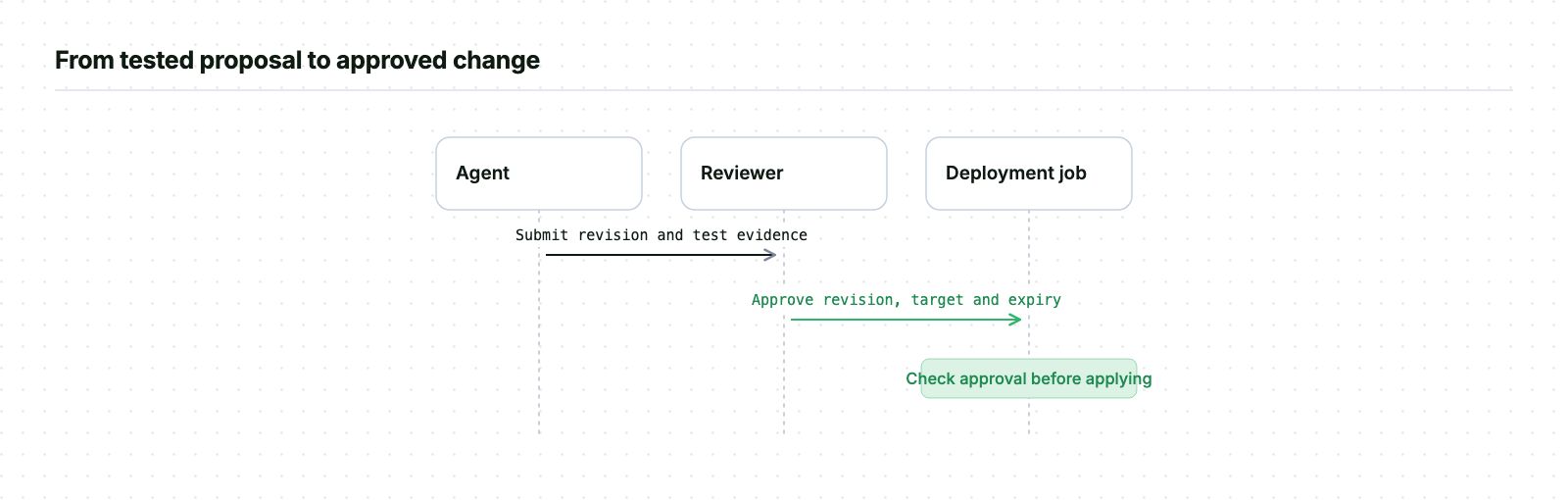
An approval record should answer the questions the operator would ask during a rollback:
| Field | Example |
|---|---|
| Requested operation | Roll out the search ranking flag to 5% |
| Target | Production search API |
| Artifact | Flag configuration revision 42 |
| Evidence | Staging checks passed and baseline error rate captured |
| Reviewer | Search on-call engineer |
| Expiry | 30 minutes from approval |
| Rollback | Restore flag configuration revision 41 |
Keep the approval and execution identities distinct. Give the agent the credentials needed to prepare and test. Give a protected deployment job the credentials to apply the live change. Configure that job to check the approval record and reject expired decisions, target mismatches, and artifact revisions the reviewer never saw.

Record both the decision and the outcome. Approval tells you who authorized a change. The execution record tells you what was applied, when, and whether it finished. If a job times out, check the live state before retrying. A timeout can happen after the change takes effect.
How do you review a rollout with incomplete evidence?
Suppose staging reported healthy response times, but it never exercised requests from mobile clients. The reviewer can ask for that specific test before approving the rollout. If staging cannot reproduce those requests, the reviewer can document the gap and approve a smaller initial audience with a threshold that triggers rollback. That decision belongs in the approval record because it changes the scope the job is allowed to apply.
If another engineer approves the same revision for a different environment, store that decision separately. The job should apply a decision only to the target and rollout size it covers.
How to build the approval gate in Sharkly
Create a Task for the proposed change and assign it to an Agent. Put the permitted scope, test requirements, and stop condition in the Task description. Make the expected handoff explicit. For example, ask for a configuration revision and staging results, then direct the Agent to stop at Ready for Release.
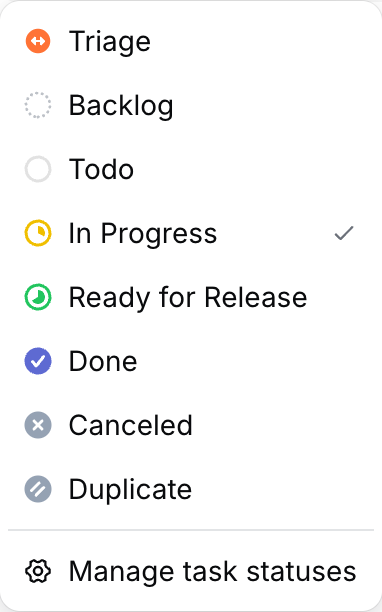
When the Agent finishes preparation, have the evidence return to the Task. The reviewer can inspect the proposal, ask for changes, and record the decision in the same place. Use a named service owner so the handoff reaches someone who can evaluate the change. See Sharkly Tasks and Task statuses.
Keep Ready for Release as the review queue. Have the reviewer approve the specific revision in the deployment system, where the production credentials and enforcement live. For merge-specific controls, see the coding agent review workflow. When a person takes over an interactive session, the browser handoff pattern applies a similar pause at a different boundary.
Where should the gate live?
Use the system that owns the credential or performs the irreversible action. A protected deployment environment can hold the production secret until an authorized reviewer approves the job. For a permissions change, use the identity system’s access review. For an external message, hand the draft to the person authorized to send it.
One board can give the team a common view across these systems. Record the decision and link to the execution record from the Task, especially when the approval and the deployment happen in separate tools.
How do you handle an emergency?
Write the emergency path while the service is healthy. For a change that cannot wait for the usual owner, route approval to the incident commander or backup on-call engineer. Define which narrowly scoped actions they can authorize and how long that authorization lasts. Keep the same checks on the artifact and target.
Put the approval request where the reviewer already receives incident updates. Give them the proposed action, the current customer impact, and the rollback in the request itself. During the incident review, compare the approved change with the one applied and check that any temporary permission expired. If the review kept people waiting, use that record to see whether the delay came from routing or missing evidence.
Start with one production action
Pick a change your team already asks someone to review. Set up a Sharkly Task with a named reviewer and an exact handoff. Then test the release control twice, once with the approved revision and once with a changed revision. Your first gate works when the approved revision goes through and the changed revision returns for review.
FAQ
Can an AI agent approve its own work?
An agent can verify test results and flag missing evidence. Require an independent authorized person for actions your policy classifies as needing human approval.
Does every tool call need approval?
Give routine operations scoped permission and reserve approvals for actions whose impact warrants judgment. Too many low-value prompts make it harder for reviewers to recognize the consequential ones.
What happens when nobody responds?
Keep the change pending until the approval window expires. Route urgent requests through your existing on-call process and define who can make the decision before an incident.
Does a successful test replace approval?
Use test results as evidence for the reviewer. The person also weighs production scope, potential customer impact, and whether the rollback is practical.
What happens if an approved change is edited?
Issue a fresh approval request for the revised artifact. The executor should use the reviewed revision as part of its authorization check.