
If you’re hunting for an open source Slack alternative, the hard part isn’t picking a chat app. It’s knowing what survives the move. ExitPath, a catalog of open-source replacements for Slack, Notion and Microsoft 365, reached 248 points on Show HN because it answers that question per tool: what transfers, what gets lost, and how many hours the switch costs.
This guide reads ExitPath’s Slack entry, then adds what a chat catalog leaves out. If your team runs coding agents, some of your work lives in Slack bots, and every path drops the bots. Sharkly is where that work can go so the chat switch doesn’t take your agent queue with it.
TL;DR
ExitPath maps three open-source paths out of Slack: Mattermost (closest layout, 1 to 3 hours of import work), Zulip (topic-based threads, 2 to 5 hours) and Element on Matrix (encryption and federation, the hardest to host). All three bring users, channels and some history. None of them bring Slack apps, workflows, canvases or Slack Connect channels. Move agent work onto a board before you move the chat.
What ExitPath is
ExitPath is a catalog of open-source alternatives to common proprietary tools. Each incumbent page rates lock-in, explains how to export, and lists alternatives with a fit score, import difficulty, effort in hours, and two plain lists: what transfers and what is lost. Its entries carry a November 2026 review date.
Every path also gets a migration score from 0 to 100, built from six ratings on a 1 to 5 scale. A low score only says the move is easy; whether the alternative is good is a separate call, made by its fit rating and verdict. Effort hours are per person, multiplied by team size, with server setup added once.
The HN thread wasn’t uncritical. Several commenters said parts of the catalog read as AI-written, and the maker fixed a confusing rating scale mid-thread. Treat it as a strong starting map and verify the details that matter to you.
The three open source Slack alternatives ExitPath maps
| Path | Fit (of 5) | License | Self-host difficulty (of 5) | Setup hours | Import hours |
|---|---|---|---|---|---|
| Mattermost | 5 | MIT builds, open core | 2 | 2 to 5 | 1 to 3 |
| Zulip | 4 | Apache-2.0 | 2 | 2 to 4 | 2 to 5 |
| Element (Matrix) | 3 | AGPL-3.0 | 4 | 5 to 14 | 2 to 5 |
Is Mattermost the closest open source Slack alternative?
Yes, by layout. ExitPath calls it the path that “needs the least retraining” because its channels, threads and slash commands follow Slack’s. The mmetl tool converts a Slack export into a bulk import, and incoming webhooks are Slack-compatible, so many integrations work with a changed URL.
Read the licence note first. ExitPath records that since version 11, Team Edition is capped at 250 users and dropped GitLab sign-in, and the default free install is an Entry edition that shows only the latest 10,000 messages. Install Team Edition explicitly if you want full history. Group calls need a paid licence.
When does Zulip beat Mattermost?
When your complaint about Slack was the noise. Every Zulip message belongs to a named topic inside a channel, so a day away means scanning topics instead of scrolling one stream. Zulip’s official importer reads a Slack export and turns Slack threads into topics. ExitPath budgets about a week for people to get used to that model.
Zulip keeps single sign-on and guest accounts in the free server. The catch: self-hosted mobile push notifications for more than 10 users need a paid plan or a community sponsorship.
Who should pick Element?
Teams that need end-to-end encryption or federation with other organisations’ servers, and have the appetite to run Matrix. There’s no official Slack importer, so many teams run a bridge for a few weeks and archive the Slack export. ExitPath’s honest note: you lose most message history in practice.
Export Slack before you choose anything
The export decides what any path can import. ExitPath’s Slack entry, which matches Slack’s own export documentation, comes down to five steps:
- Check your plan. Free and Pro workspaces export public channels only; Business+ and Enterprise owners can include private channels and direct messages.
- Run the export from Settings, then Import/Export Data, then Export. You get JSON.
- Fetch the files right away. The export holds links, not files, and the links die when the workspace closes. ExitPath points to slack-advanced-exporter for this.
- Act early on the free plan. History older than 90 days is hidden there, and older data is eventually deleted.
- Tell people before you export direct messages. Where it’s possible at all, it’s a privacy decision.
Then run a trial import on a test server. Both Mattermost and Zulip document theirs (Zulip’s migration guide covers Slack, Mattermost and Teams).
What never makes the trip
ExitPath’s “lost” list, merged across all three paths:
- Slack apps and bots
- Workflows built in Workflow Builder
- Canvases
- Slack Connect channels shared with other companies
- Huddles (free Mattermost calls are one-to-one; Zulip hands calls to Jitsi, BigBlueButton or Zoom)
Messages move. Behaviour doesn’t. If Slack is only chat, that’s manageable. If Slack is where work gets assigned, it’s the whole problem.
Why agent work breaks first in a Slack migration
Coding agents tend to arrive through chat. Someone installs a bot, mentions it in a channel, and it opens a run in Claude Code or Codex. Soon the channel is the queue: requests, status updates and “is this done?” all live in threads. We covered that pattern in using Slack with AI agents and the Slack bot setup for coding agents.
Now run that through ExitPath’s lists. The bot is a Slack app, so it’s lost on every path. Slack-compatible webhooks carry inbound messages, not an app that listens, decides and starts a run. The threads may import as history, but nothing in Mattermost or Zulip knows which of them were open requests. Your agent queue doesn’t migrate. It ends.
So separate the two jobs. Chat is for talking. The record of who owns a task, which agent ran it, and who accepted the result belongs somewhere that doesn’t care which chat app you run.
The Sharkly side: put the work on a board, keep chat as a surface
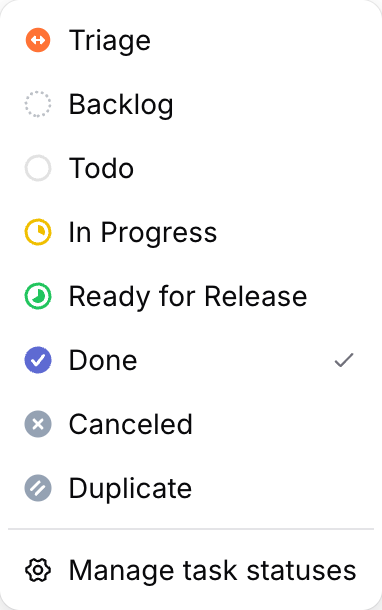
Sharkly is a work system for teams that run coding agents. A Task is the unit of work; an Agent can be its assignee; it runs on a Computer your team connected, through a Runtime such as Claude Code or Codex; and a person reviews the result before it’s Done. Chat connects to that system rather than containing it.
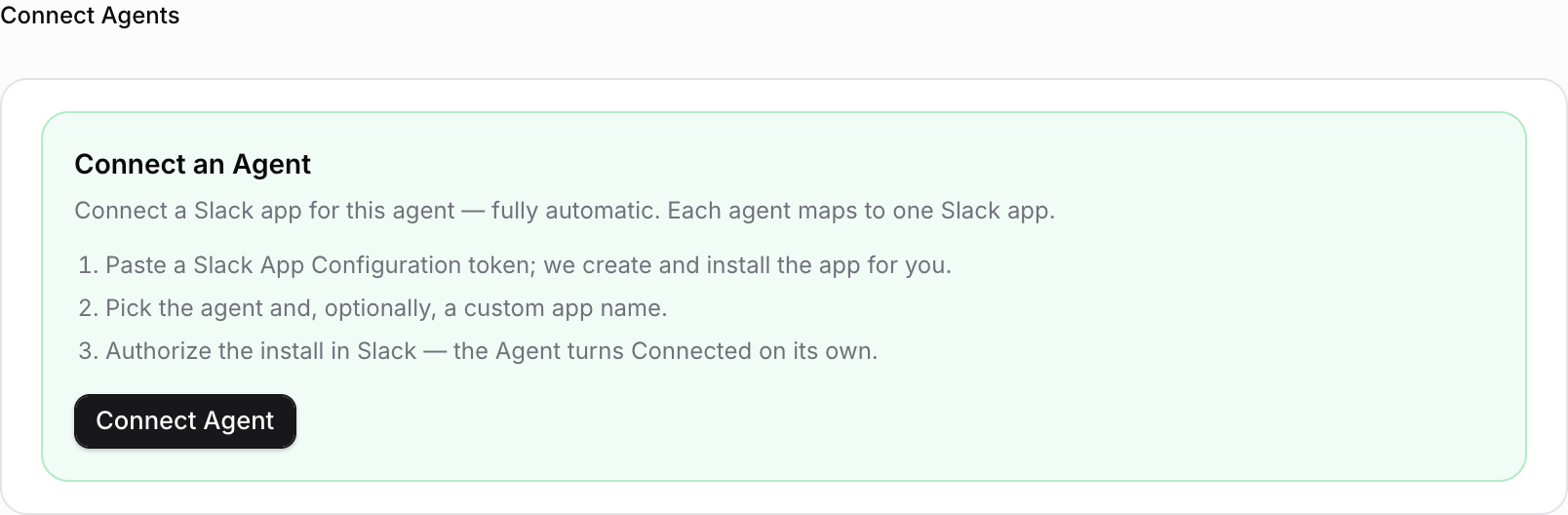
The Slack integration docs spell out the split. A workspace connection lets people create Tasks from a slash command or message shortcut and post linkbacks. A separate Agent bot binding gives one Agent its own Slack app, so messages become Agent conversations.
Two lines in those docs matter for anyone planning an exit. Sharkly’s Inbox remains the complete record, and Slack is an optional outbound channel. And disconnecting the Slack workspace stops Task creation and notifications from Slack, but it doesn’t delete existing Tasks or Slack messages. When the chat app changes, the queue stays.
Be clear about limits. Sharkly’s documented chat integrations are Slack and Discord (Discord docs), not Mattermost, Zulip or Matrix. Sharkly isn’t open-source either; self-hosting is a custom-priced deployment. If you’re leaving Slack for one of ExitPath’s three paths, the board and Inbox carry the work and your new chat app carries the conversation, with no bridge between them today.
On cost, the pricing page says the full product is free for organizations of up to 5 people, and Agents, Computers and guests don’t occupy seats.
A migration order that keeps agents running
This order keeps the agent queue alive through the switch:
- List every bot and workflow in Slack, and mark which ones start or track work.
- Move that work to Tasks first. Each open request in a channel becomes a Task with an owner, human or Agent. The bug report to agent task walkthrough shows one request end to end.
- Export Slack and fetch the files, following the five steps above.
- Trial-import into your chosen open source Slack alternative on a test server.
- Run both chats in parallel for a week, or bridge them if you chose Element.
- Cut over, then disconnect the Slack workspace in Sharkly. Tasks and their history stay where they were.
When staying on Slack is the right call
ExitPath is a map, not a verdict, and the HN thread raised fair objections. One commenter named the Slack Connect network effect as the blocker: shared channels with customers don’t move. Another pointed at identity, arguing that single sign-on is why companies stay in big suites. A third said self-hosted tools tend to lose on setup effort and polish, and that the time is better spent on revenue.
If most of your chat is with other companies, or nobody wants to run a server, Slack may still be cheaper. Moving work onto a board pays off either way. For the same trade in project tools, see open-source alternatives to ClickUp.
Conclusion
ExitPath tells you what you lose, which most alternative lists skip. For Slack, the answer holds across Mattermost, Zulip and Element. Your messages can move. Your apps, workflows and shared channels can’t. For a team running coding agents, that second list is the agent queue.
So move the work first. Connect a Computer and assign your first Task in Sharkly, then pick your chat app on its own merits.
FAQ
What is the best open source Slack alternative?
By ExitPath’s fit scores, Mattermost (5 of 5) is the easiest switch because it copies Slack’s layout, Zulip (4 of 5) suits teams tired of noise, and Element (3 of 5) fits teams that need encryption or federation. Pick by the reason you’re leaving.
Can I import my Slack history into Mattermost or Zulip?
Yes. Mattermost’s mmetl tool and Zulip’s official importer both read a Slack export and bring users, channels, messages and threads. Files need fetching first, and private channels only arrive if your Slack plan exported them.
What doesn’t transfer when you leave Slack?
Slack apps, Workflow Builder workflows, canvases, Slack Connect channels and huddles, on every path ExitPath lists. Element also loses most message history in practice, because it has no official importer.
Does Sharkly work with Mattermost or Zulip?
Not as a documented integration. Sharkly’s documented chat integrations are Slack and Discord. Tasks, Agents and the Inbox work without any chat app connected, so the board keeps running whichever chat you choose.