TL;DR
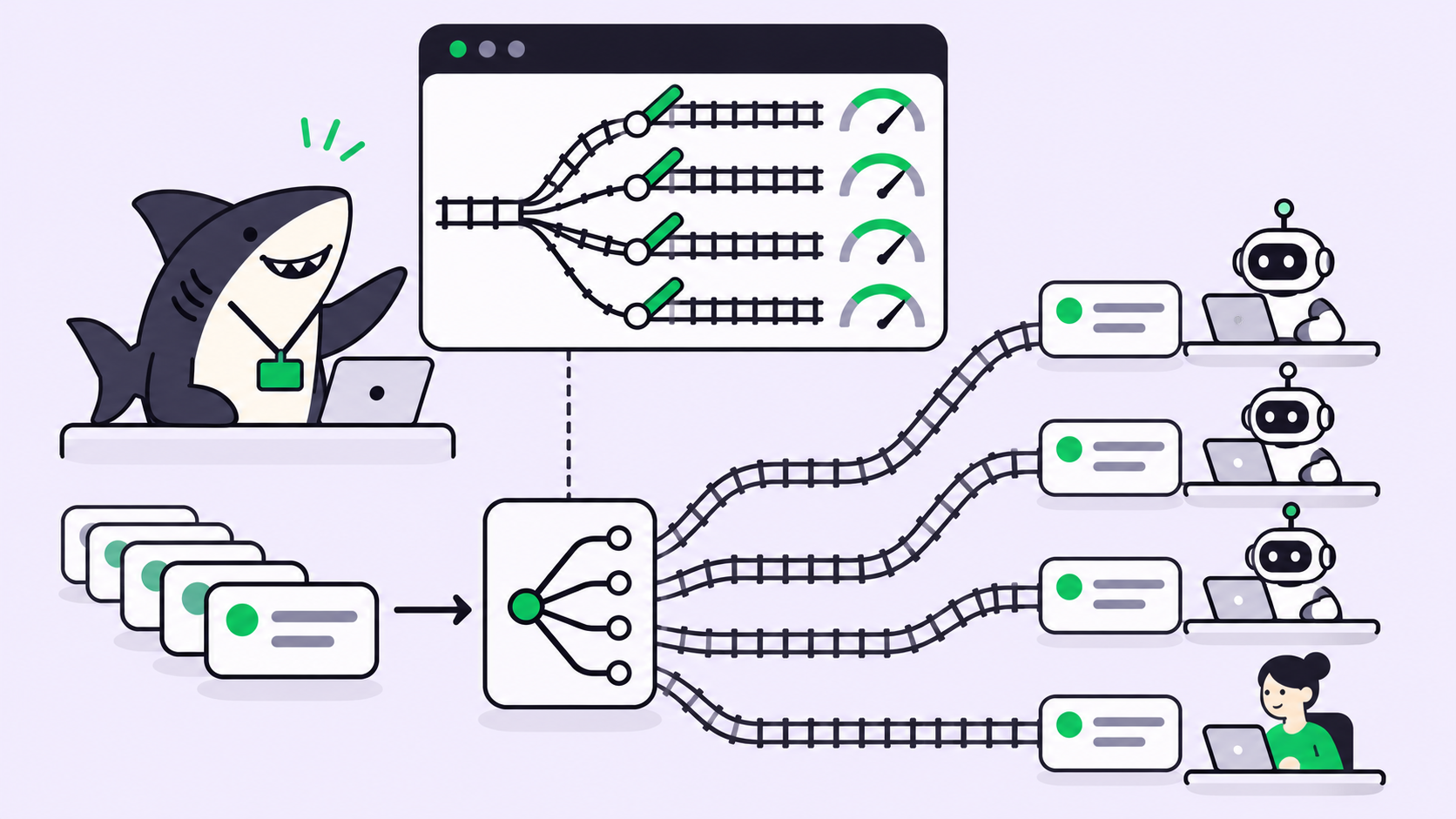
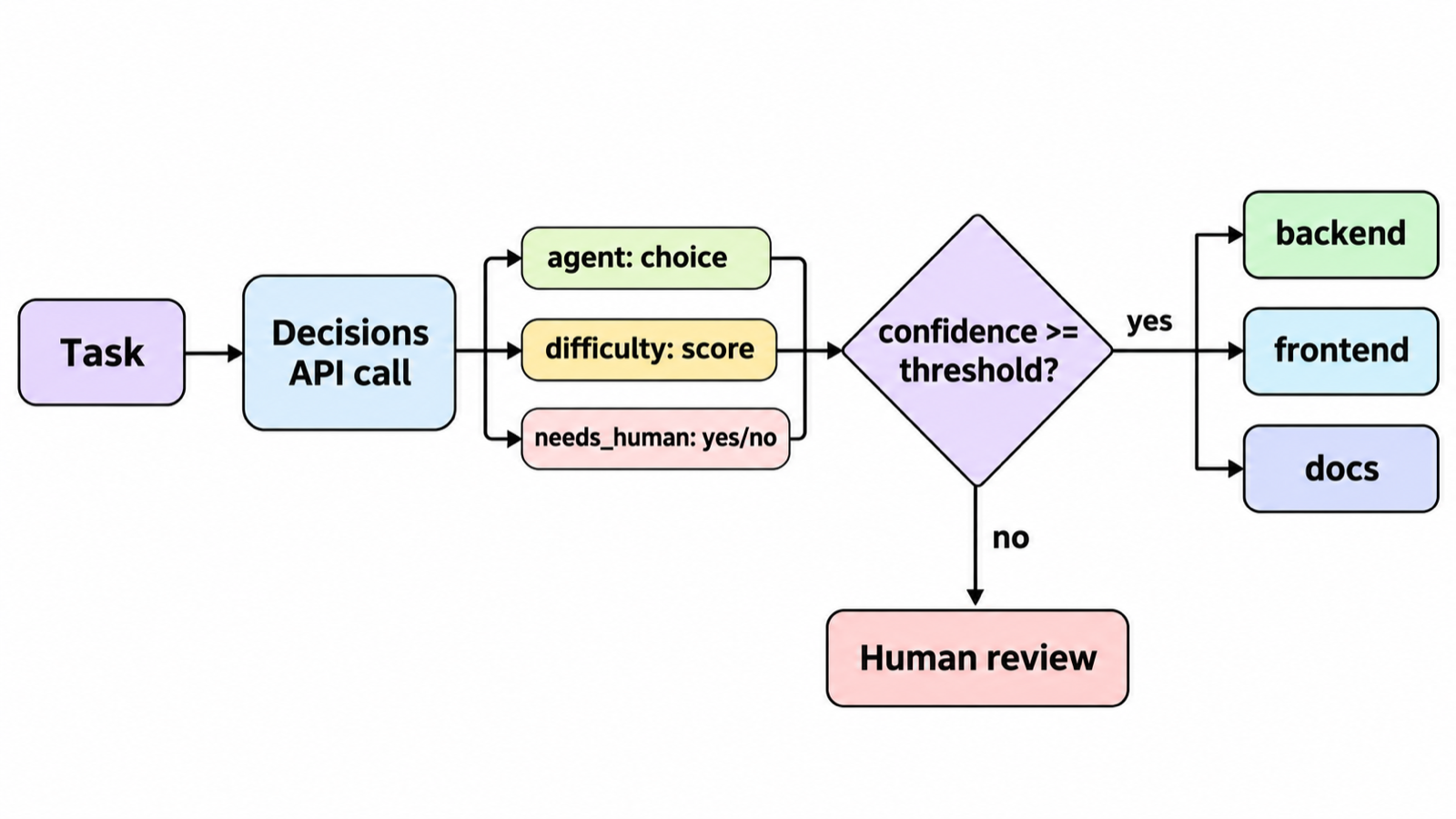
To route AI agent tasks with the Gemini Decisions API, send the task’s title and description to gemini-decision-1 with three questions: a choice for which Agent takes it, a score for how hard it is, and a noul for whether a person must decide first. Assign automatically when confidence clears your threshold. Hold everything else for a human.
Introduction
Every team running several coding agents ends up with the same chore: someone reads each new task and decides who takes it. The backend Agent or the frontend one? The cheap model or the strong one? Ready to start, or still missing a decision?
Google shipped a purpose-built tool for that chore on November 11, 2026. The Gemini Decisions API answers closed questions with calibrated probabilities instead of generated text. Google uses it inside Gemini Notebook to send each query to the right model tier and thinking level, and says that cut latency on everyday queries by up to 40%.
This post builds the same router for an agent board: one call per task, three questions, one threshold, and a clean handoff to a person when the router isn’t sure. If you want a board to run it against, Sharkly is free to start. For the routing policy itself (which tasks deserve the strong model), read route agent tasks by difficulty first. This post is about the call that applies that policy.
What the Gemini Decisions API does
The Gemini Decisions API is an endpoint that evaluates typed questions against a shared input and returns a probability and a confidence score for each one. It generates no text, so output tokens are always zero. Your code branches on the numbers directly, with no parsing step.
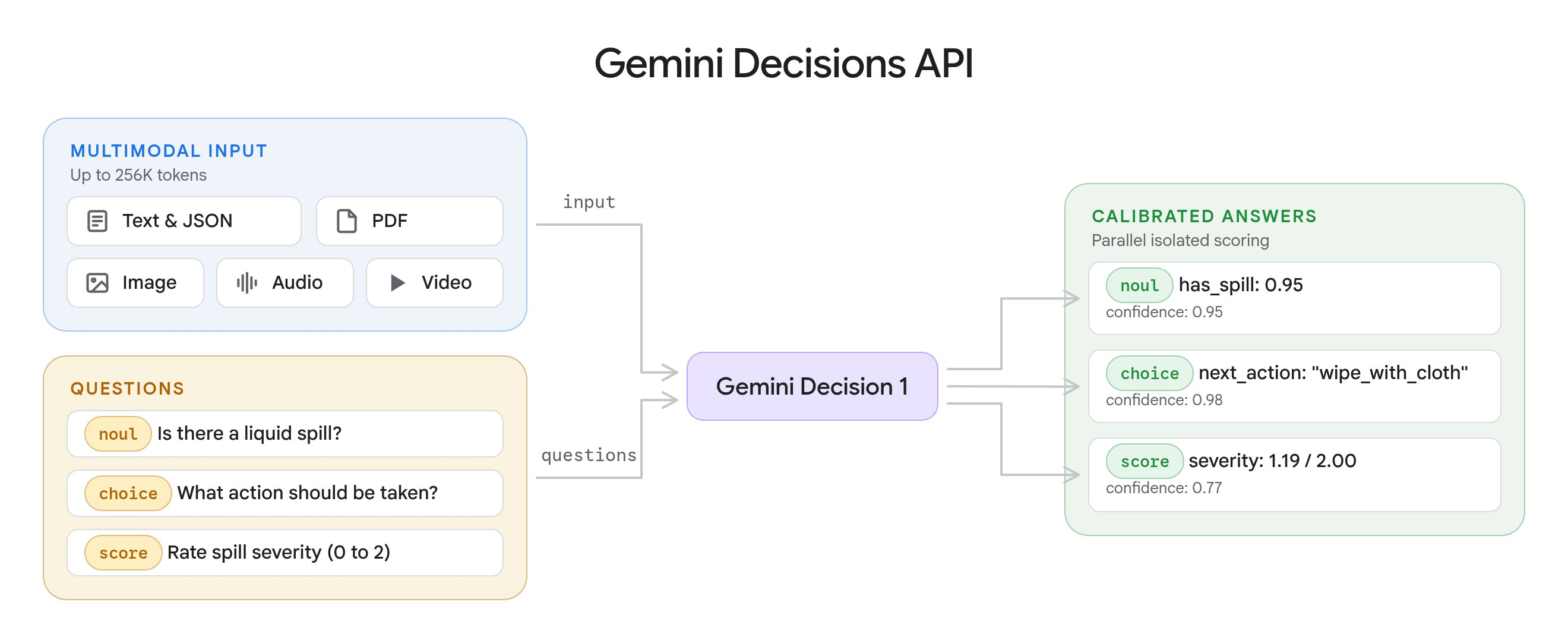
Three question types cover routing:
| Type | What it answers | What comes back |
|---|---|---|
choice |
Pick one option from 2 to 255 | choice, probabilities, confidence |
score |
Rate against an ordered rubric | score, probabilities, legend, confidence |
noul |
Yes or no | noul (0.01 to 0.99), confidence |
One request carries up to 1,000 questions against the same input. Per the Decisions API docs, questions run in one forward pass and can’t see each other, so adding a question doesn’t change the other answers. Google puts end-to-end latency at 150 to 250 ms, nearly flat from 1 to 100 questions.
If you read our post on Jev and decision models above coding agents, the shape will look familiar. The difference here is practical: a Google-hosted model, three questions written out, and the wiring to a board.
The routing call: three questions per task
Here is the router. It needs google-genai 3.2 or later and a GEMINI_API_KEY from Google AI Studio.
import json
from google import genai

client = genai.Client(http_options={"api_version": "v1beta"})

AGENTS = {
    "backend": "Server code, APIs, database migrations, and backend tests.",
    "frontend": "UI components, styling, client state, and frontend tests.",
    "docs": "README files, docs pages, and changelogs. No code changes.",
    "other": "Work that fits none of the options above.",
}

DIFFICULTY = [
    "Trivial: one file, obvious change, no design decision.",
    "Routine: a few files, follows a pattern already in the repo.",
    "Involved: several modules or a new pattern, needs new tests.",
    "Hard: cross-cutting, touches auth or data migrations, or the spec is thin.",
]

def ask(task):
    state = json.dumps({
        "title": task["title"],
        "description": task["description"][:8000],
    })
    result = client.decisions.create(
        model="gemini-decision-1",
        input=state,
        questions={
            "agent": {
                "type": "choice",
                "instructions": "Which agent should take the task in `title` and `description`?",
                "criteria": AGENTS,
            },
            "difficulty": {
                "type": "score",
                "instructions": "How hard is this task for a coding agent working alone?",
                "criteria": DIFFICULTY,
            },
            "needs_human": {
                "type": "noul",
                "instructions": "Does a person need to make a decision before any agent starts?",
                "criteria": {
                    "true_description": "The spec is ambiguous, contradicts itself, or asks for a product, security, or pricing call.",
                    "false_description": "The spec is clear enough to implement as written.",
                },
            },
        },
    )
    return result.answers
Four details in that code come straight from the docs and are easy to miss.
The model never sees your keys. It reads instructions and criteria only, so write the full question in instructions and describe every option.
Option keys sort alphabetically. The API orders choice keys by UTF-8 byte order before scoring. That is why the catch-all is other and not none_of_the_above, which would sort ahead of real options.
Score levels must be linear. The returned score is a probability-weighted average of the level indices, so 0 to 3 here. Keep adjacent levels clearly distinct.
Send only what the questions need. The docs say unrelated content lowers accuracy. Title and description usually beat the whole comment thread.
Pick the confidence threshold from your own tasks
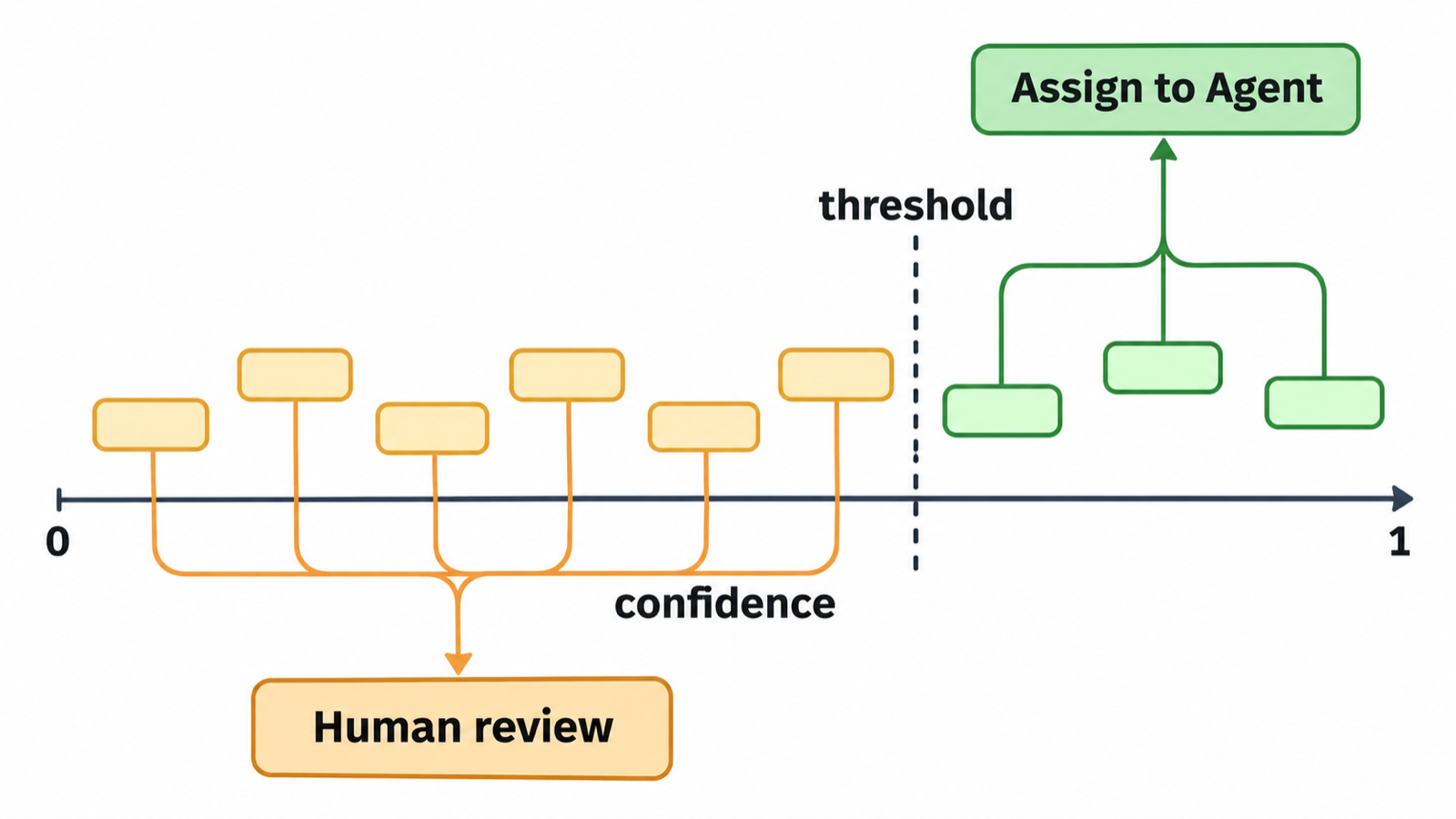
The answer value tells you what to do. Confidence tells you whether to do it without asking. For a choice answer, confidence equals the top option’s probability. For a noul, it’s max(noul, 1 - noul).
Here is the decision layer:
AUTO = 0.75      # assign without a person above this
HARD = 2.4       # difficulty score that earns the strong-model Agent

def decide(a):
    if a["needs_human"].noul >= 0.5:
        return ("human", "needs a decision first")
    if a["agent"].choice == "other" or a["agent"].confidence < AUTO:
        return ("human", f"router unsure ({a['agent'].confidence:.2f})")
    tier = "strong" if a["difficulty"].score >= HARD else "default"
    return (f"{a['agent'].choice}-{tier}", "auto")
Don’t copy 0.75 blindly. Google’s guidance is to set thresholds from labeled examples of your own traffic. Pull your last 50 to 100 closed tasks, note which Agent finished each one, and run them through ask(). Pick the lowest threshold at which the auto-routed tasks match what your team did. A wrong auto-route costs a failed run and a re-assign; a needless human hold costs a few minutes. Weigh those two against each other, not against a round number.
Two traps. A noul probability never goes above 0.99, so a check like > 0.99 never fires. And a score of 1.5 can mean “split between levels 1 and 2” or “unsure across all four.” When it matters, read probabilities too.
Wire the router into a Sharkly board
The router is plain Python, so it can run anywhere. On a Sharkly board, the cleanest trigger is the moment a task becomes ready for work.
1. Create one Agent per lane and tier. For example backend-default, backend-strong, frontend-default. Per the Sharkly Agents docs, each Agent follows its Runtime’s model by default, and the Model row lets you pick another model from that Runtime’s catalogue. That is where difficulty becomes a model choice.
2. Apply the decision with the sharkly CLI.
import subprocess

def apply(task_id, target, reason, a):
    note = (f"Router: agent={a['agent'].choice} ({a['agent'].confidence:.2f}), "
            f"difficulty={a['difficulty'].score:.1f}, "
            f"needs_human={a['needs_human'].noul:.2f}")
    if target == "human":
        subprocess.run(["sharkly", "task", "comment", task_id,
                        "--body", f"{note}. Held for a person: {reason}."], check=True)
        return
    subprocess.run(["sharkly", "task", "edit", task_id,
                    "--delegate-agent", target], check=True)
    subprocess.run(["sharkly", "task", "comment", task_id, "--body", note], check=True)
Assigning an Agent starts its run once the task is in a ready status. Writing the probabilities into a comment matters more than it looks: it’s how you audit the router a month from now.
3. Trigger it on a status change. A Sharkly Automation stores instructions, an Agent assignee, and triggers. Give a small Router Agent the instruction “run route.py on the task that triggered you,” then add a task-status trigger for the status your team uses for “ready.” Runs started by a task-status trigger link back to that task, so the routing record sits with the work. From the CLI:
sharkly automation trigger create <automation-id> --kind task_event --to-status "Ready"
What a routing call costs
Gemini Decision 1 bills $0.10 per 1M input tokens and $0 for output, per Google’s launch post. Shared input is billed once per request, however many questions you ask.
| Item | Tokens (estimate) |
|---|---|
| Task title and description | 2,000 |
| Three questions with criteria | 300 |
| Total per routing call | 2,300 |
| 1,000 routed tasks | 2.3M, about $0.23 |
The router costs less than one agent run on one task. Google also lists a no-cost tier in AI Studio for prototyping.
Limits to know before you rely on it
The API ships as v1beta on the Gemini Developer API, with Gemini in Google Cloud listed as “coming soon.” The docs state that it doesn’t support context caching, the Batch API, or Flex and Priority inference, so repeated input counts in full every time. Rate limits by tier sit on Google’s rate limits page; check yours before you route every task through one key.
Treat task descriptions as untrusted input. The docs warn that user-supplied text can argue for its own classification. If anyone outside your team can file tasks, keep the human hold on anything touching auth, payments, or production data, whatever the router says.
Google’s benchmark claims (lowest calibration error across its suite, nearly 5x cheaper than Gemini 3.5 Flash-Lite through the Interactions API) are Google’s numbers. Your own labeled tasks are the benchmark that counts.
When a routing call is the wrong tool
Use a Decisions call when tasks arrive faster than a person can triage them and the options are fixed: a set of Agents, a set of tiers, a yes/no gate. Use a plain rule when a label already decides it. If every task tagged docs goes to the docs Agent, an if statement is cheaper and never wrong.
Use a generative model instead when you need the router to explain itself in prose, rewrite the spec, or split the task into subtasks. The Decisions API returns numbers, not text. For splitting work across several roles, a Crew whose leader breaks the goal down fits better; see model routing for agent Crews.
Conclusion
Routing is a closed-set decision, and the Gemini Decisions API is built for closed-set decisions: one call, typed answers, a confidence score you can threshold, and a cost measured in fractions of a cent. The work that remains is yours: write clear option descriptions, calibrate the threshold on your own closed tasks, and send low-confidence cases to a person.
Start with one lane. Route new backend tasks for a week, compare the router’s picks with what your team would have done, then widen it. To run the router against a real board with Agents, Automations, and human review in one place, get started with Sharkly.
FAQ
What is the Gemini Decisions API?
It is a Gemini API endpoint, launched November 11, 2026, that answers yes/no, choice, and score questions about text, images, audio, video, or PDFs. It returns calibrated probabilities and confidence instead of generated text, using the gemini-decision-1 model.
How much does Gemini Decision 1 cost?
Google lists $0.10 per 1M input tokens and $0 for output tokens, with shared input billed once per request. A no-cost tier exists in Google AI Studio for prototyping.
How many questions can one request ask?
Between 1 and 1,000, bounded by a 262,144-token context window across the input and all questions. Choice questions take 2 to 255 options.
What confidence threshold should I use for routing?
There is no universal number. Google recommends setting thresholds from labeled examples of your own traffic. Replay 50 to 100 closed tasks and pick the threshold where automatic picks match your team’s.
Can the Decisions API pick which model an agent uses?
Indirectly. Ask a score question for difficulty, then map high scores to an Agent configured with a stronger model. In Sharkly, each Agent can be set to a model from its Runtime’s catalogue.
Is the Gemini Decisions API available on Vertex AI?
Not yet. Google’s launch post says support for Gemini in Google Cloud is coming soon. Today it runs on the Gemini Developer API as v1beta.