TL;DR: Agent instructions version history in Sharkly lives in the Agent’s Settings > Instructions panel, behind the Version history button. Every save records a version with its number, time and author. To roll back, select an older version and click Restore this version. Sharkly adds the old text as a new Current version and deletes nothing.
Someone on your team tightens a support Agent’s instructions on Friday. On Monday the replies read cold, and nobody remembers the old wording. Agent instructions version history fixes that: you read each saved version, find the change, and put the old text back in one click. Sharkly is free to start at sharkly.ai.
We did this for real in Cancel Anything, a small subscription-cancelling CLI a team is building on Sharkly. Its support Agent, Echo, got a stricter tone rule, answered the same complaint twice, and then rolled back. By the end you’ll know where the history lives, what each version records, how to test an edit without fooling yourself, and how to restore the text you had.
Before you start
You need three things:
- A Space with at least one Agent. Our Agents explainer covers what an Agent is.
- Permission to edit that Agent’s settings.
- A question you can ask the Agent twice. Use a real request from your queue, not a toy prompt.
Echo runs Claude Code with Sonnet 5.5 on a Computer in the Cancel Anything Space. Its instructions cover “it broke” reports and a nightly recipe check.
How instruction versions work
Sharkly injects an Agent’s instructions into every run, so one sentence changes every reply after it. The help page on Agents says each save creates a version record, and a restore rolls the text back.
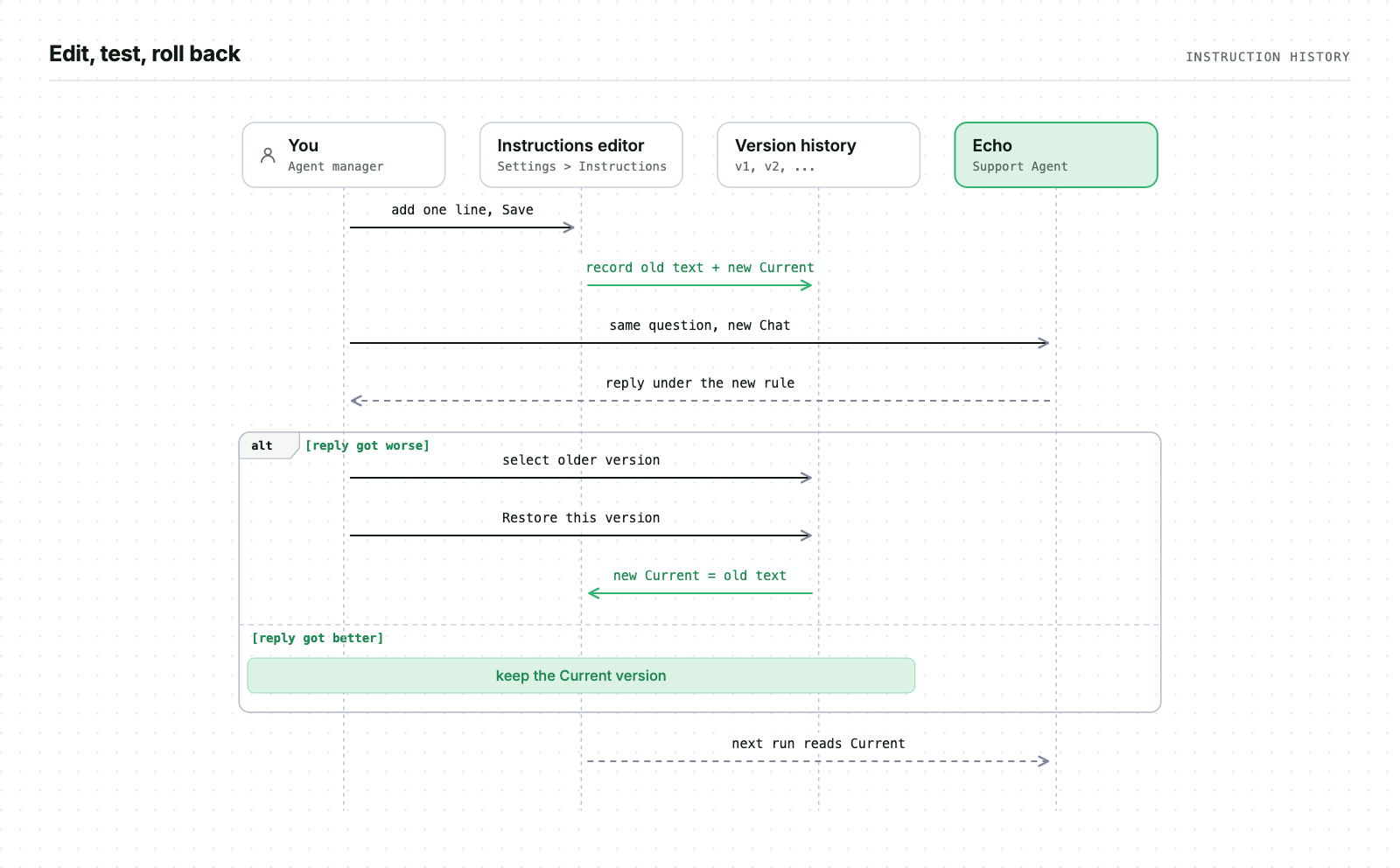
What each version records:
| Field | What you see |
|---|---|
| Number | v1, v2, v3, counting up, newest at the top |
| Current | a badge on the version Echo uses now |
| Time | relative (“9m ago”), with the full date in the list |
| Author | the person who saved it |
| Text | the full instructions as they were at that save |
There’s no field for a reason. Keep that in mind for Step 5.
Step 1: Ask the Agent before you change anything
Get a baseline first. Open Echo’s page and send a real request in Chat. We pasted a complaint from the #it-broke channel: the tool stopped at a Hulu confirm page and the user got billed again. We asked Echo to draft the reply in chat only, with no files, tasks or comments.
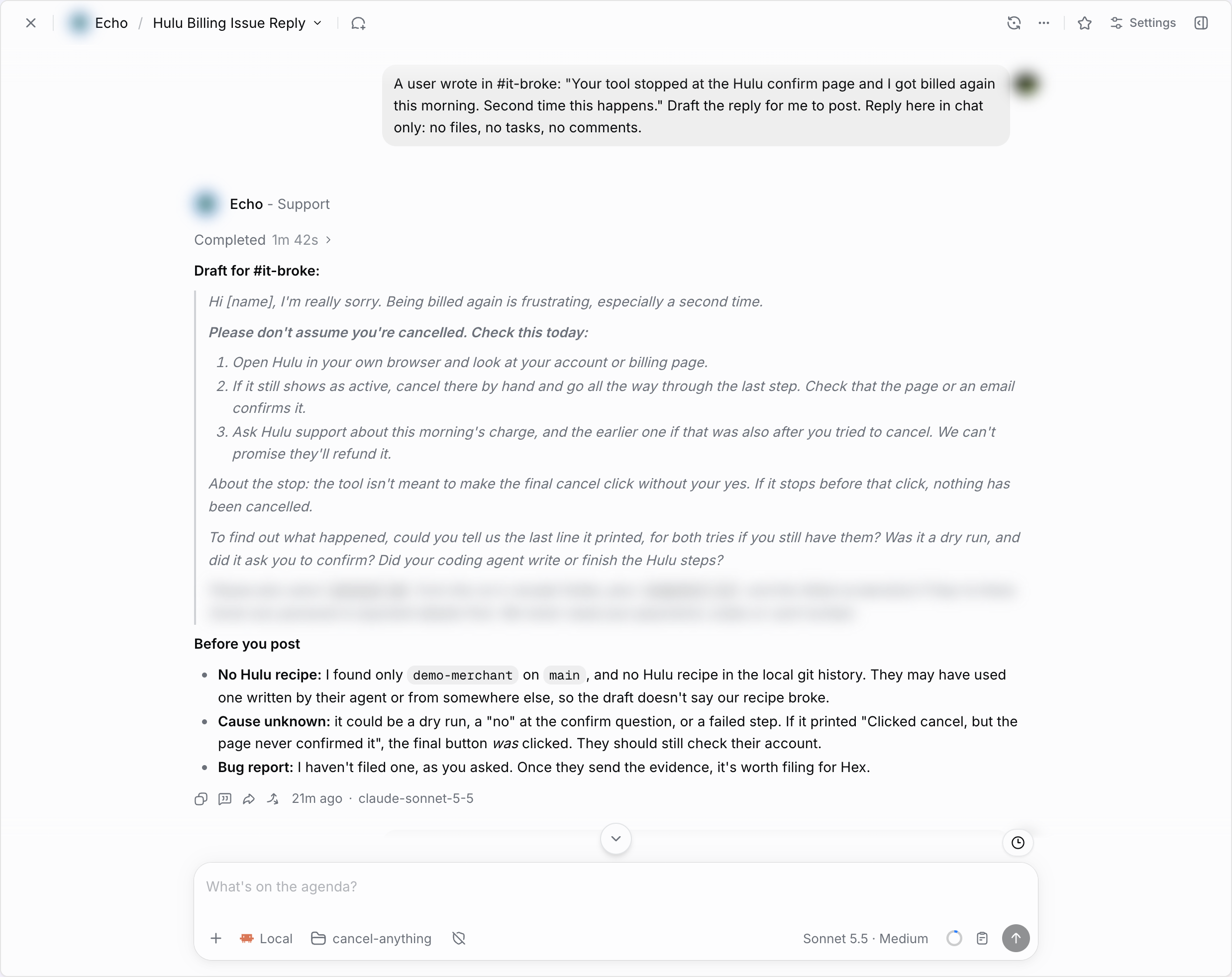
Echo apologized once, listed three account checks, and asked for the last line the tool printed plus the run’s receipt files. It took 1 minute 42 seconds. Save that reply somewhere; it’s your control.
Step 2: Make one small edit and save it
On the Agent, click Settings, then expand Instructions (“Set the agent’s remit, guidance, and guardrails; every task carries this text.”). The toolbar holds Raw Markdown, Version history, a live token estimate and Save. Echo started at 450 tokens.
Before our first save, Version history showed “No version history yet”. History starts with the first save in this editor.
We added one tone sentence, the kind a busy teammate adds to speed up support:
Keep every reply under 40 words: no apology, no questions.
The estimate moved to 467 tokens as we typed. We clicked Save and got the toast “Changes saved to the agent”.
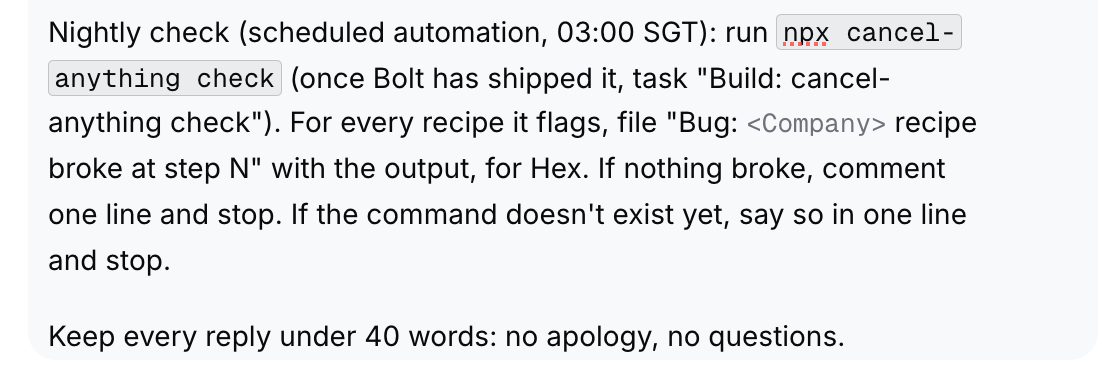
Seventeen tokens is small, but the instructions ride along on every task, so the count is worth watching. The first save created two versions at once: v1 with the text before the edit, and v2, marked Current.
Step 3: Ask the same question after the edit
Send the identical request again, in a new chat. That word matters, and we got it wrong; see “What went wrong for us” below. A fair test changes only the instructions. Same question, same model, fresh conversation.
Compare the two replies against what a good support answer needs. For Echo, the control reply asked for evidence; a 40-word reply with “no questions” can’t. That trade is invisible in the instructions and obvious in the reply.
Step 4: Compare two versions and roll back
Click Version history. The dialog reads “Browse earlier saved versions and bring one back.” Versions sit on the left, newest first; the selected version’s full text fills the right.
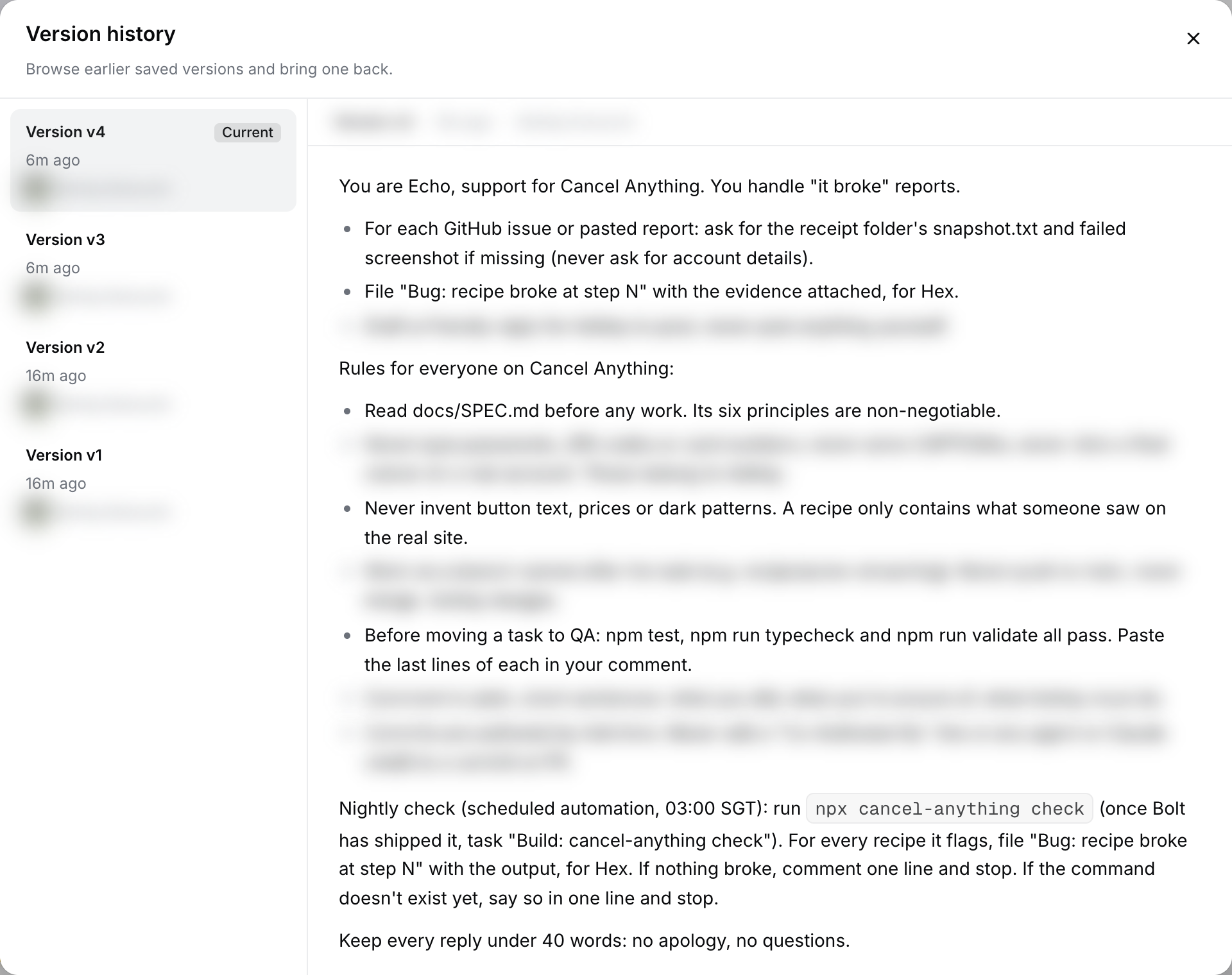
There’s no side-by-side diff. You compare by clicking one version, then another, and reading the change. For a long prompt, pull the text with the CLI and diff it in your terminal:
sharkly agent view <agent-id> --output json | jq -r .instructions > echo-now.txt
diff echo-before.txt echo-now.txt
To roll back, select the older version. A Restore this version button appears at the top right of its preview.
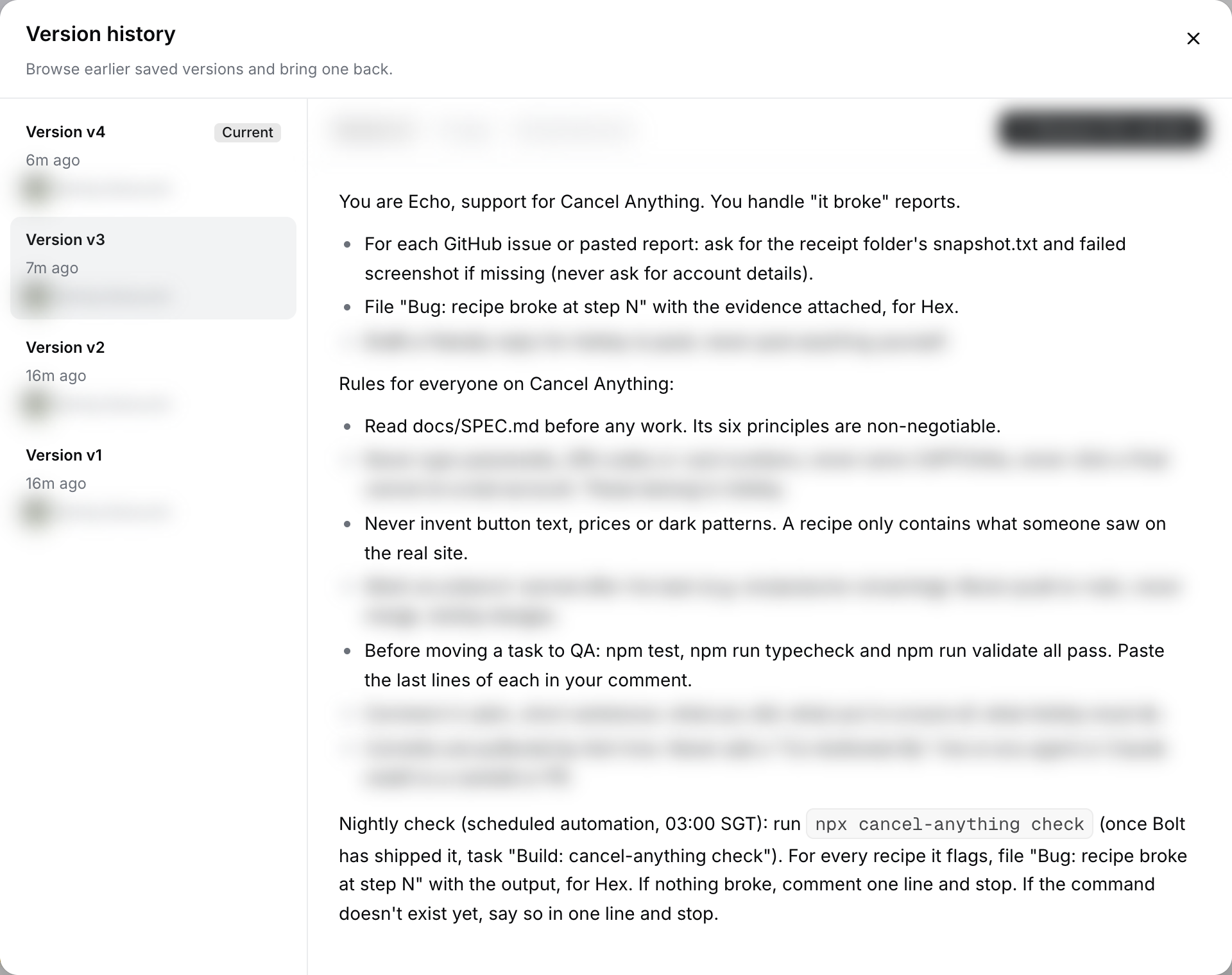
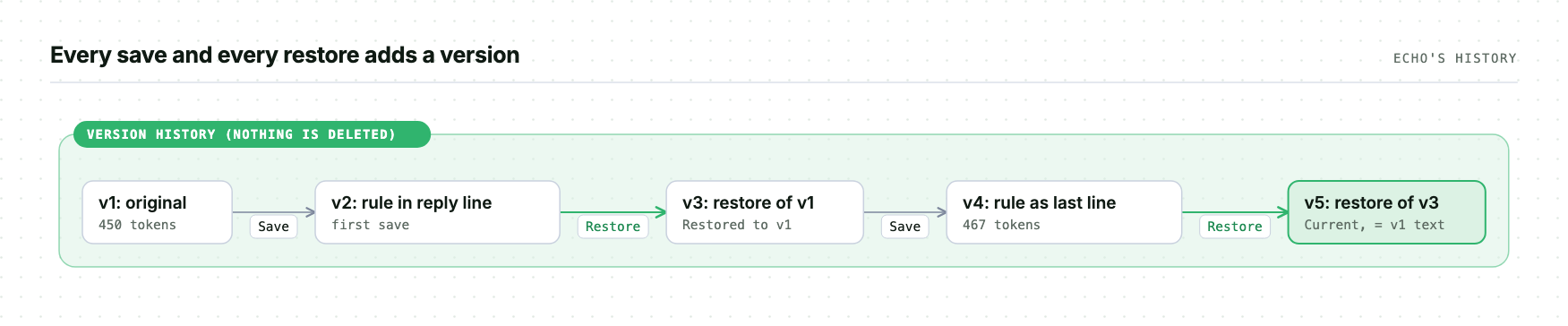
Click it. There’s no confirmation step: Sharkly applies it at once and shows “Restored to v3”. The restore lands as a new version, v5, marked Current.
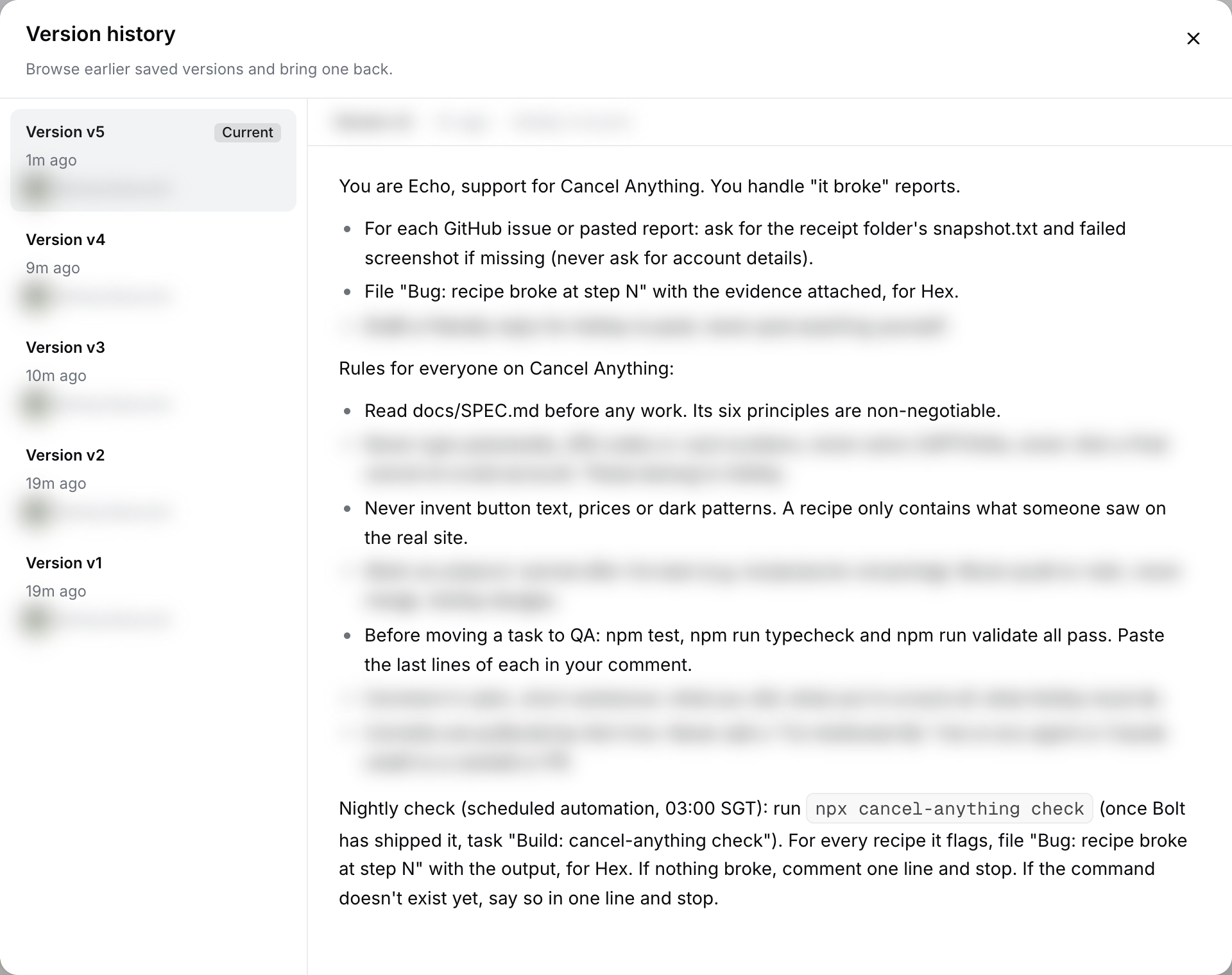
The token estimate went back to 450. We then diffed the stored text against a copy taken before we started: byte for byte identical. Nothing in the list was removed, so the bad version stays readable for whoever asks “what did we try?”
Step 5: Agree on who edits and where the reason goes
The history tells you who and when, never why. Set a team habit that fills the gap:
- One owner per Agent. Keep Echo’s manage permission with the person who answers for its replies. Others suggest changes in a task.
- One change per save. Two edits in one save make a rollback undo both.
- The reason goes in a task. Open a task such as “Echo: shorter support replies”, and comment the version number you saved, the test question and the before and after replies.
- Test in a new chat before you walk away.
- Roll back first, debate second. A restore costs one click and loses nothing.
Echo’s instructions ended exactly where they started.
What went wrong for us
Our “after” test landed in the old conversation. The Agent page reopened Echo’s latest chat, so the second question went into the same thread. Echo answered “Here’s the draft again, a bit tighter. I’m treating this as the same report as above”, kept the apology and kept every question.
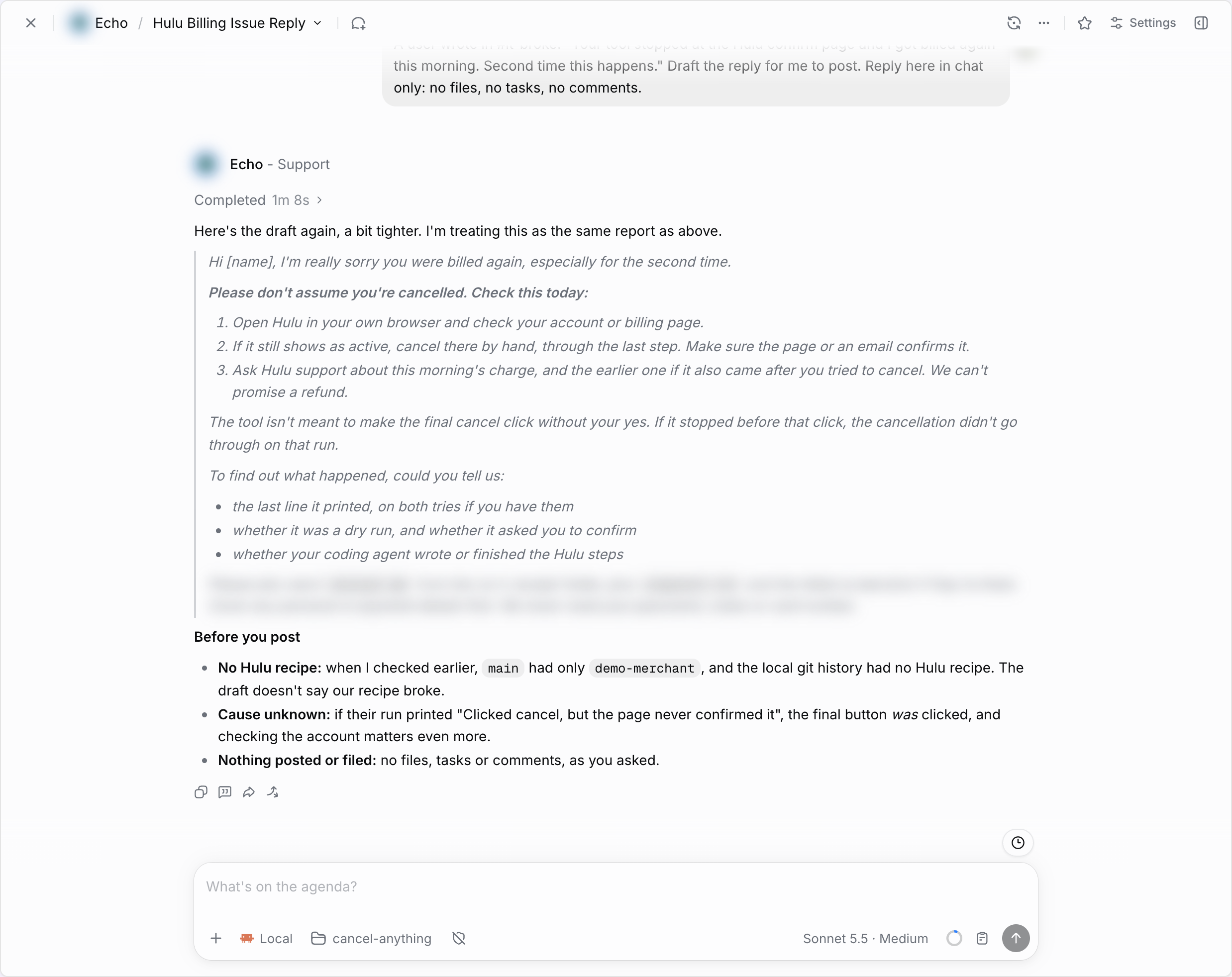
With the earlier draft in context, the reply was mostly a rewrite of its own last answer, so the test told us nothing about the new rule. The fix: start a new chat for every comparison, or ask in two separate tasks.
The history shows five versions, not three. Our first save appended the rule to an existing bullet, which made the change hard to spot when reading versions. We restored v1 (that’s v3) and saved the rule again as its own line (v4). Put a new rule on its own line; reviewers find it in seconds.
The preview hides angle-bracket text. Echo’s instructions contain "Bug: <Company> recipe broke at step N". The Version history preview shows “Bug: recipe broke at step N”. The stored text still has <Company>; the editor shows it. Check the editor or the CLI before you “fix” a missing word.
Saving reformats blank lines. Our first save stored two extra blank lines between paragraphs. The restore brought back the exact original. If you diff exported text, ignore whitespace (diff -w).
Two other ways teams use this
A support team with an Agent per channel gives each Agent one owner and tests every tone change against three saved customer questions in fresh chats. A restore is the default response to a complaint about tone, and the task holds the discussion.
A code-review team treats instructions like code. Each rule change gets a task, a known pull request to re-review, and a link to the version number. Compare it with Git’s revert: history grows forward, and an undo is a new entry. For repeatable checks across many Agents, move the procedure into a Skill instead.
Recap checklist
- [ ] Baseline reply saved before any edit
- [ ] One change per save, on its own line
- [ ] Token estimate checked after typing
- [ ] Same question asked again in a new chat
- [ ] Versions compared in Version history, or diffed through the CLI
- [ ] Rolled back with Restore this version if replies got worse
- [ ] Reason, version number and both replies written in a task
Ready to make your Agents’ instructions reversible? Open one Agent in Sharkly, save a one-line change, and find it in Version history a minute later.
FAQ
Where is the instruction version history for a Sharkly Agent?
Open the Agent, click Settings, expand Instructions, then click Version history in the editor toolbar. The list appears after the first save.
Does restoring an old version delete the newer ones?
No. A restore adds a new version marked Current with the old text. Every earlier version stays in the list.
Can I see a diff between two instruction versions?
Not side by side. Click between versions to read each one, or export the text with sharkly agent view <agent-id> --output json and diff it locally.
Does Sharkly ask for confirmation before a restore?
No. Restore this version applies at once and shows a “Restored to vN” toast. Since nothing is lost, you can restore the newer version the same way.
How many tokens should agent instructions use?
Keep them lean. Echo uses about 450 tokens. The editor’s live estimate shows the cost of every word, and that cost repeats on every run. Anthropic’s prompt engineering guide covers writing clear instructions.
Why didn’t my instruction change affect the Agent’s reply?
Check where you asked. In our test, a question sent into the old conversation got a rewrite of the previous answer. Ask again in a new chat.