OpenAI shipped GPT-6 Luna on September 22 at $0.10 per million input tokens and $0.50 per million output, with the API id gpt-6-luna and a 1M context window. At that rate the interesting question stops being whether the model is good enough in the abstract. It becomes which lanes of your board you are willing to hand to it, and how the cheap lane and the expensive lane run on the same Computer without anyone losing track of which one produced a given result.
That is a configuration problem before it is a model problem. A team that binds Luna everywhere saves money and then spends it back in review. A team that never binds it keeps paying premium rates to have an Agent rename a test file. This guide takes the smallest useful path: put gpt-6-luna on one Computer, keep it in its own lane, assign one real Task, and read the result where the team can see it.
TL;DR
Bind gpt-6-luna as the default model of a Runtime on a connected Computer, confirm that Runtime reads Available in Sharkly, give it its own Agent rather than reusing the expensive one, raise the per-Task timeout before trusting a long run, and keep Luna on work whose output a person can check in under a minute. Sharkly will not display the model name. It will show the run, the log, the questions, and the result on the Task. Agents research, execute, test, and report. People set direction, grant authority, and accept the result.
Where the model setting lives
Sharkly does not pick models. The Agents documentation is explicit: “The Agent follows the Runtime’s default model. It does not promise or display a specific model name. Change models in the Runtime or Computer tool configuration, not on the Agent.”
So there is no model dropdown on an Agent, and no thinking-depth control either. Four roles, one job each. The Agent defines how work should be handled. The Computer supplies the host and local resources. The Runtime performs the actual agent session. The Task remains the shared record for the team. The full walk-through of that setup lives in our GPT-6 Sol guide; this post covers the part that is specific to putting a cheap model on the board.
Step 1: bind gpt-6-luna on the Computer
On the Computer that will run it, update your agent tool and sign in with an account or API key that has Luna access. OpenAI made Luna available in ChatGPT Work and in Codex for Plus, Pro, Business, Enterprise, and Edu plans, gave Free and Go users Luna in the desktop app, and has not put it in Chat yet. If codex -m gpt-6-luna starts a session in a plain terminal on that host, Sharkly can use it.
Then set the default so runs on that Runtime pick it up:
# ~/.codex/config.toml
model = "gpt-6-luna"
model_provider = "openai"
model_reasoning_effort = "high"
Two cautions on that snippet. The reasoning-effort key name differs between Codex versions, so check it against the sample configuration for the build installed on that Computer. And high is there on purpose rather than as a default: every published Luna result below is measured at high or max effort, not at the setting you would pick to make a cheap model cheaper. [VERIFY]
Back in Sharkly, open Computer detail and run the rescan or connection test. The Runtime should read Available. A Computer showing online only means its local service is sending heartbeats. The Runtime capability status is what tells you a run can start.
Step 2: keep the cheap lane visibly separate
A Computer can expose one or more Runtimes, each reporting its own connection state, and a custom ACP Runtime can be added from Computer detail with its own name and startup command. That is the lever worth using here. Give the Luna lane its own Runtime entry and its own Agent, named for the lane rather than for the model, and the board tells you which lane a Task ran in without anyone reading an execution log.
This is not cosmetic. Sharkly cannot reliably read the model a Runtime is actually using, which is exactly why Agents follow the Runtime default and show no model name. If one Agent silently changes model between Tuesday and Thursday because somebody edited a config file, two runs that look identical on the Task were not. A lane per cost tier makes that visible in the one place the team already looks. See Computers in Sharkly for how Runtimes are detected and tested.
A decision pair, since two lanes cost something to maintain. Split the Runtime when more than one person assigns work on that Computer and the difference between a $0.10 run and a $10 run matters to someone. Do not split it when one engineer runs a handful of Tasks a week; a single Runtime and a per-Task judgment call is less to keep straight, and worktree isolation already keeps the runs from colliding.
Step 3: size the run for a model that starts slowly
Cheap is not the same as fast, and this is the setting people get wrong first. Artificial Analysis, a third party rather than either vendor, measured 153.9 output tokens per second for the max reasoning variant of GPT-6 Luna at 124.23 seconds to first token. That is longer than most people wait before assuming a process has hung.
So set the per-Task timeout deliberately, and keep the working directory in Temporary mode so each Task gets an isolated directory and a fresh worktree. Two Luna runs on the same repository then cannot write over each other, and a run that is thinking looks different from a run that has died, because the Task carries a status and a terminal scrollback does not.
Where a cheap Runtime belongs in a Crew
A Crew is a reusable group of People and Agents coordinated by one leader Agent. The placement rule that falls out of OpenAI’s own numbers is that Luna belongs among the members and not at the top.
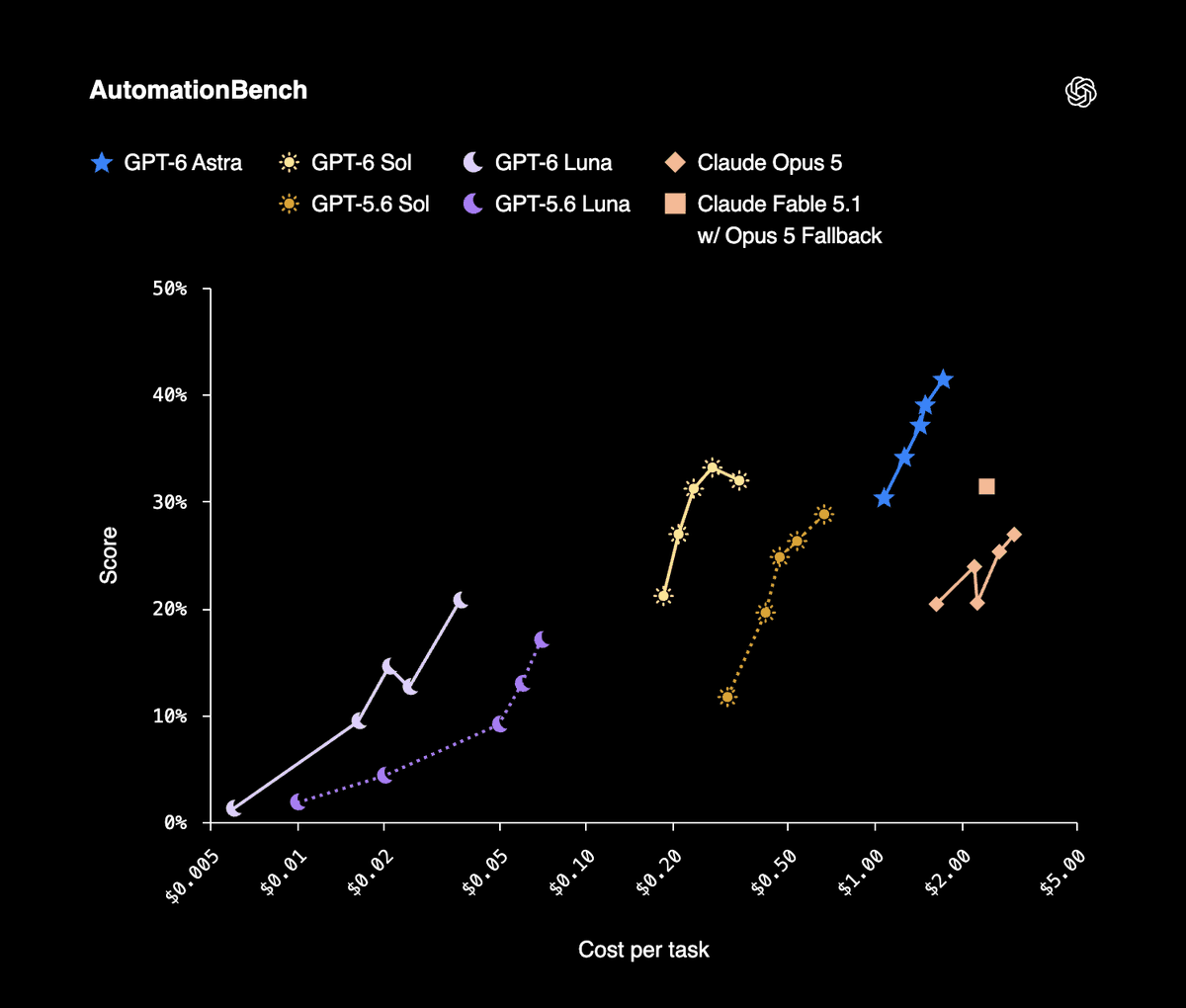
The member case is strong. On DeepSWE 1.1, OpenAI reports Luna at max effort scoring 66.6%, comparable to Claude Opus 5 and Fable 5 at medium effort, at 93% lower cost per task than Opus 5 and 96% lower than Fable 5. On OSWorld 2.0 offline, Luna at max beats GPT-5.6 Sol at medium for a tenth the cost. On AutomationBench 1.0.6, Luna at high scores 5.4 percentage points above its predecessor at 58% lower cost per task, and on factuality, Luna at higher effort matches GPT-5.6 Sol at about a hundredth the cost. OpenAI also describes Sol and Luna as 50% cheaper than GPT-5.6 promotional pricing, and that qualifier is OpenAI’s own: the baseline is a promotional rate rather than a list rate.
The leader case is weak, and not because of any benchmark. A leader interprets the goal, decides what the members do, and brings their results back into one Task. An interpretation error at the top is not one bad run, it is every member’s run pointed at the wrong thing, and the saving on the leader’s tokens is rounding error against that. Our Crew leader guide makes the same argument at the other end of the price list.
| Work | Lane | Why |
|---|---|---|
| Triage, labelling, backlog grooming | Luna | High volume, and a person can check the verdict in seconds |
| Test scaffolding, first-pass review notes | Luna at high effort | The published wins are at high or max, not at a lower setting |
| Changes to code that ships | GPT-6 Sol at $2 / $10 | AutomationBench 33.2% at $0.27 per task |
| Interpreting an ambiguous goal for a Crew | GPT-6 Sol, or Astra at $10 / $50 | A leader’s mistake multiplies across every member |
Write that down as a rule rather than a habit. Which model for which coding task covers the routing question in full.
One caveat on reading OpenAI’s margins: its launch post benchmarks against Claude Opus 5, and Anthropic replaced Opus 5 with Opus 5.5 hours later on the same day. The Luna comparisons above are measured against the previous generation of the model they name.
What a cheap Runtime does not make cheaper
Luna lowers the price of producing a change. It does nothing to the price of accepting one. Ten cheap runs produce ten diffs, ten sets of test output, and ten decisions that only a person can make, and OpenAI’s own spend figures are a warning rather than a reassurance: it reports a median researcher above $600 a day on coding agents, with the 90th percentile at $7,000. Cheaper per task is how a bill like that gets built.
The honest version of the pitch, then. A cheap Runtime is worth binding when the work it takes on is work a person can verify quickly, and it is a false economy when it multiplies the queue in front of your reviewer. Keep context, progress, blockers, results, and human review visible from request to release, and decide the lane at assignment time rather than at review time. Human review is the bottleneck has the scheduling side of that.
If you are already running several coding agents, connect one Computer, create one Agent on the cheap lane, and assign it something boring.