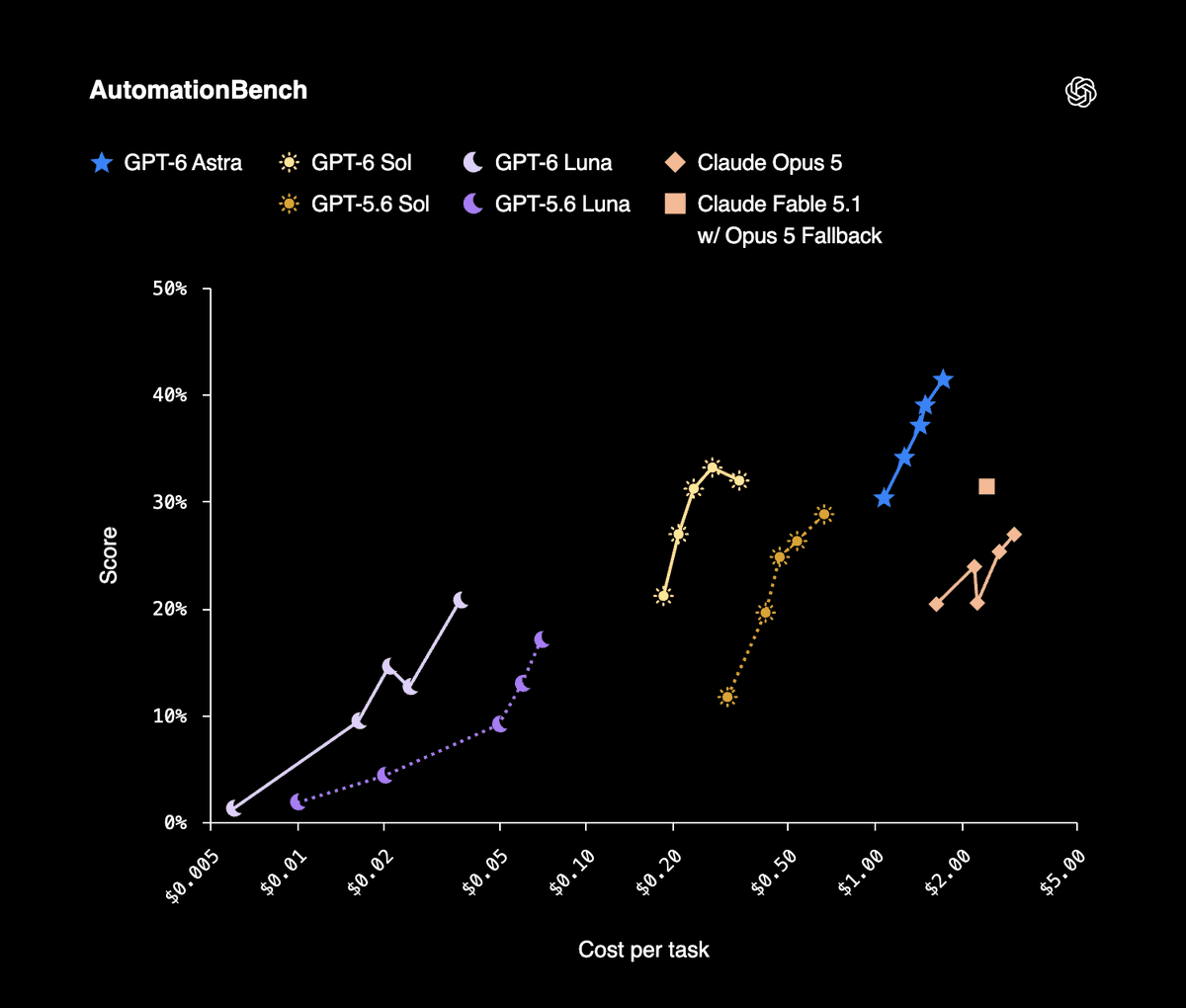
OpenAI shipped GPT-6 Sol on September 22 at $2 per million input tokens and $10 per million output, with the API id gpt-6-sol and an 872k context window. The number that should change how your board looks is not the token rate. It is the cost per finished task: on OpenAI’s AutomationBench 1.0.6 results, Sol at xhigh reasoning effort scores 33.2% at $0.27 per task, while Claude Opus 5 at max effort scores 26.9% at 11.1 times Sol’s cost per task.
Read that as a budget statement rather than a leaderboard. If your team has been rationing agent runs because a full run was expensive, that constraint just moved. The next constraint is the one nobody can buy their way out of: a person still has to read the diff and accept the work. This guide takes the smallest useful path through the setup, then is honest about the part the price cut does not solve. Put Sol in Codex on one Computer, create one Agent, assign one real Task.
TL;DR
Set model = "gpt-6-sol" in Codex on a connected Computer, confirm the Codex Runtime reads Available in Sharkly, keep the Agent’s working directory in Temporary mode, raise the per-Task timeout before you trust the first long run, and assign one Task. Sharkly will not display the model name. It will show the run, the log, the questions, and the result on the Task. Agents research, execute, test, and report. People set direction, grant authority, and accept the result.
Where the model setting lives
Sharkly does not pick models. The Agents documentation states it plainly: “The Agent follows the Runtime’s default model. It does not promise or display a specific model name. Change models in the Runtime or Computer tool configuration, not on the Agent.”
There is no model dropdown on an Agent and no thinking-depth control either, so do not go looking for one. Four roles, one job each. The Agent defines how work should be handled. The Computer supplies the host and local resources. The Runtime performs the actual agent session, and Codex is the Runtime here. The Task remains the shared record for the team.
Step 1: put GPT-6 Sol in Codex on the Computer
On the Computer that will run it, update Codex and sign in with an account or API key that has Sol access. OpenAI made Sol available in ChatGPT Work and in Codex for Plus, Pro, Business, Enterprise, and Edu plans, and it is not in Chat yet. If codex -m gpt-6-sol starts a session in a plain terminal on that host, Sharkly can use it.
Then set the default so every run on this Computer picks it up:
# ~/.codex/config.toml
model = "gpt-6-sol"
model_provider = "openai"
model_reasoning_effort = "xhigh"
Two cautions on that snippet. The reasoning-effort key name differs between Codex versions, so check it against the sample configuration for the Codex build on that Computer. And the effort level is a cost decision, not a quality dial you leave at maximum: OpenAI’s own published results use different effort levels for different benchmarks, and the $0.27 per task figure above is the xhigh row. [VERIFY]
Back in Sharkly, open Computer detail and run the rescan or connection test. The Codex Runtime should read Available. A Computer showing online only means its local service is sending heartbeats. The Runtime capability status is what tells you a run can start.
Step 2: set up the cache before you scale the Crew
This is the GPT-6 change that matters most once more than one Agent is working in the same repository, and it is the one most teams will skip.
OpenAI reports higher cache hit rates by default for GPT-6, a 90% discount on cached input reads, a prompt caching dashboard and a diagnostics tool, and, importantly for agent work, that changing reasoning effort or tool availability no longer invalidates the cache. Explicit breakpoints let you choose where a cached prefix ends. OpenAI cites GitHub seeing more than 50% fewer prompt tokens needing fresh processing across billions of requests.
For a crew, the practical shape is this. Every Agent run on the same repository re-sends a large, nearly identical prefix: the repository layout, the house rules, the test command, the conventions. That prefix is exactly what a cache is for, and it is the reason a fleet of agents can cost far less per run than the first agent did.
A decision pair, because this is not free work. Pin a stable prefix and set an explicit breakpoint when several Agents run repeatedly against one codebase and your Skill and instruction text is settled. Do not bother when an Agent runs a handful of times a week or its instructions are still changing weekly, because you will spend more time maintaining the boundary than you save.
Step 3: build the Agent around a run that starts slowly
Open Agents, select New Agent, choose the Computer and the Codex Runtime, then set three things.
Per-Task timeout. Set this deliberately, because a Sol run in a high reasoning mode can look dead before it looks busy. Artificial Analysis, a third party rather than either vendor, measured 102.15 seconds to first token for the max reasoning variant of GPT-6 Sol. That is longer than most people wait before assuming something has hung, and it is exactly the failure that a status on a shared board prevents and a terminal does not. A run that is thinking and a run that has crashed look identical in a scrollback. See coding agent observability for what a status has to carry to be worth reading.
Working directory. Temporary mode. Each Task gets an isolated directory, and repository-backed runs prepare a fresh worktree, so two Sol runs on the same repository cannot write over each other. Default concurrency for temporary directories is 50% of the Computer limit. Leave it there until that Computer has handled several real runs; higher concurrency consumes CPU, memory, disk, and provider capacity at once.
Instructions. Short and stable:
Read the Task description and recent comments before editing.
Keep changes limited to the requested behavior.
Ask a question only when different interpretations would
materially change the result; otherwise proceed with a stated
assumption and record it in your report.
Run the closest relevant checks and report failures without hiding them.
Stop and ask before anything destructive or outside the repositories
attached to this Agent.
Step 4: assign one Task, then decide if a Crew earns its place
Pick a Task with a clear acceptance criterion. Select the Agent as Assignee and move the Task out of Backlog into a status whose category is ready for work; a Task assigned in Backlog waits. The run moves through queued, dispatched, and running, and the Executions tab streams the log. If the Agent needs a decision, the question returns to the Task as a comment, the Task shows waiting for human reply, and that routes to your Inbox.
For a bounded change, one Agent is the right call and the moving parts stay at zero. A Crew is a reusable group of People and Agents coordinated by one leader Agent, and it earns its place when the leader has to interpret a goal and bring several members’ results back into one Task.
Sol changes that math, because a leader mostly reads, plans, assigns, and reviews, and that was the hardest work to justify at the top of a price list:
| Runtime model | API id | Input / output per 1M | Where it fits on a Crew |
|---|---|---|---|
| GPT-6 Astra | not stated | $10 / $50 | Leader when the plan itself is the hard part |
| GPT-6 Sol | gpt-6-sol |
$2 / $10 | Leader and the members doing real changes |
| GPT-6 Luna | gpt-6-luna |
$0.10 / $0.50 | High volume members: triage, labelling, scaffolding |
We wrote the same setup for Astra in running GPT-6 Astra as a Crew leader. The argument there holds; the price point under it moved.
What the price cut does not buy
OpenAI describes Sol as 50% cheaper than GPT-5.6 promotional pricing. That qualifier is OpenAI’s own and it matters, because the comparison baseline is a promotional rate rather than a list rate. Two more caveats belong on the same page. OpenAI’s launch benchmarks compare against Claude Opus 5, which Anthropic replaced with Opus 5.5 hours later on the same day, so read those margins as measured against the previous generation. And the effort level does the work: Sol reaches 68.8% on DeepSWE 1.1 and 56.4% on Agents’ Last Exam V1 at max effort, not at the setting you would leave on for routine tasks.
Then the part that is not about the model at all. OpenAI reports that its own median researcher spends more than $600 a day on coding agents, with the 90th percentile above $7,000. Cheaper per task is how a bill like that gets built, not how it gets avoided. Every run still produces a change that a person has to read, question, and accept, and that queue did not get 11 times cheaper this week. Plan around review capacity rather than model choice, write routing down as a rule instead of a preference, and keep assignment, progress, blockers, results, and human review in one place from request to release.
If you are already running several coding agents, connect one Computer, create one Agent, and assign it something boring.