TL;DR
To use GLM-5.4, subscribe to Z.ai’s GLM Coding Plan, create a plan API key, and point each tool at its own endpoint: Claude Code at /api/anthropic, Codex at /api/v1, Cursor at /api/coding/paas/v4. For a team, the harder part comes after setup: deciding which tasks get the new model, keeping one key per person, and tracking credits.
How to use GLM-5.4 when a team already runs several agents
GLM-5.4 is Z.ai’s new flagship coding model and its first built on a Loop Transformer, an architecture that runs a shared block of 28 layers twice per token. The GLM-5.4 model page lists a 1M-token context window and 128K maximum output.
Two facts shape every rollout decision:
- It’s plan-only for now. GLM-5.4 is available to all GLM Coding Plan users. Z.ai says the pay-as-you-go Model API opens after a security assessment, with no date given.
- It thinks long. Z.ai’s own page warns that the model “tends to get caught in overly long ‘marathon thinking’ loops.” That extra reasoning improves accuracy, and every thinking token is an output token you pay for in credits.
If one developer wants to try it, the setup below is all they need. If five engineers run Claude Code and Codex agents side by side, you also need rules for routing, keys and spend. That’s where most of this guide goes, and it’s where Sharkly comes in: one board where People assign tasks to coding agents running on their own Computers.
GLM-5.4 setup in Claude Code, Codex and Cursor
Each tool speaks a different protocol, so each gets its own base URL. Use a Coding Plan key, created under Personal Coding Plan > Plan Overview on z.ai. Z.ai keeps personal plan keys, Team Plan keys and standard API keys separate, and they don’t work in each other’s place.
| Tool | Protocol | Base URL | Model name |
|---|---|---|---|
| Claude Code | Anthropic Messages | https://api.z.ai/api/anthropic |
glm-5.4[1m] |
| Codex | OpenAI Responses | https://api.z.ai/api/v1 |
glm-5.4 |
| Cursor | OpenAI Chat Completions | https://api.z.ai/api/coding/paas/v4 |
GLM-5.4 (uppercase) |
Claude Code
Add these keys to the env block of ~/.claude/settings.json, per Z.ai’s Claude Code guide. Don’t replace the whole file.
{
  "env": {
    "ANTHROPIC_AUTH_TOKEN": "your_zai_coding_plan_key",
    "ANTHROPIC_BASE_URL": "https://api.z.ai/api/anthropic",
    "ANTHROPIC_DEFAULT_OPUS_MODEL": "glm-5.4[1m]",
    "ANTHROPIC_DEFAULT_SONNET_MODEL": "glm-5.4[1m]",
    "ANTHROPIC_DEFAULT_HAIKU_MODEL": "glm-5.3-flash[1m]",
    "CLAUDE_CODE_AUTO_COMPACT_WINDOW": "1000000",
    "API_TIMEOUT_MS": "3000000"
  }
}
The [1m] suffix turns on the full 1M context. Open a new terminal, run claude, and confirm the model with /status.
Codex
Codex needs a model catalog file plus a provider block. Z.ai’s Codex guide gives the full ~/.codex/models.json; the provider part of ~/.codex/config.toml looks like this:
model_provider = "ZAI"
model = "glm-5.4"
model_reasoning_effort = "max"
model_catalog_json = "~/.codex/models.json"

[model_providers.ZAI]
name = "ZAI"
base_url = "https://api.z.ai/api/v1"
experimental_bearer_token = "your_zai_coding_plan_key"
wire_api = "responses"
wire_api has to be responses. Restart Codex after saving.
Cursor
In Cursor Settings > Models, click Add Custom Model, pick the OpenAI protocol, paste the key, turn on Override OpenAI Base URL with the coding endpoint, and type GLM-5.4 in capitals. Z.ai’s Cursor guide flags the uppercase name as a requirement.
Decide which tasks go to GLM-5.4
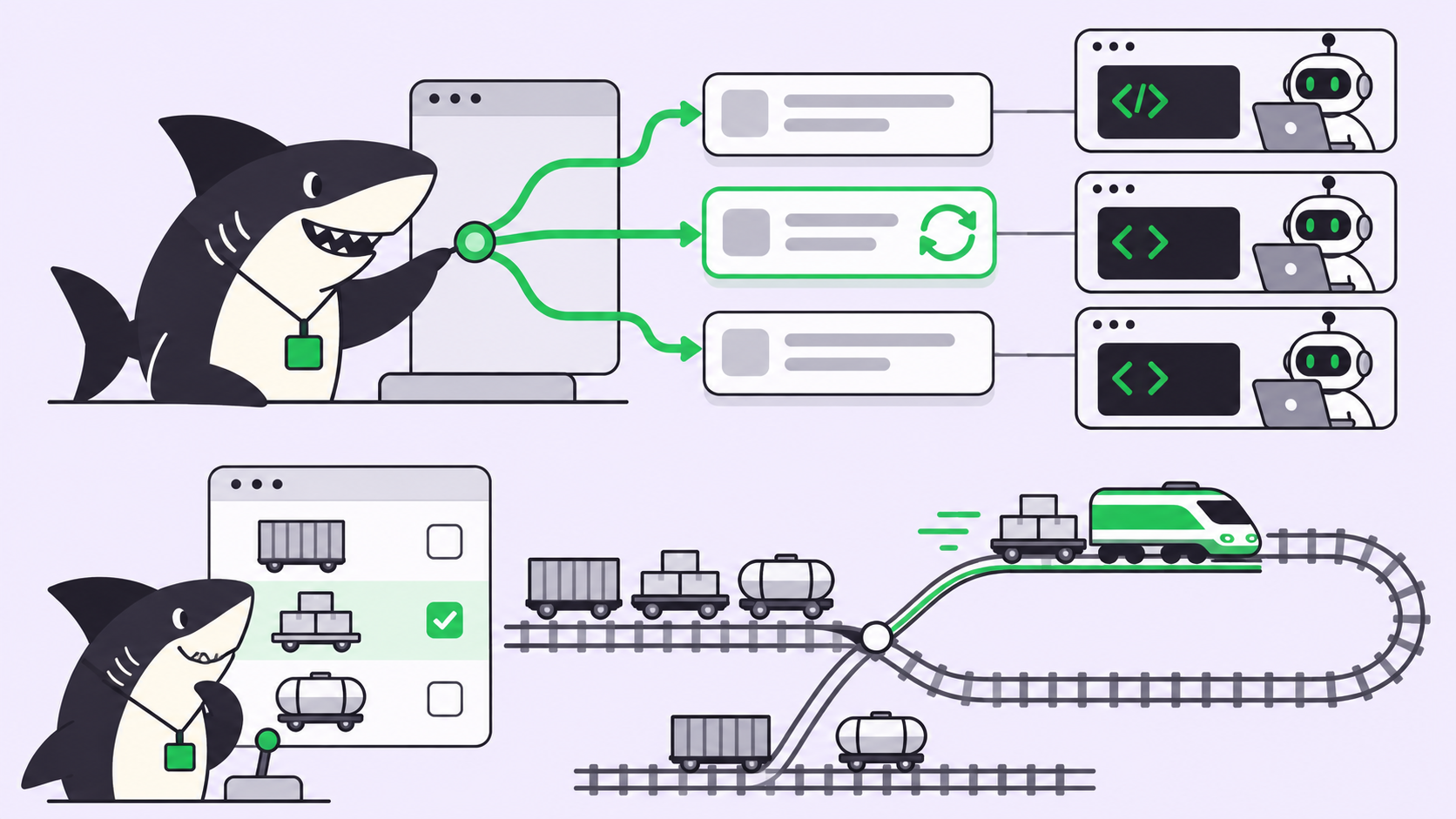
A new model shouldn’t take over every agent on day one. Route by task shape instead:
- Good fits: long refactors that need the 1M context, multi-file debugging, and design work where deeper reasoning pays off.
- Poor fits: one-line fixes, formatting, changelog drafts and other short tasks, where long thinking burns credits for no gain.
- Keep a control: run the same kind of task on your current model for a week, so you compare results on your own repos rather than on launch charts.
Effort controls matter more than usual here. Z.ai’s Codex catalog exposes three levels, low, high and max, with max as the default. Drop routine work to high and keep max for the hard tasks. Our guide to routing agent tasks by difficulty covers the general pattern.
What does a GLM-5.4 task cost in credits?
On the plan you spend credits, not dollars per token. The Coding Plan overview gives the formula:
$$\text{credits} = \frac{\text{input} \times 4.6 + \text{cached} \times 1.1 + \text{output} \times 16}{10{,}000}$$
GLM-5.3 uses multipliers of 6.9, 1.7 and 24, so GLM-5.4 costs about a third less per token. Take an agent turn that reads 100K tokens and writes 10K: that’s 62 credits uncached, or 30.5 credits when 90K of the input hits the cache.
| Plan | 5-hour credits | Weekly credits |
|---|---|---|
| Lite | 2,000 | 10,000 |
| Pro | 12,000 | 60,000 |
| Max | 28,000 | 140,000 |
Timing changes the bill too. Off-peak usage is charged at 50% of the standard rate, and peak hours are Monday to Friday, 14:00 to 18:00 Singapore time (UTC+8). Queue long background tasks outside that window and the same work costs half.
One key per person: GLM plan rules for teams
This is the rule teams trip over. Z.ai’s usage policy says subscription benefits are exclusive to the subscriber and prohibits account sharing or multi-user access. It also limits the plan to officially supported tools; Claude Code, Codex and Cursor are all on that list.
So one personal key pasted into every teammate’s agent config breaks the terms. You have two clean options:
- Each person subscribes. Every engineer holds their own personal plan and key, and their agents use only that key.
- Use the Team Plan. Z.ai’s Team Plan gives each member a seat and adds team usage insights by member and time period, plus per-member spending limits when on-demand overage is on.
The Team Plan solves the provider side of spend tracking. It doesn’t tell you which task burned the credits. For that you need the work and the runs in one place, which is the gap our post on tracking coding agent spend walks through.
Route GLM-5.4 work across a team with Sharkly
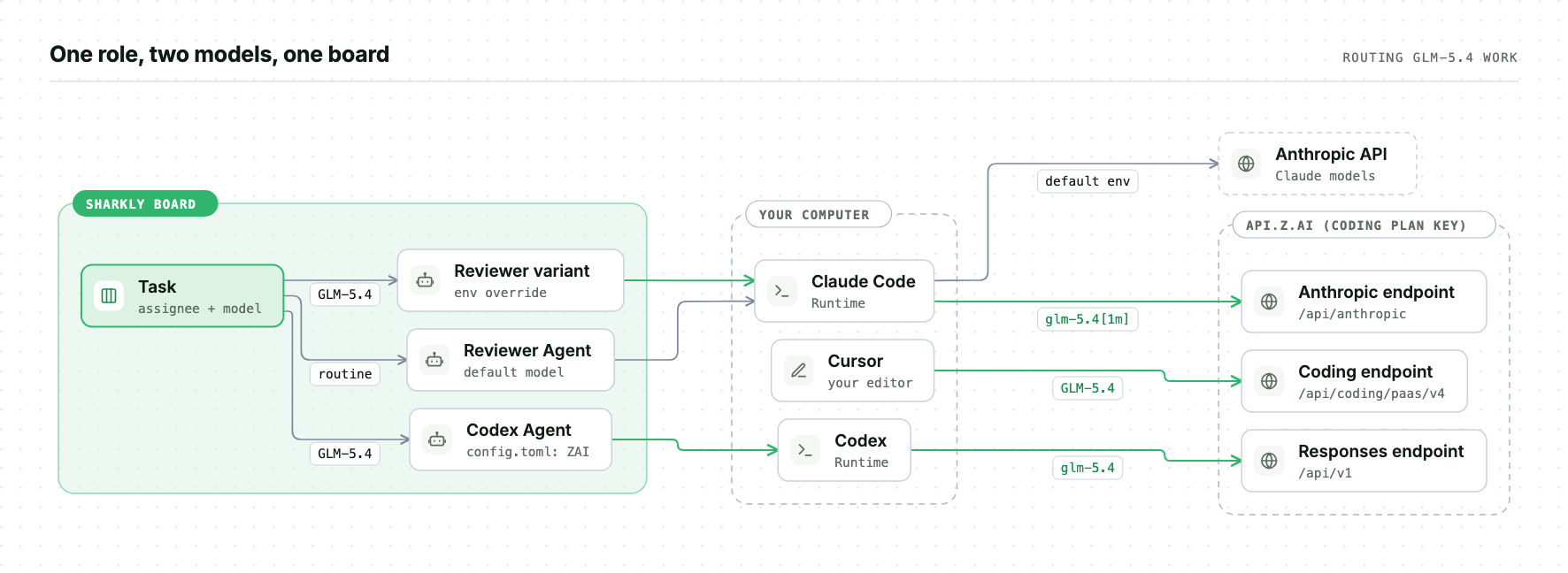
Sharkly doesn’t replace Claude Code or Codex; it runs them. An Agent in Sharkly is a configured teammate that executes through a Runtime (Claude Code, Codex and others) on a connected Computer. Sharkly is BYOK, so runs bill to whatever plan the Runtime uses, here your Coding Plan.
Three settings make a GLM-5.4 rollout manageable, all documented on the Agents page:
- Environment variables. Each Agent holds plain and secret environment variables. Put
ANTHROPIC_BASE_URLand the model names in plain variables and the Coding Plan key in a secret one, instead of editing a sharedsettings.json. - Variants. An Agent variant inherits the original Agent live and overrides single settings. Create “Reviewer” on its usual model, then a “Reviewer GLM-5.4” variant that overrides only the environment variables. Instructions and Skills stay maintained in one place.
- Per-task model. When the Runtime’s catalog lists the model, you can pick it for one run from the Assignee picker without touching the Agent’s default.
Cursor stays where it is: in each developer’s editor, on their own key. The board handles the agent runs.
Roll it out in five steps
- Connect the Computer that holds the subscriber’s Claude Code or Codex install with
sharkly computer register. - Create the GLM-5.4 variant of an existing Agent and set its environment variables, key as a secret.
- Keep the variant on that subscriber’s Computer, so one person’s key serves one person’s runs.
- Assign it the long, reasoning-heavy tasks from your routing list, and the short ones to the original Agent.
- Read each run’s result and execution log on the Task before you accept the work.
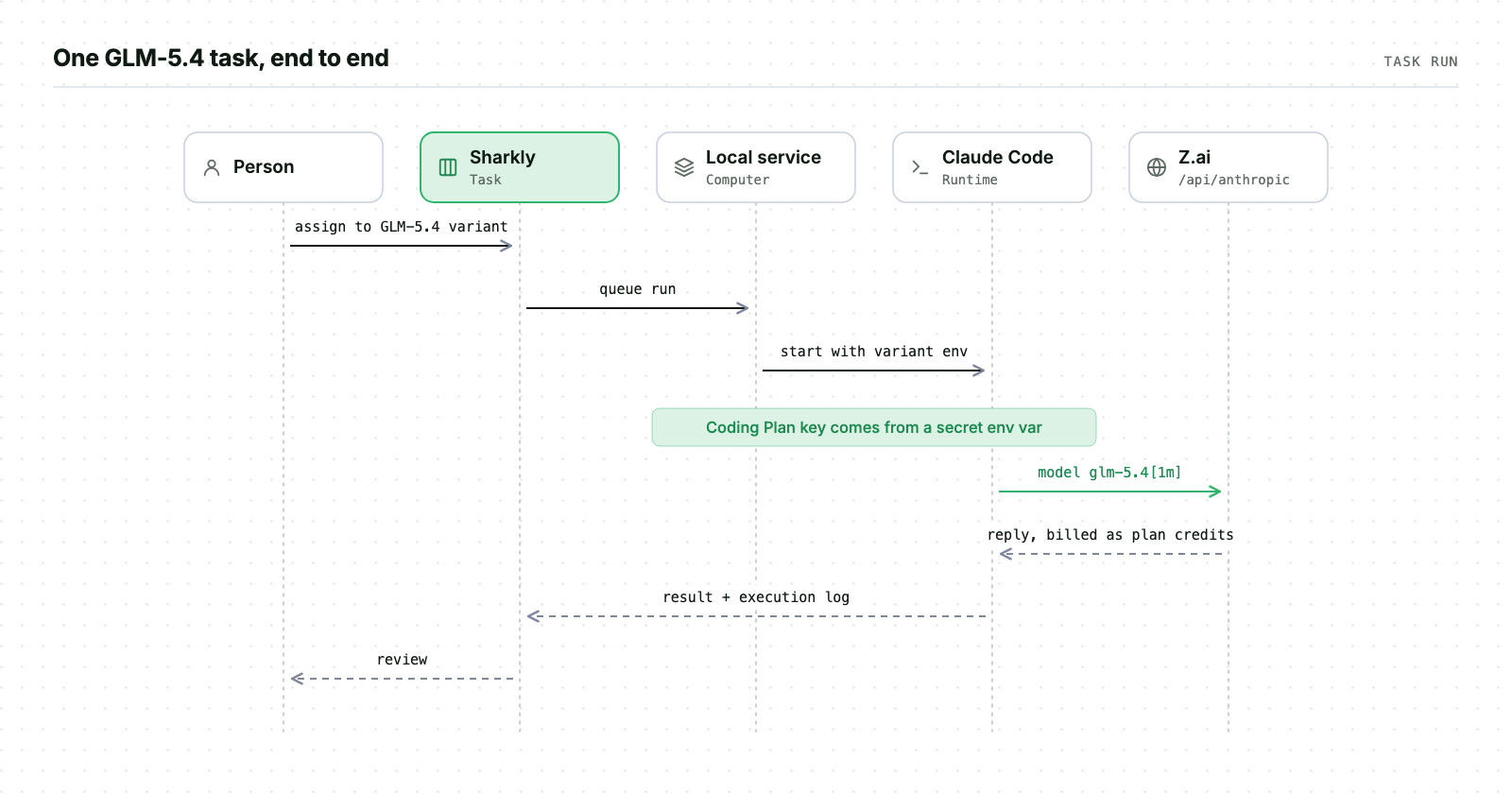
If a run fails with a quota or rate-limit message, the execution log shows the provider’s original response, so you can tell a spent 5-hour window from a bad key.
Alternatives to switching now
You don’t have to adopt GLM-5.4 this week:
- Stay on your current model until Z.ai opens the Model API, if your team needs pay-as-you-go billing.
- Use GLM-5.3-Flash for cheap tasks. Its multipliers are half of GLM-5.4’s. Our post on running agents on GLM-5.3-Flash covers that setup.
- Mix models in one Crew, with a stronger model reviewing a cheaper one, as in mixed-model crews.
Conclusion
Setting up GLM-5.4 takes ten minutes per tool. Running it across a team takes three decisions: which tasks it gets, whose key each run uses, and how you’ll see the credits each task spent. Get those right and a new model becomes one more option on the board, not a config change in five places. To try it, connect a Computer to Sharkly and create your first GLM-5.4 variant next to an Agent you already trust.
FAQ
Can I use GLM-5.4 without the Coding Plan?
Not yet. As of November 24, 2026, GLM-5.4 is available only through the GLM Coding Plan. The Model API opens after a security assessment.
Can my whole team share one GLM Coding Plan key?
No. Z.ai’s usage policy prohibits account sharing and multi-user access. Give each person their own plan, or use the Team Plan with a seat per member.
Why does Cursor need GLM-5.4 in uppercase?
Z.ai’s Cursor guide requires the uppercase name for Cursor. Claude Code and Codex use lowercase glm-5.4.
Can I run Claude Code and Codex on GLM-5.4 at the same time?
Yes. Both are supported tools, and both draw on the same plan credits, so watch the 5-hour limit when several agents run at once.
How do I keep GLM-5.4 from overspending credits?
Route only long, reasoning-heavy tasks to it, lower effort to high for routine work, keep sessions on the same files so the cache hits, and queue big jobs outside peak hours.