Claude Code is strong at reading a large codebase and holding a plan across many files. Codex is strong at tightly scoped, test-driven changes. Plenty of engineers end up wanting both on the same repository: one drafting a refactor while the other hardens a flaky test suite. The moment you try it, the same working directory becomes the problem. Two different tools, two different CLIs, one folder they both write to.
This guide walks the setup step by step, names the failure mode at each step, and shows where two terminals stop scaling. The isolation half is a solved problem with git worktrees. The coordination half, knowing which tool is on what and keeping every change reviewable, is where a runtime-neutral layer like Sharkly takes over.
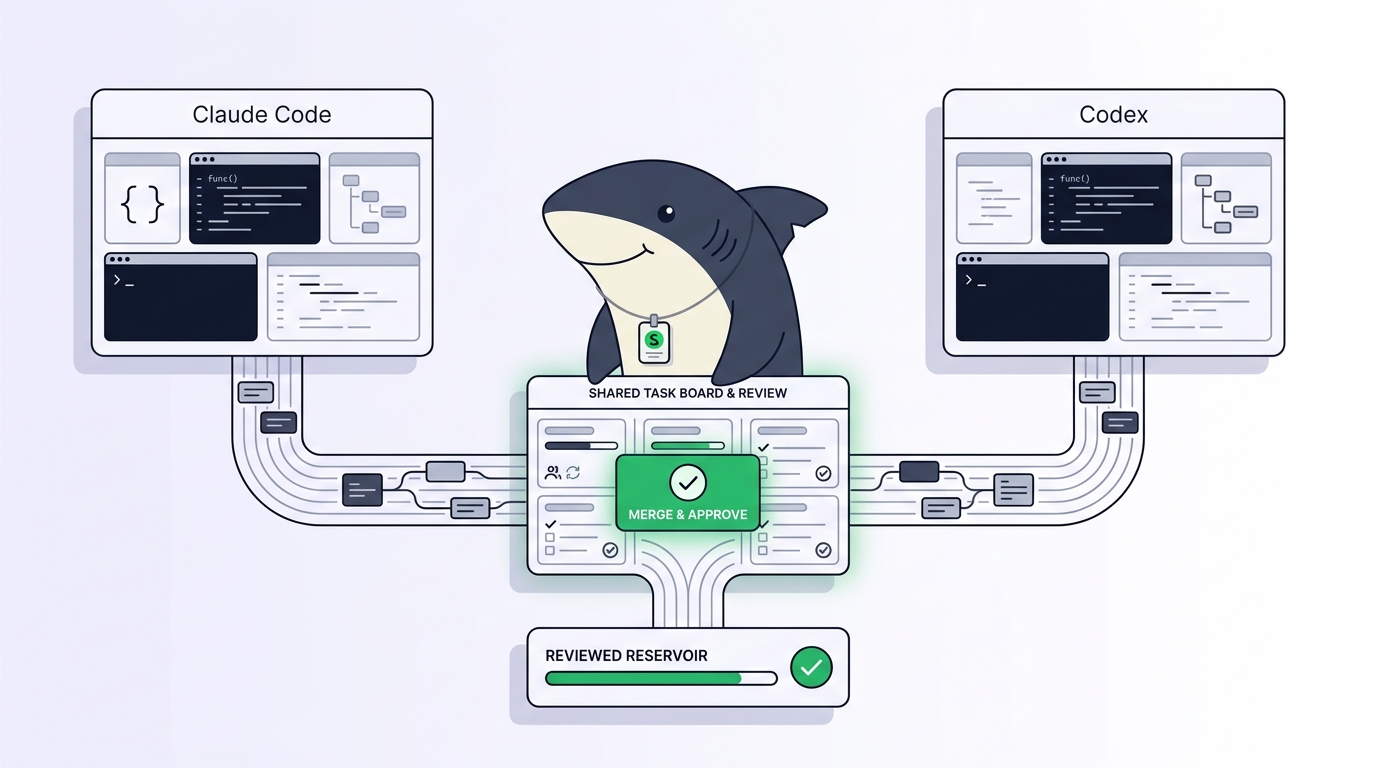
Sharkly is not a replacement for Claude Code or Codex. It adds the shared Task, Computer, context, and review layer around the execution tools you already run, so a Claude Code session and a Codex session become two assignments in one workflow instead of two terminals you babysit.
Why you’d run Claude Code and Codex on the same repo
Three reasons show up again and again, and they are not the same problem.
Different strengths on different tasks. You send the wide-context work (trace this bug across the module, plan this migration) to one agent and the narrow, verifiable work (make this test pass, tighten this function) to the other. Matching the tool to the task is its own topic; see which model for which coding task.
A head-to-head on real work. The only honest benchmark is your codebase, not a leaderboard. Running both on the same ticket and comparing the diffs tells you more than any published score. We cover the method in how to compare coding agents on your own codebase.
You already pay for both. Many teams have a Claude subscription and a Codex or API seat already. Provider neutrality is the point: your workflow should survive whichever tool ships the next best model, without a rebuild.
Whatever the reason, the failure is identical. Two agents in one folder are two writers editing one document with no lock. One switches the branch out from under the other, or reformats a file mid-edit, and you get half-applied diffs that make no sense.
Step 1: give each agent its own worktree
The git worktree fixes the collision at the root. One repository can have several working directories checked out at once, each on its own branch, sharing a single .git database. Instead of one folder both tools fight over, you get one per task.
# One checkout per task, each on its own branch
git worktree add ../app-refactor -b agent/refactor
git worktree add ../app-tests    -b agent/tests

git worktree list
Point a different tool at each directory:
cd ../app-refactor && claude          # Claude Code on the refactor
cd ../app-tests    && codex           # Codex on the test suite
Failure mode if you skip this: both tools run cd into the same repo, race on the same files, and one silently overwrites the other’s uncommitted work. Worktrees make that physically impossible. The cleanup afterward has its own sharp edges; managing worktrees without the cleanup pain covers git worktree remove and the stale-branch problem.
Step 2: point each tool at the right instructions
Claude Code and Codex read different project files. Claude Code looks for CLAUDE.md; Codex reads AGENTS.md. If your repo has only one of them, one agent works blind to your conventions.
Keep both, and keep them consistent. The reliable pattern is to write the shared rules once and have each entry point include them:
<!-- CLAUDE.md and AGENTS.md both start with -->
See ./docs/agent-conventions.md for build, test, and style rules.
# Verify each tool actually loads its file before you turn it loose
claude --version   # Claude Code reads CLAUDE.md from the worktree root
codex --version    # Codex reads AGENTS.md from the worktree root
Failure mode if you skip this: Codex follows one lint config while Claude Code follows another, and every merge turns into a style fight nobody wrote down. A personal note here matters: an install token does not carry your conventions, and a .gitignored local file does not travel to the worktree. Put shared rules in tracked files, or each new worktree starts empty.
Step 3: launch, then watch the coordination gap open
With two worktrees and two config files, the mechanics work. You have Claude Code on one branch and Codex on another, neither touching the other’s files. For an afternoon with two agents, this holds.
The gap opens when you look up from the keyboard. Each session keeps its own history in its own tab, invisible to the other. When the Codex run needs to know what the Claude Code run already changed, there is no shared memory to consult, so you become the integration layer. Agents finish at different times and wait silently for input, so “run both in parallel” quietly degrades into “check on each in sequence.”
Scale this past two. The natural next move is a wrapper script that spins up worktrees, launches the right tool in each, and pipes output into named tmux panes. It helps for a handful of runs. Then it grows: branch naming, cleanup, a way to tell which tool is on which task, retries for the one that crashed. Before long you maintain a brittle orchestration framework held together with bash, where half the state lives in shell history and the other half in your head. Running many at once has the same wall whether the agents are all Claude Code, as in running multiple Claude Code agents, or a mix.
Where two terminals stop scaling
The honest test for whether you have outgrown the DIY setup:
- Can a teammate see what your agents are doing right now, without you reading them your terminal?
- When Codex finishes at 2 p.m. and needs input, does anything tell you?
- When both agents finish together, is there a queue for reviewing their work, or just you and two branches?
If the answers are no, the missing piece is not another shell script. It is a layer that assigns work to either tool, shows live status, and keeps every change reviewable before it merges. That is what a task board adds over raw terminals.
This is the boundary worth stating plainly. Claude Code and Codex perform execution. A command layer manages assignment, connected Computers, task context, progress, blockers, results, and human review across both. In Sharkly, you assign one Task to a Claude Code Runtime and another to a Codex Runtime; each runs in its own isolated worktree on a connected Computer, and execution, blockers, and results return to the Task timeline instead of disappearing into private terminals.
The division of labor stays clean. Agents research, execute, test, and report. People set direction, grant authority, and accept the result. Automation stops where your judgment is required, and hands back a diff with the verification evidence attached. You keep the tools you already pay for, model usage still runs through the subscriptions and API keys configured in each, and you get one place to see who is on what.
Use the manual setup when you are running one or two agents for an afternoon and can hold the state in your head. Reach for a shared layer when a second person needs visibility, when the count climbs past what one terminal window shows, or when you are comparing tools often enough that “which run produced this branch” stops being obvious.
A checklist you can run today
Run this top to bottom the next time you put both tools on one repo:
- [ ] Create one
git worktreeper task, each on its own branch. Never point two tools at the same directory. - [ ] Commit both
CLAUDE.mdandAGENTS.md, each pointing at one shared conventions file in tracked source. - [ ] Confirm each tool loads its config from the worktree root before you assign work.
- [ ] Assign one scoped Task per agent. Wide-context work to one, narrow test-driven work to the other.
- [ ] Decide your review gate up front: no branch merges until a person reads the diff and the test results.
- [ ] When you pass two or three concurrent runs, stop scaling the bash and move assignment, status, and review into one layer.
If you want to keep using both Claude Code and Codex rather than committing to one ecosystem, that is the problem Sharkly is designed around. Download Sharkly, connect one Computer, and assign your first Task to whichever agent fits the work.
FAQ
Can Claude Code and Codex edit the same files safely? Not in the same directory. Give each its own git worktree so they work on separate branches, then merge through review. Same-directory concurrency is where uncommitted work gets lost.
Do I need two subscriptions? You need whatever each tool requires. Model usage continues through the subscriptions or API keys configured in Claude Code and Codex; a coordination layer does not change or resell that access.
Is a task board overkill for two agents? For two agents you control in one sitting, plain worktrees and two terminals are enough. The board earns its place when a teammate needs visibility or the run count climbs. See the best tools for managing parallel AI coding agents.